Curated List: 10 Best AI Tools for Analytics (in 2026)
Ten AI analytics tools rated for ease of use, from no-code data prep to forecasting and one-off CSV analysis, plus the augmented-analytics platforms at the enterprise BI end.

Updated · 7 min read
Revenue
$2.4M
Orders
18,304
Avg order value
2,140
Active customers
961
Data cleaning, automation and dashboards in one platform.




Table of contents
AI is changing how teams work with data. Automating cleanup, speeding up insights, and reducing the need for technical skills.
But not all “AI-powered” tools are worth your time. Many are clunky, complex, or just buzzwords.
Here are 10 useful AI analytics tools in 2026, including one we use ourselves to unify, clean, and automate data (without writing a single line of code).
| Tool | Best For | Ease of Use |
|---|---|---|
| Mammoth (Get a demo) | Preparing, unifying & automating data workflows | ★★★★★ |
| Akkio | Building AI forecasts | ★★★★☆ |
| Polymer | Spreadsheet-to-dashboard conversion | ★★★★☆ |
| Power BI | Enterprise dashboards | ★★☆☆☆ |
| Zams | Fast predictions from CSVs | ★★★★☆ |
| Zoho Analytics | Budget BI suite with AI features | ★★★☆☆ |
| Trifacta | Advanced data prep | ★★☆☆☆ |
| ChatGPT + CSV | One-off natural language analysis | ★★★★☆ |
| Tableau + GPT | Visual reporting with AI summaries | ★★☆☆☆ |
| Levity | Tagging unstructured data | ★★★★☆ |
The 10 Best AI Data Analytics Tools of 2026
1. Mammoth

Best for: unifying, preparing, cleaning, and automating messy data. No code required.
Mammoth is built for teams who work with large sets of data but don’t have time (or staff) to wrangle it manually.
You can pull in data from almost anywhere. APIs, webhooks, databases, spreadsheets, and tools like Google Analytics, HubSpot, or Salesforce. From there you can clean, transform, combine, and reshape it using an intuitive, no-code interface.
Every step you take builds a repeatable pipeline you can automate. And once your data’s ready, you can send it to tools like Tableau or Looker. Or, just explore it inside Mammoth with powerful filtering, drill-down, and alert features. Use Mammoth’s set of (ever-growing) AI tools to help run each data actions even more efficiently.
✅ No coding, no SQL, no analyst needed
🔄 Build automated, transparent data pipelines
📤 Send cleaned data to any destination
👉 Try Mammoth free and take control of your data analytics, minus the complexity.
2. Akkio

Best for: building AI forecasts and predictions without a data science team.
Akkio makes it easy to create predictive models using your own business data. Just upload a dataset (like leads, revenue, or churn), choose what you want to predict, and Akkio builds the model for you.
It’s great for marketers, sales teams, or ops leads who want to forecast outcomes, score leads, or identify what’s driving performance, fast.
⚡️ Build and deploy models in minutes
📈 Great for forecasting, classification, and lead scoring
🧠 Designed for non-technical teams
3. Polymer

Best for: turning spreadsheets into interactive dashboards with AI assistance.
Polymer helps non-technical users explore and visualize their data without needing a BI tool or analyst. Just upload a spreadsheet, and Polymer automatically suggests charts, highlights trends, and lets you slice and dice your data with ease.
It’s ideal for fast-moving teams that want to get insights without building dashboards from scratch.
📊 Instantly visualize spreadsheet data
🧠 AI suggests relevant charts and insights
🖱️ Drag-and-drop interface, no setup
4. Power BI (with Copilot)

Best for: enterprise teams that need advanced dashboards and AI-powered insights.
Power BI has long been a go-to for business intelligence, and with the addition of Microsoft Copilot, it now includes AI-generated summaries, natural language queries, and smart recommendations.
It’s a powerful platform, but it comes with a learning curve. Best suited for larger teams with some technical support.
🧠 Copilot helps generate insights and answer questions
🔌 Deep integrations with Microsoft ecosystem
📊 Highly customizable, enterprise-grade dashboards
5. Zams

Best for: fast, no-code predictions using plain English.
Zams lets you upload a CSV and start making predictions in minutes. No coding, no model tuning, no headache. Just choose what you want to predict, and it handles the rest.
It’s perfect for small teams or startups that want to run quick forecasting or classification tasks without hiring a data scientist.
⚡️ Upload → Predict in minutes
💬 Ask questions in plain English
🤖 Ideal for churn prediction, forecasting, and trend spotting
6. Zoho Analytics

**Best for: **small teams that want a full BI suite with built-in AI.
Zoho Analytics combines data visualization, reporting, and AI-powered insights in a single, user-friendly platform. It’s budget-friendly and includes features like automated trend analysis, anomaly detection, and predictive forecasting.
A solid choice for growing teams that need BI functionality without the enterprise price tag.
📈 AI-powered trend analysis and forecasting
🔄 Connects to 500+ data sources
💸 Affordable pricing for SMBs
7. Trifacta (by Alteryx)

Best for: advanced data cleaning and transformation.
Trifacta is a powerful tool for preparing raw data, especially when the data is messy, inconsistent, or large-scale. It’s built for analysts and data engineers who need flexibility and control over how data is cleaned and shaped.
While it’s not the most beginner-friendly option, it’s incredibly capable for technical users.
🧹 Deep data wrangling and transformation features
🧪 Ideal for prepping data for BI and ML workflows
Steeper learning curve, better for experienced users
8. ChatGPT + CSV Plugin

**Best for: **quick, ad hoc data analysis using natural language.
If you want to explore data without writing formulas or code, the ChatGPT CSV plugin is a surprisingly effective tool. Just upload a file, ask questions in plain English, and get instant answers (from summaries and breakdowns, to charts and comparisons).
It’s not a full analytics platform, but for fast, one-off analysis, it’s incredibly useful.
💬 Ask data questions in plain English
📄 Upload CSVs directly
⚡️ Great for quick insights, not long-term workflows
9. Tableau + Einstein GPT
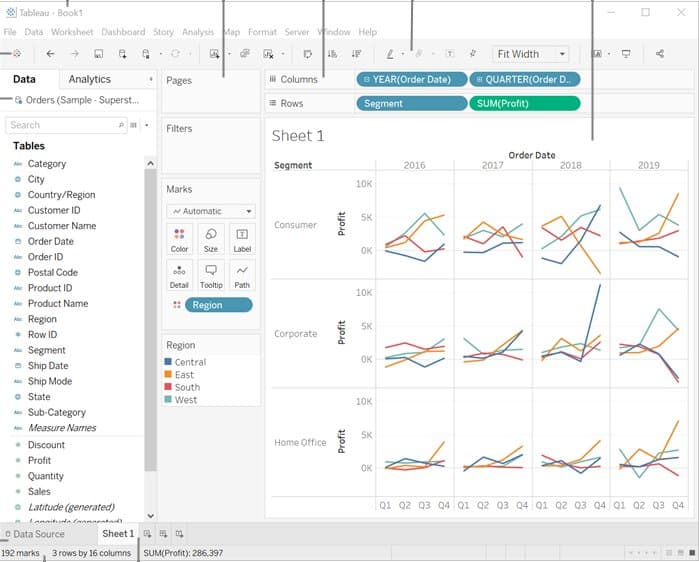
Best for: powerful data visualization with built-in AI assistance.
Tableau has always been a leader in visual analytics, and with the addition of Einstein GPT (from Salesforce), it now offers AI-driven insights, automated explanations, and natural language querying.
It’s perfect for teams that want full control over how their data is visualized. But, it requires setup and technical know-how.
📊 Industry-leading data visualization
🤖 AI-generated summaries and recommendations
🧠 Best for data-savvy teams or organizations already using Salesforce
10. Levity

**Best for: **automating analysis of unstructured data like text and images.
Levity focuses on a specific challenge: making sense of data that doesn’t live neatly in rows and columns. You can train it to categorize support tickets, tag survey responses, or process images. All without writing code.
It’s a powerful niche tool for teams that deal with lots of messy, qualitative data.
🖼️ Automate tagging of images, emails, documents
🧠 Train your own AI models
🧩 Best for workflows involving unstructured or repetitive data
The augmented-analytics platforms
"Augmented analytics" is the analyst-firm name for BI platforms that use machine learning to prepare data, surface insights and answer questions in plain language. They sit at the enterprise end of this list: heavier, dearer, and bought by a data team rather than picked up by an analyst. Prices are deliberately not repeated here; where a vendor's pricing has its own guide, it is linked.
- ThoughtSpot. Search-driven analytics: type a question, get a chart, and SpotIQ scans for insights across large datasets. The learning curve is steeper than the marketing suggests. ThoughtSpot pricing.
- Domo. Data applications rather than dashboards, with AI-assisted cleaning and trend detection. Powerful and expensive for a small team. Domo pricing.
- Qlik Sense. The associative model finds connections between data points a query would not have asked for. Takes time to understand. Qlik Sense pricing.
- Sisense. Preparation and visualisation on one platform, which is its whole appeal. Sisense pricing.
- Oracle Analytics Cloud. Natural-language queries in 28 languages and enterprise-scale compliance. Overkill for most teams.
- AnswerRocket. Conversational analytics: ask aloud or type, get an explained answer.
- Pyramid Analytics. Explains why a metric moved, not only that it did.
- Tellius. AutoML plus natural-language search, for teams that want predictions without a data scientist.
- Yellowfin. Guided natural-language queries that adapt to the user's skill level.
- DataRobot. An AutoML platform first, with augmented analytics attached.
Power BI with Copilot and Tableau with Einstein belong to this group too and are covered in the list above.
Why simple usually wins
The pattern across the customers this blog has written about is that the fanciest tool is rarely the one that removed the work. Reporting cycles fell from days to hours when a team chose automation it could run itself over an enterprise platform that needed a dedicated team to operate. The question to ask of any tool on this page is not what it can do but who on your team can change it when the data changes.
How to choose an AI analytics tool
AI tools are reshaping how we work with data. Helping teams move faster, uncover insights sooner, and spend less time wrangling spreadsheets.
The key is choosing a tool that fits your workflow. Need to predict churn? Clean up messy exports? Unify data from five different platforms? There’s something on this list for you.
If you’re looking for a way to bring it all together, data from anywhere, easy to prepare, fully automated, AI-powered with no code required, Mammoth is built for that.
👉 Try Mammoth free and take control of your data analytics, minus the complexity.















