Multi-source joins
Joining data from multiple systems sounds straightforward until you discover that "Apple Inc." in your CRM is "APPLE INC" in your ERP and "Apple" in your billing system. Entity resolution, determining that these three records represent the same company, is one of the hardest problems in data integration. This guide is for data architects and engineers. It covers four matching patterns from exact keys to AI-assisted matching, a master resolution table, and schema reconciliation.
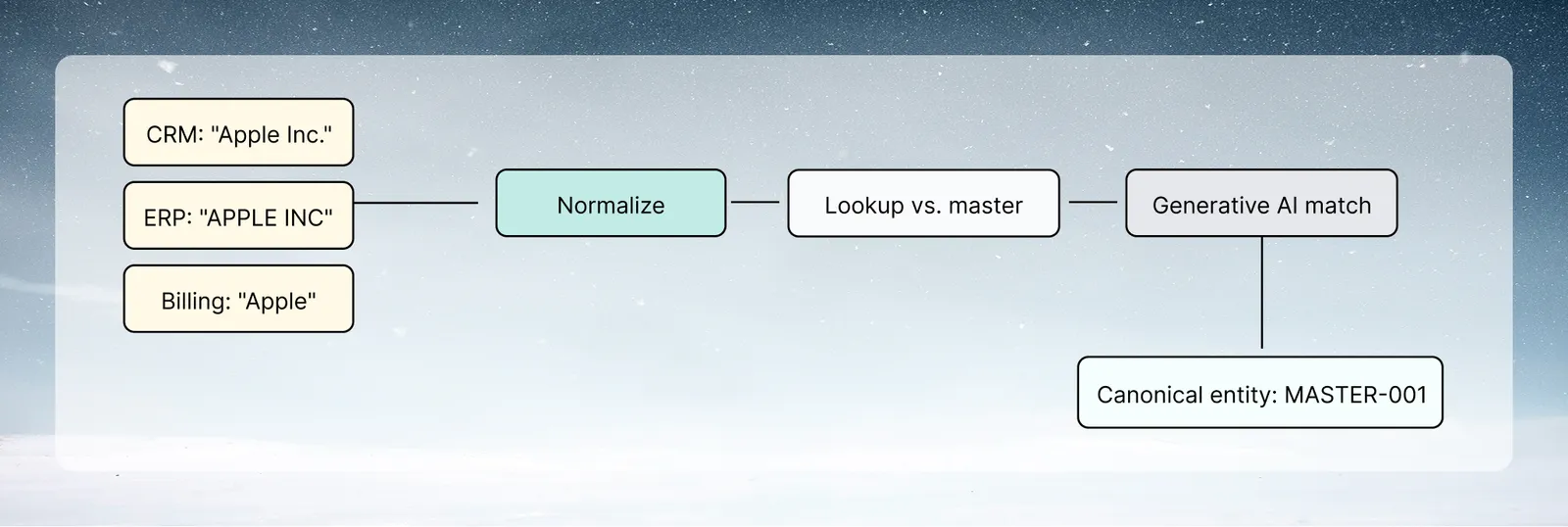
The join reliability ladder
Build multi-source joins in layers, from most to least reliable:
- Exact key match: join on a shared unique ID (
CustomerID,OrderID). Use this whenever possible - Normalized key match: clean both sides identically before joining (lowercase, remove punctuation)
- Multi-field match: join on name, country, and postal code (less likely to drift)
- Fuzzy match: AI-assisted matching for cases where exact and normalized matching fails
- Manual resolution table: human-maintained mapping for exceptions
Use the most reliable method available and only escalate to less reliable methods for unresolved records.
Pattern 1: Exact key matching
The safest join. If both systems share a common identifier, use it directly.
Common shared keys:
emailaddress (normalize case before joining)phonenumber (normalize format: E.164 international format)domainextracted from email (john@acme.com→acme.com)tax_id/ EIN / VAT numberDUNSnumber (Dun & Bradstreet business identifier)LinkedIn company ID(for B2B data)
Key normalization before joining:
- Text formatting task on both datasets: Lower Case plus Normalize whitespace on the key column
- Join on the normalized key
- Track unmatched records: after a Left join, use Label & Insert Values with a condition (joined column is empty) to set
UnmatchedFlag = 1
Pattern 2: Normalized string matching
When no shared key exists, join on entity name after aggressive normalization.
Company name normalization
Raw: "Apple, Inc." / "APPLE INC" / "Apple Inc." / "Apple" / "Apple Incorporated"
Normalization tasks (apply to both datasets before joining):
- Text formatting: Upper Case plus Normalize whitespace
- Find & replace: remove common legal suffixes →
" INC"," LLC"," LTD"," CORP"," CO",", INC."," INCORPORATED"→"" - Find & replace: remove punctuation →
".",",","'","-"→"" - Text formatting: Normalize whitespace again to collapse any double spaces left behind
After normalization, "Apple, Inc." / "APPLE INC" / "Apple Inc." all become "APPLE", which gives an exact match.
Address normalization
For address-based joins:
- Normalize street abbreviations:
"Street"→"ST","Avenue"→"AVE"(Find & replace) - Normalize postal codes: trim, pad to consistent length
- State/province: normalize to 2-letter code
- Join on:
normalized_city + normalized_state + normalized_postal_code
Pattern 3: Multi-field probabilistic matching
When single-field normalized matching is insufficient, combine multiple fields for higher-confidence matching.
Composite match key
Create a composite key from multiple normalized fields:
- Build
CompositeKeyby combining the normalized company name, country code, and the first three characters of the postal code with Combine columns & text, using|as the separator - Join on
CompositeKeyacross datasets, or add each field as a separate key pair in Join
The three-field composite reduces false matches compared to name-only matching. A company called "Atlas" in Germany (postal prefix "10") is distinct from "Atlas" in the UK (postal prefix "EC").
Match confidence scoring
After joining, calculate a match confidence score:
Use AI SQL Query (or Label & Insert Values with a condition) to add one scoring column per field, then add them with Math function:
NameMatch = CASE WHEN source_name = target_name THEN 30 ELSE 0 ENDDomainMatch = CASE WHEN source_domain = target_domain THEN 40 ELSE 0 ENDPostalMatch = CASE WHEN source_postal = target_postal THEN 20 ELSE 0 ENDPhoneMatch = CASE WHEN source_phone = target_phone THEN 30 ELSE 0 ENDMatchScore = "NameMatch" + "DomainMatch" + "PostalMatch" + "PhoneMatch"
Route records by score:
MatchScore >= 60→ high confidence match, use automaticallyMatchScore 30–59→ review queue, human confirmation neededMatchScore < 30→ unmatched, escalate to manual resolution table
Pattern 4: AI-assisted fuzzy matching
For records that fail exact and normalized matching, use the Generative AI task to determine if two entities are the same:
Prompt template:
Using the source_company, source_domain, and source_city columns as Record A and the target_company, target_domain, and target_city columns as Record B, are these two records referring to the same company? Answer with only 'Match', 'No Match', or 'Uncertain'.
Select those six columns as the task's context columns (up to 20 are allowed). Each row of the candidate pairs dataset carries both records.
Application pattern:
- First run exact and normalized matching to handle the records that resolve
- Keep only the unmatched records (Conditional Filter)
- Create a candidate pairs dataset: for each unmatched source record, find the 3 most similar target records using normalized name similarity
- Apply the Generative AI task to evaluate each candidate pair (a row's two records fit comfortably within the 20 context columns the task allows)
- Records scored
Matchare added to the master resolution table - Records scored
Uncertaingo to manual review
This approach uses AI only on the hard cases, which controls cost while solving the matching problem.
Building a master resolution table
For recurring multi-source joins, build and maintain a master entity resolution table:
| SourceSystem | SourceID | MasterID | MatchMethod | MatchedAt | ReviewedBy |
|---|---|---|---|---|---|
| CRM | CRM-12345 | MASTER-001 | ExactKey | 2026-01-15 | Automated |
| ERP | ERP-A4892 | MASTER-001 | NormalizedName | 2026-01-15 | Automated |
| Billing | BILL-99023 | MASTER-001 | GenerativeAI | 2026-01-18 | J.Smith |
Once a resolution is established, future pipeline runs use the master resolution table as the join key, so no re-matching is needed. AI and fuzzy matching only run for new, unresolved entities.
Maintenance process:
- New source records that don't match the resolution table go to a
pending_resolutiondataset - A weekly automation (with a Messaging task, which sends email) prompts a data steward to review the pending list
- Confirmed matches are added to the resolution table
- The pipeline re-runs and picks up the new resolutions
Multi-source schema reconciliation
Beyond entity resolution, multi-source joins require aligning schemas.
Column naming conflicts: Source A has customer_name, Source B has CustomerName, Source C has Name. Rename all of them to customer_name before the join.
Data type mismatches: One source stores dates as strings ("2026-01-15"), another as integers (20260115). Normalize both to ISO date format before joining.
Granularity mismatches: One source has daily rows, another has monthly. Aggregate the daily source to monthly before joining:
- Group & Pivot the daily dataset by
YearMonth + EntityID - Join the monthly aggregate to the monthly source