Facebook Ads report template
14-day Pro trial · No credit card · Viewers are always free

The template: paste this into Mammoth
Facebook Ads report: amount spent, reach, CPM, CTR, purchases and ROAS as KPIs, amount spent and purchase value by month, purchase value by placement, and ROAS by age

In production at














What is a Facebook Ads report template?
A Facebook Ads report template is a ready-made report for your Facebook and Instagram ads, with the numbers and charts already chosen. You connect your ad account and it fills in with amount spent, reach, CPM, CTR, purchases and return on ad spend, by month, placement and age. It updates from Meta, so the monthly report is ready without an export.
What's on it
What's in the Facebook Ads report template
Six numbers at the top and three charts below them.
Six numbers at the top
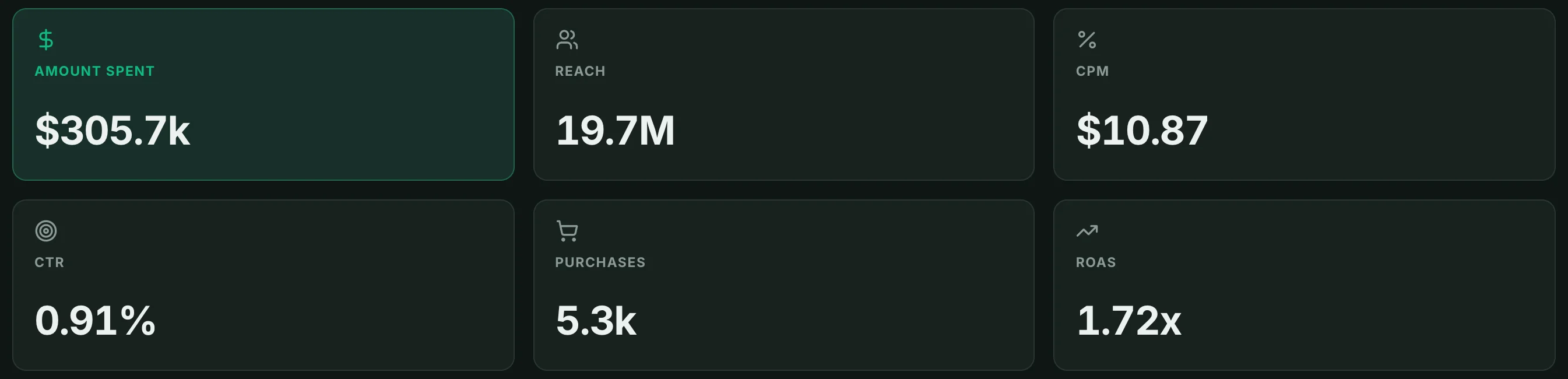
- Amount spent
- What you paid Meta for the ads.
- Reach
- How many people saw an ad, summed across the days in the report.
- CPM
- Cost per 1,000 impressions: amount spent ÷ impressions × 1,000.
- CTR
- Link clicks ÷ impressions.
- Purchases
- Purchases Meta attributed to the ads.
- ROAS
- Purchase value ÷ amount spent.
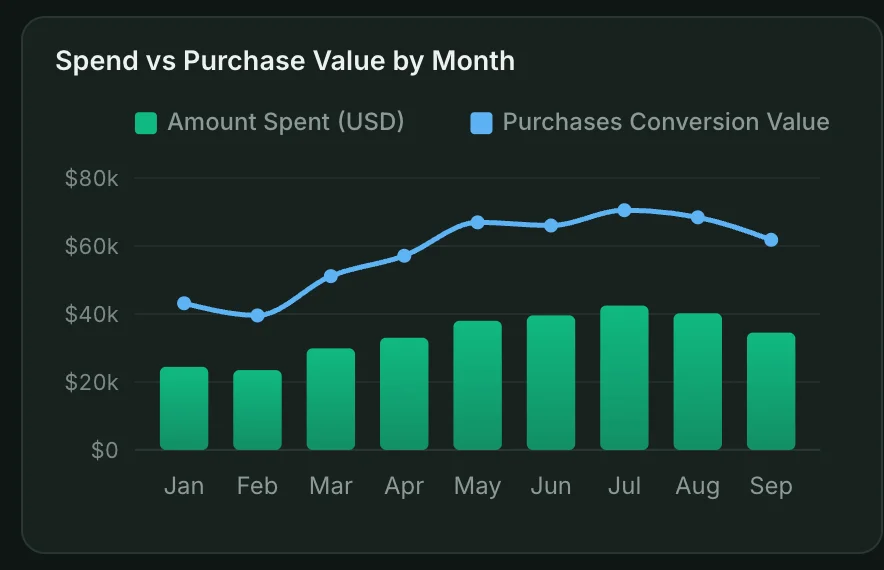
Spend and purchase value by month
Spend as bars and purchase value as a line, one point a month.
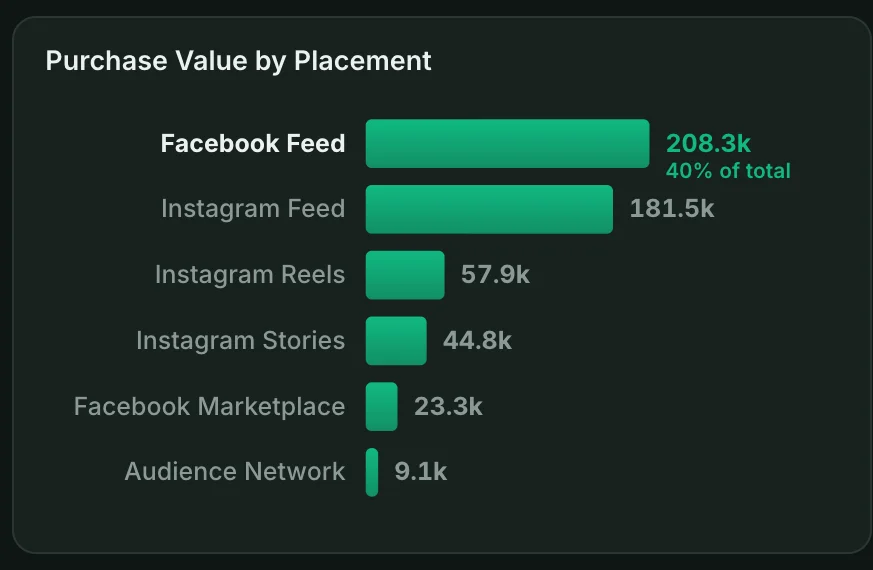
Purchase value by placement
Purchase value from each placement: Feed, Reels, Stories and the rest.
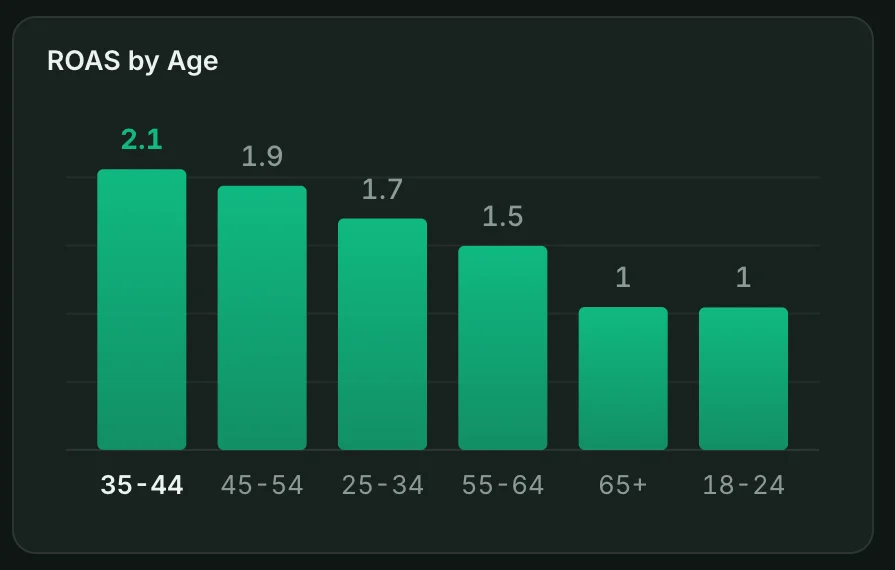
ROAS by age
Return on ad spend for each age group, highest first.
How it works
How to use this Facebook Ads report template
- Step 1
Connect Facebook Ads
Connect your Facebook Ads account in Mammoth, or upload a report export.
- Step 2
Paste the template
Copy the sentence at the top of this page into Mammoth. It builds the same dashboard from your data.
- Step 3
Share or schedule it
Share a link, or have it emailed every week. Viewers are free.


Compare
Facebook Ads report templates compared
This template in Mammoth, Ads Manager's own reports, and a Data Studio template. Data Studio is Google's free report builder, called Looker Studio until recently.
Mammoth template
For a monthly Facebook Ads report you send to clients or your team.
- ✓Ready-made template
- ~FreeFree plan for uploaded files
- ✓Google Ads or Shopify data in the same report
- ✓Share a link anyone can open
- ✓Change it by asking in plain words
Ads Manager reports
For checking campaigns inside Meta.
- ✕Ready-made template
- ✓Free
- ✕Google Ads or Shopify data in the same report
- ✕Share a link anyone can open
- ✕Change it by asking in plain words

Data Studio template
For a free report when most of your data is Google's.
- ✓Ready-made template
- ~FreeMeta needs a paid partner connector
- ~Google Ads or Shopify data in the same reportNeeds a paid partner connector
- ✓Share a link anyone can open
- ✕Change it by asking in plain words
Facebook Ads report template questions
What should a Facebook Ads report include?
Why is reach higher than in Ads Manager?
How do I use this Facebook Ads report template?
Is the template free?
Can I change the template?
Can Mammoth connect to Facebook Ads directly?
How often does the dashboard update?
Can I combine Facebook Ads with other sources?
Can I share it with clients?
Is the data on this page real?





Use this Facebook Ads report template
Connect Facebook Ads, paste the template, and share the dashboard with a link.
- ✓ 14-day Pro trial
- ✓ No credit card
- ✓ Viewers always free
More free dashboard templates
Real Mammoth dashboards like this one, each with the sentence that builds it.