Customer support dashboard examples: free template
14-day Pro trial · No credit card · Viewers are always free


The template: paste this into Mammoth
Customer support dashboard from a help desk ticket export: tickets created, tickets solved, median first reply time in hours, median full resolution time in hours, satisfaction score (good ratings over good plus bad) and replies per ticket as KPIs, tickets created by month, tickets by channel, and median first reply time by channel

In production at














What is a customer support dashboard?
A customer support dashboard shows how your support team is doing, with the numbers and charts already chosen. This one reads a ticket export from your help desk: upload it and it fills in with tickets created and solved, median first reply and resolution times and customer satisfaction, by month and channel.
What's on it
What's in the customer support dashboard template
Six numbers at the top and three charts below them.
Six numbers at the top
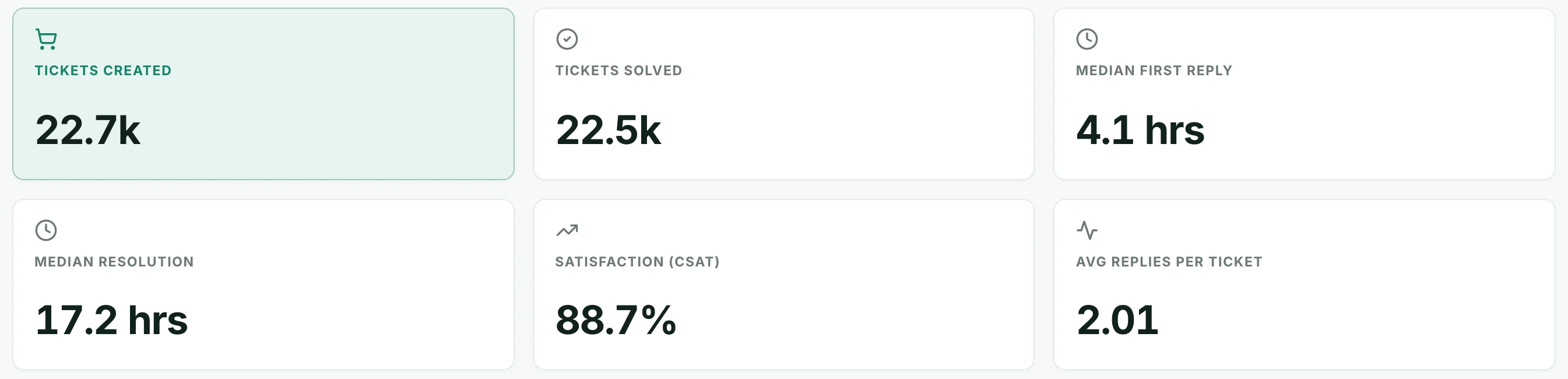
- Tickets created
- New tickets in the period.
- Tickets solved
- Tickets marked solved.
- Median first reply
- Half of tickets got a first reply faster than this.
- Median resolution
- Half of solved tickets were closed faster than this.
- Satisfaction (CSAT)
- Good ratings ÷ good plus bad ratings.
- Average replies per ticket
- Agent replies on an average ticket.
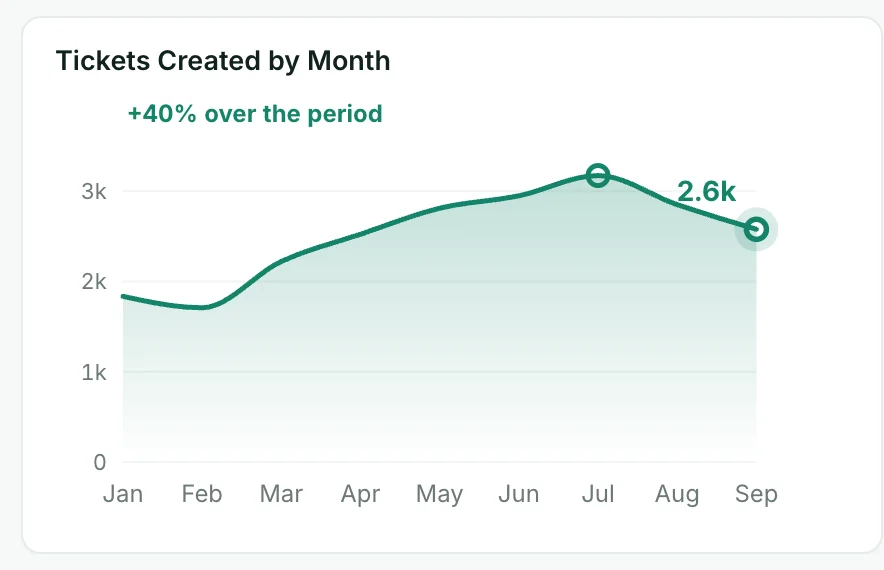
Tickets created by month
New tickets each month.
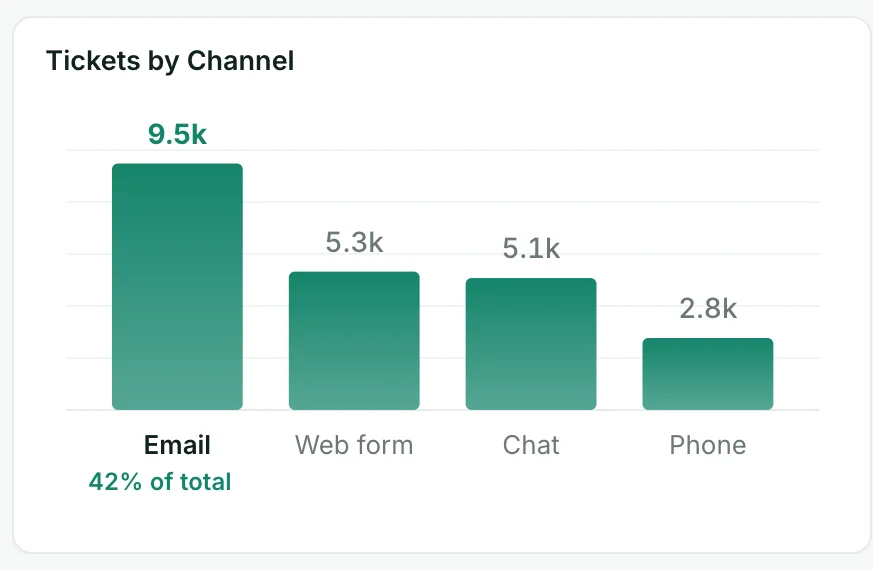
Tickets by channel
Tickets from each channel: email, web form, chat and phone.
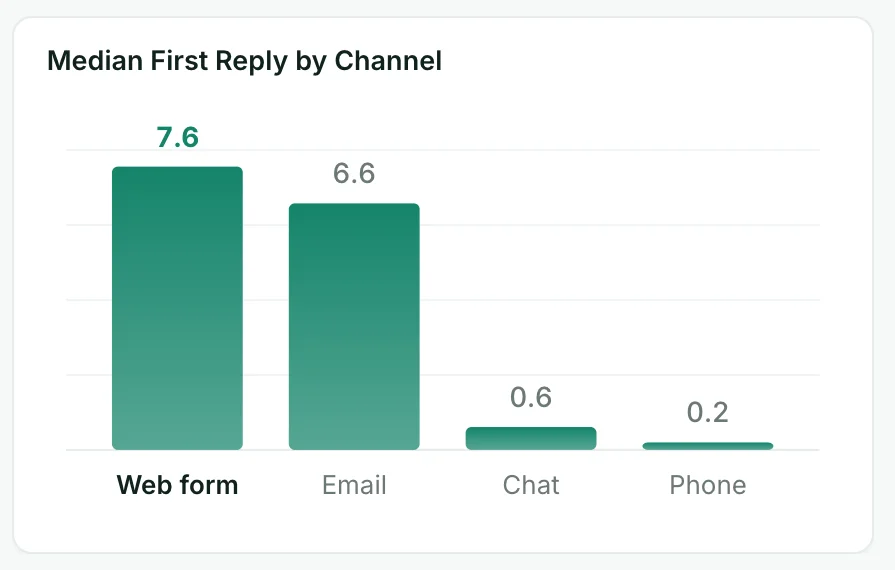
Median first reply by channel
How fast each channel gets a first reply, slowest first.
How it works
How to use this customer support dashboard template
- Step 1
Export from your help desk
Export your data from your help desk as a CSV or Excel file and upload it to Mammoth.
- Step 2
Paste the template
Copy the sentence at the top of this page into Mammoth. It builds the same dashboard from your data.
- Step 3
Share or schedule it
Share a link, or have it emailed every week. Viewers are free.


Compare
Customer Support Dashboard templates compared
This template in Mammoth, the reports built into your help desk, and a report built by hand in a spreadsheet from an export.
Mammoth template
For a support dashboard from any help desk, next to your order or CRM data.
- ✓Ready-made template
- ~FreeFree plan for uploaded files
- ✓Order or CRM data in the same dashboard
- ✓Share a link anyone can open
- ~Updates itselfUpload a new export
Your help desk's reports
For reporting inside your help desk, for people with a login.
- ~Ready-made templatePrebuilt dashboards
- ~FreeIncluded; more on higher plans
- ✕Order or CRM data in the same dashboard
- ✕Share a link anyone can open
- ✓Updates itself

Spreadsheet from an export
For a one-off look at the numbers.
- ✕Ready-made template
- ✓Free
- ~Order or CRM data in the same dashboardPasted in by hand
- ~Share a link anyone can openSend the file
- ✕Updates itself
customer support dashboard template questions
What should a customer support dashboard include?
Which help desks does it work with?
Why median and not average reply time?
How do I use this customer support dashboard template?
Is the template free?
Can I change the template?
Can Mammoth connect to Zendesk, Intercom and Help Scout directly?
Can I combine Zendesk, Intercom and Help Scout with other sources?
Can I share it with clients?
Is the data on this page real?





Use this customer support dashboard template
Upload your help desk ticket export, paste the template, and share the dashboard with a link.
- ✓ 14-day Pro trial
- ✓ No credit card
- ✓ Viewers always free
More free dashboard templates
Real Mammoth dashboards like this one, each with the sentence that builds it.