7 Best Alteryx Alternatives for 2026 (Sorted by Job)
The best Alteryx alternatives are Mammoth, KNIME, Power Query, Tableau Prep, Dataiku, Prophecy and Databricks, sorted by the job each one does best.

Updated · 9 min read
The short answer
Pick by where the prepared data has to end up. If it ends in a dashboard people open, Mammoth does the prep and the dashboard in one product. If you want Alteryx's style of visual workflow for free, KNIME is the closest match. If your company runs on Microsoft, Power Query is already inside Excel and Power BI. If your data lives on Databricks or a cloud warehouse, look at Prophecy and Databricks.
AI data cleaning that re-runs automatically.


Table of contents
- The seven Alteryx alternatives at a glance
- What Alteryx is, and why teams leave it
- 1. Mammoth Analytics: best Alteryx alternative when the prep has to end in a dashboard
- 2. KNIME: best free Alteryx alternative for visual workflows
- 3. Power Query: best Alteryx alternative for Microsoft shops
- 4. Tableau Prep: best Alteryx alternative for teams already on Tableau
- 5. Dataiku: best Alteryx alternative for data science teams at enterprise scale
- 6. Prophecy: best Alteryx alternative for AI-assisted prep on a cloud data platform
- 7. Databricks: best Alteryx alternative for data engineering at scale
- How to choose an Alteryx alternative
- How to switch from Alteryx without breaking reports
- Frequently Asked Questions
Alteryx alternatives are tools that do the job Alteryx does: they take messy data from files and systems, clean and combine it, and run the same steps again whenever new data arrives. Some cost less, some need less training, and some carry the result all the way to a dashboard people can open.
I sorted seven of them by the job each one does best and checked every price on the vendor's own pricing page on 2 November 2026. Full disclosure: Mammoth is our product, and it's on the list.
The seven Alteryx alternatives at a glance
| Tool | Best for | Starts at |
|---|---|---|
| Mammoth | Prep that ends in a dashboard | Free, then $39/month billed annually |
| KNIME | Free visual workflows | Free |
| Power Query | Microsoft shops | Included in Excel and Power BI Desktop |
| Tableau Prep | Teams already on Tableau | Included in Tableau Standard |
| Dataiku | Data science teams at enterprise scale | Not published |
| Prophecy | AI-assisted prep on a cloud data platform | Free, then $150 a user a month |
| Databricks | Data engineering at scale | Pay as you go |
What Alteryx is, and why teams leave it
Alteryx is a data preparation and analytics tool. Its desktop app, Alteryx Designer, lets an analyst drag tools onto a canvas to build a workflow that cleans, joins and reshapes data, and it's very good at it. It also carries spatial and predictive tools that few rivals match.
People rarely leave because the workflows are bad. They leave because of what surrounds them.
The seat price. Alteryx One Starter is $250 a user a month, billed annually, for one to ten users. That's $3,000 a year for each person who builds, so five builders cost $15,000 a year before anyone sees a result. Professional and Enterprise are priced by sales.
The output isn't a dashboard. An Alteryx workflow produces a file, a table or an extract. Turning that into something the rest of the company can read takes a separate BI tool, with its own licences. My Alteryx pricing guide covers what the full stack costs.
Scheduling sits higher up. Running workflows on a schedule needs Alteryx One Professional or above, or Alteryx Server. And Designer is a Windows app: Alteryx's own system requirements list Windows 11 as the minimum, with macOS only inside a virtual machine.
It's specialist work. Alteryx certifies users at Core and Advanced levels, which tells you something about the learning curve. That's fine with a team of trained users. It's a bottleneck when one person maintains every workflow.
AI data cleaning that re-runs automatically.
1. Mammoth Analytics: best Alteryx alternative when the prep has to end in a dashboard
Most suitable for: business teams whose cleaned data needs to become a dashboard that other people open, without a second tool.
Mammoth Analytics connects to your sources, cleans and joins the data in a pipeline of no-code steps (with raw SQL when you want it), and builds dashboards on the result. The Data Engine and the dashboards are one product, so the job Alteryx hands to a BI tool stays in the same place, and the pipeline re-runs on a schedule on every paid plan.
You can describe the change you want in plain language or pick a step, so the person who knows the data can maintain the workflow without a certification. It runs in the browser, with nothing to install, on Windows or a Mac.
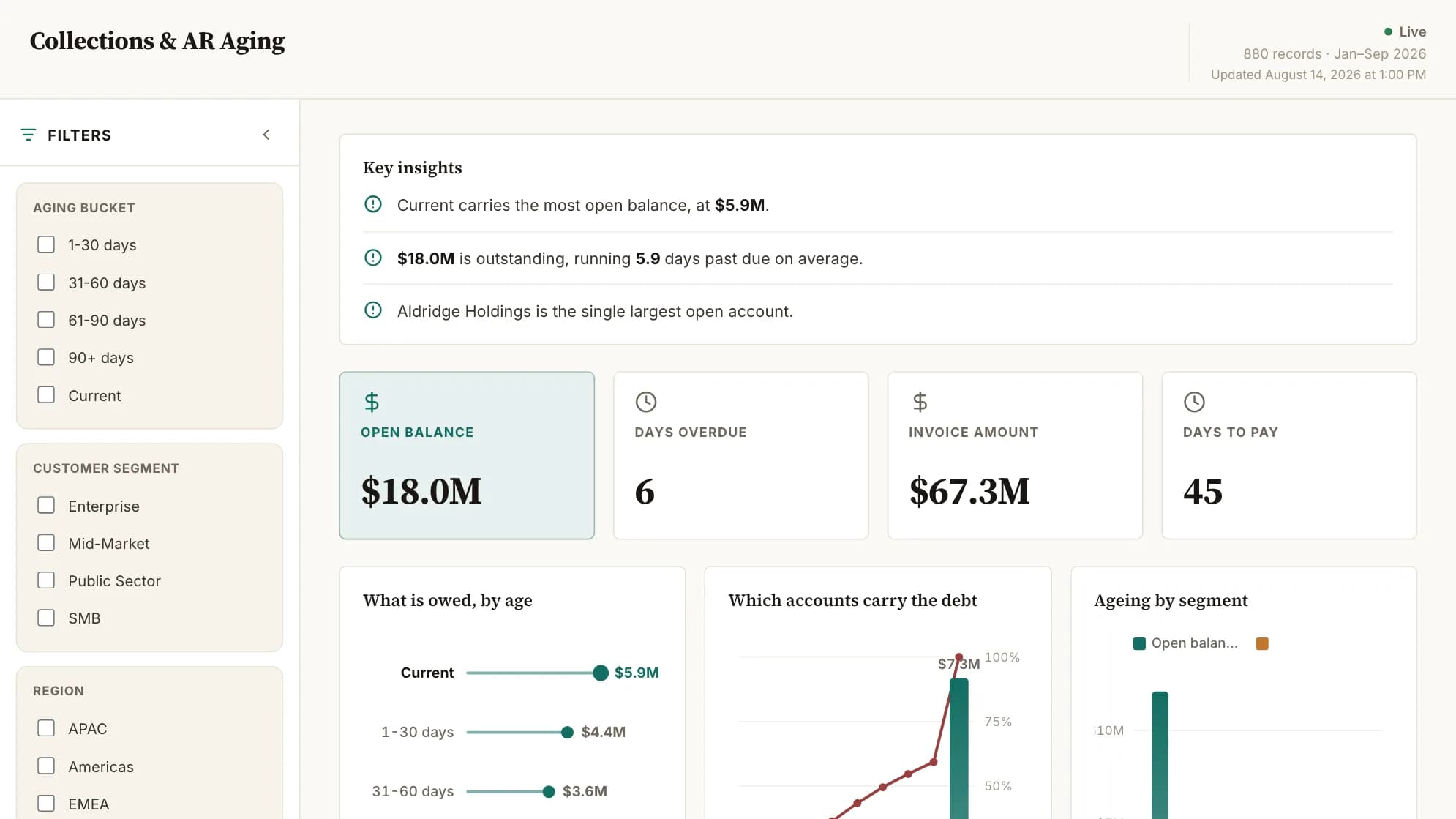
Dashboard viewers are free on every Mammoth plan. The Team plan is $1,788/year for 5 builders, billed annually, plus the storage size you pick, against $15,000 a year for five Alteryx Starter seats and a BI tool on top.
Where Alteryx is better: depth. Its preparation toolkit goes further, and its spatial and predictive tools have no equivalent in Mammoth. If the output is a dataset for other systems rather than a dashboard, Alteryx fits that job well. The Mammoth vs Alteryx comparison sets out both sides.
2. KNIME: best free Alteryx alternative for visual workflows
Most suitable for: analysts who like Alteryx's drag-and-drop workflow style and want it without a licence fee.
KNIME Analytics Platform is a free, open-source desktop app. You build a workflow by dragging nodes onto a canvas and wiring them together, which is the closest thing on this list to working in Alteryx Designer.
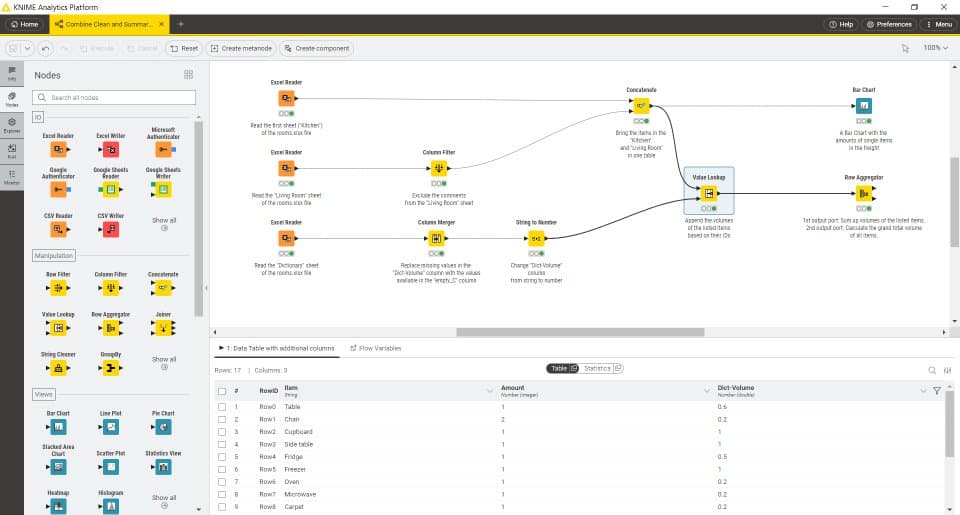
The desktop app costs nothing. Sharing and scheduling workflows across a team happen on KNIME's paid Hub plans, and the Business Hub tier is priced through sales. Like Alteryx, it ends in data or a basic chart rather than a dashboard the business reads every day.
3. Power Query: best Alteryx alternative for Microsoft shops
Most suitable for: teams already working in Excel and Power BI.
Power Query is Microsoft's data preparation engine, and it's the nearest thing to a Microsoft equivalent of Alteryx. You connect to a source, apply transformations in an editor without writing code, and Power Query saves the steps as a query you can refresh. Microsoft lists over 350 types of transformation.
It's built into Excel for Windows and Mac and into Power BI Desktop, so many teams already own it. Scheduled refresh comes from the product it runs in, such as the Power BI service, where Power BI Pro is $14 a user a month, paid yearly. Dataflows in Power BI and Microsoft Fabric run the same editor in the cloud.
The catch is reach. Each query lives inside the file or service that hosts it, which suits one analyst well and gets harder to manage as workflows multiply.
4. Tableau Prep: best Alteryx alternative for teams already on Tableau
Most suitable for: companies that already pay for Tableau and want the prep in the same place.
Tableau Prep Builder is Tableau's visual tool for cleaning and combining data into a flow before it reaches a dashboard. It comes with Tableau Standard, which starts at $15 a user a month, billed annually.
Scheduling Prep flows needs the Data Management tools that come with Tableau Enterprise, which starts at $35 a user a month. If you're not on Tableau already, it's a lot of licence to buy for prep alone. My Tableau alternatives guide covers that side.
5. Dataiku: best Alteryx alternative for data science teams at enterprise scale
Most suitable for: larger organisations where analysts and data scientists share one platform.
Dataiku is a platform for data preparation, machine learning and analytics, where business users work visually and data scientists write code in the same project.
Dataiku doesn't publish prices, and it offers a trial. It's a platform decision rather than a tool swap, and it expects a team to run it.
6. Prophecy: best Alteryx alternative for AI-assisted prep on a cloud data platform
Most suitable for: teams whose data already sits on Databricks or a cloud warehouse.
Prophecy builds visual workflows that run natively on Databricks, Snowflake or BigQuery, so there's no separate engine like Alteryx's. It also imports existing Alteryx workflows, which makes it a common pick for teams moving prep off the desktop.
The Starter plan is free within compute limits. Professional is $150 a user a month, billed monthly, and Enterprise Express is $4,000 a month for up to 20 users, billed annually. If you don't already run one of those three platforms, there's nothing for it to run on.
7. Databricks: best Alteryx alternative for data engineering at scale
Most suitable for: data engineering teams working with large volumes and machine learning.
Databricks is a data and AI platform where engineers prepare data with notebooks, SQL and pipelines at a scale no desktop tool reaches. It replaces Alteryx for the engineering team, not for the business analyst who built the workflow.
It's pay as you go with no upfront cost, billed per second in Databricks Units, so the cost follows usage rather than seats. Expect to need engineers to use it well.
How to choose an Alteryx alternative
Start from where the prepared data has to end up, because that splits this list faster than price does.
- A dashboard people open. Mammoth does the prep and the dashboard in one product, with viewers free.
- A file or dataset for other systems. KNIME is the closest free swap, and Alteryx itself still fits this job.
- Excel or Power BI. Power Query is likely already in the tools you own.
- A cloud warehouse or Databricks. Prophecy for analysts, Databricks for engineers.
- Tableau. Tableau Prep, if you already pay for Tableau.
Then rebuild your most-used workflow in the shortlisted tool with your real data. That one test will tell you more than any comparison table.
How to switch from Alteryx without breaking reports
- List the workflows that run on a schedule. Those are the ones people depend on. One-off analysis can wait.
- Start with a workflow that ends in a report. That's where a switch shows its value soonest.
- Rebuild it and run both side by side for one cycle, comparing the outputs row for row.
- Move the people who read the output last, once the numbers match.
- Check your renewal date and start early enough to finish before it.
What would Alteryx cost your team?
Alteryx Starter is $250 per user per month, billed annually, for each person who builds workflows. Put in your own team to see the yearly figure.
Your team
Prepare, blend and clean the data.
Change it if you pay a different rate.
Alteryx, 3 people
$750/mo
$9,000 a year
Mammoth Team
$149/mo
Covers 5 builders. Viewers never count.
You would pay $7,212 less a year.
Alteryx prices from Alteryx’s pricing page, checked 2 November 2026. Mammoth prices are the annual rates on our pricing page and include 10 GB of data. This compares licence cost only.
Frequently Asked Questions
Is Alteryx still relevant in 2026?
Yes. Its preparation toolkit is among the deepest available, and its spatial and predictive tools are hard to match. The question is whether your team needs that depth, or needs prep that more people can maintain and that ends in a dashboard.
Is there a Microsoft equivalent to Alteryx?
Power Query is the closest. It's Microsoft's data preparation engine, built into Excel and Power BI Desktop, and it saves your cleaning steps as a query you can refresh. Dataflows in Power BI and Microsoft Fabric run the same editor in the cloud.
What is a free alternative to Alteryx?
KNIME Analytics Platform is free and open source, and its drag-and-drop workflows are the nearest match to Alteryx Designer. Power Query is free inside Excel. Mammoth has a free plan with one builder and three dashboards.
What is Google's equivalent of Alteryx?
Google doesn't sell a direct equivalent. BigQuery holds and queries the data, and tools like Mammoth can prepare data and load it into BigQuery on a schedule.
Is there an Alteryx alternative that runs on a Mac?
Yes. Alteryx Designer needs Windows, but Mammoth runs in the browser, so it works on a Mac with nothing to install. Power Query also runs inside Excel for Mac.
Can Mammoth replace Alteryx?
For prep that ends in a dashboard, yes, and with viewers free. For spatial analytics, predictive modelling or highly specialised workflows, no: Alteryx goes deeper there, and it's better to say so.
Want to talk it through first? Talk to us about your setup.


