Mailchimp report template
14-day Pro trial · No credit card · Viewers are always free

The template: paste this into Mammoth
Mailchimp email report: emails delivered, open rate, click rate, unsubscribe rate, orders and revenue as KPIs, open rate and click rate by month, revenue by campaign type, and click rate by campaign type

In production at














What is a Mailchimp report template?
A Mailchimp report template is a ready-made report for your email campaigns, with the numbers and charts already chosen. You connect Mailchimp and it fills in with emails delivered, open rate, click rate, unsubscribes, orders and revenue, by month and by type of email. It updates from Mailchimp, so the email report covers every campaign without copying numbers out one by one.
What's on it
What's in the Mailchimp report template
Six numbers at the top and three charts below them.
Six numbers at the top
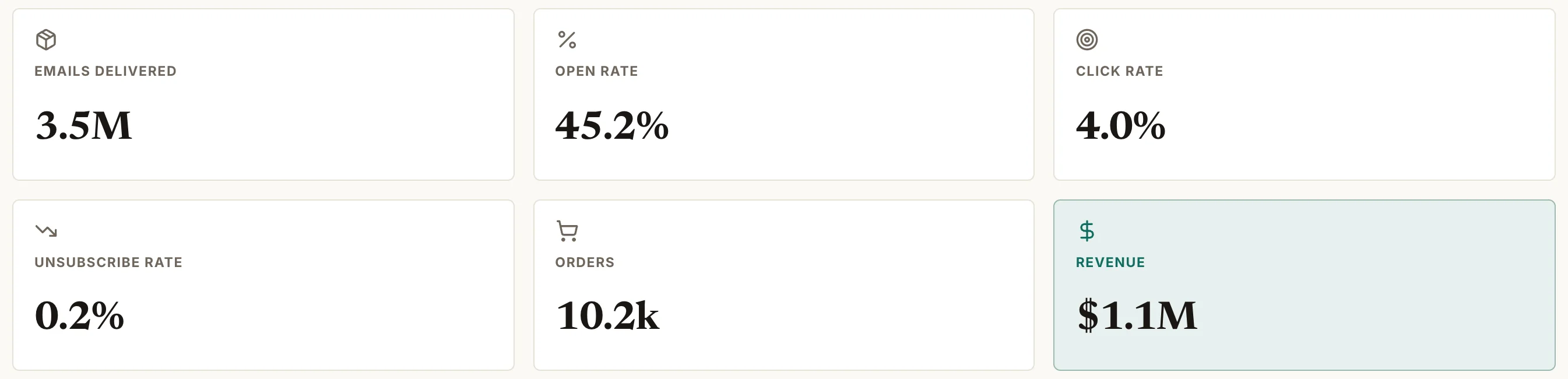
- Emails delivered
- Emails sent, minus the ones that bounced.
- Open rate
- Unique opens ÷ emails delivered.
- Click rate
- Unique clicks ÷ emails delivered.
- Unsubscribe rate
- Unsubscribes ÷ emails delivered.
- Orders
- Orders Mailchimp tracked from the emails.
- Revenue
- The value of those orders.
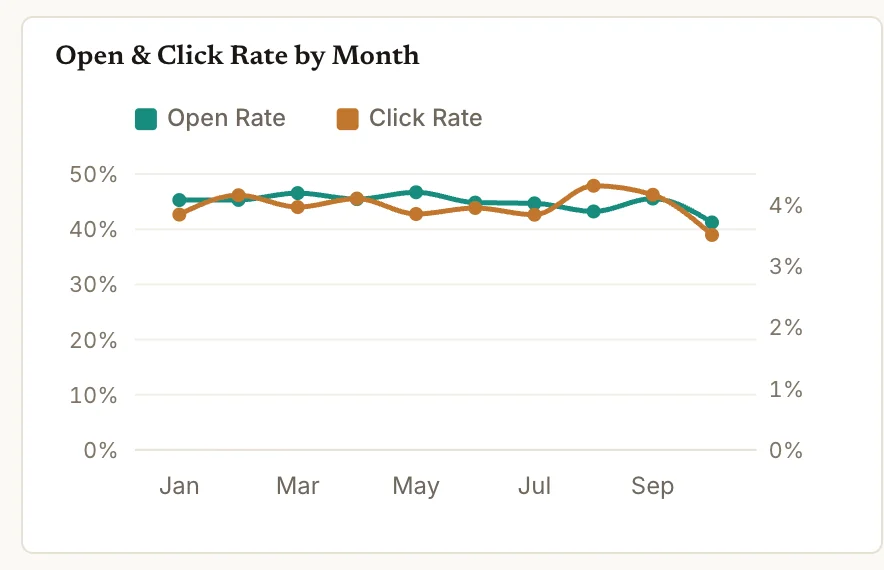
Open rate and click rate by month
Open rate and click rate for each month's sends.
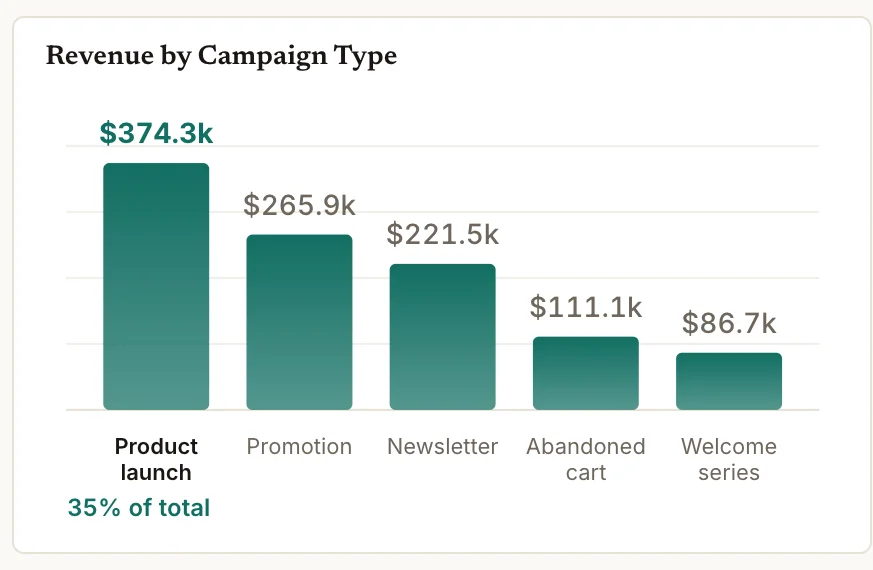
Revenue by campaign type
Revenue from each kind of email: launches, promotions, newsletters and automations.
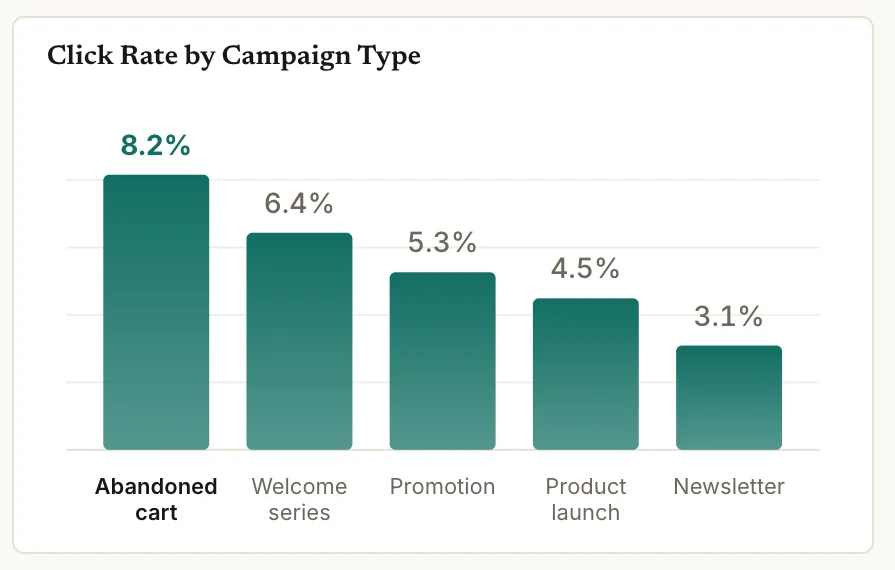
Click rate by campaign type
Click rate for each kind of email, highest first.
How it works
How to use this Mailchimp report template
- Step 1
Connect Mailchimp
Connect your Mailchimp account in Mammoth, or upload a report export.
- Step 2
Paste the template
Copy the sentence at the top of this page into Mammoth. It builds the same dashboard from your data.
- Step 3
Share or schedule it
Share a link, or have it emailed every week. Viewers are free.


Compare
Mailchimp report templates compared
This template in Mammoth, Mailchimp's own reports, and a Data Studio template. Data Studio is Google's free report builder, called Looker Studio until recently.
Mammoth template
For one email report across every campaign, next to your store and ad data.
- ✓Ready-made template
- ~FreeFree plan for uploaded files
- ✓Every campaign in one view
- ✓Shopify or ad data in the same report
- ✓Change it by asking in plain words
Mailchimp reports
For checking one campaign or audience inside Mailchimp.
- ~Ready-made templateBuilt-in reports
- ~FreeIncluded with Mailchimp
- ~Every campaign in one viewOne campaign at a time
- ✕Shopify or ad data in the same report
- ✕Change it by asking in plain words

Data Studio template
For a free report when most of your data is Google's.
- ✓Ready-made template
- ~FreeMailchimp needs a paid partner connector
- ✓Every campaign in one view
- ~Shopify or ad data in the same reportNeeds a paid partner connector
- ✕Change it by asking in plain words
Mailchimp report template questions
What should an email marketing dashboard include?
How are open rate and click rate worked out?
How do I use this Mailchimp report template?
Is the template free?
Can I change the template?
Can Mammoth connect to Mailchimp directly?
How often does the dashboard update?
Can I combine Mailchimp with other sources?
Can I share it with clients?
Is the data on this page real?





Use this Mailchimp report template
Connect Mailchimp, paste the template, and share the dashboard with a link.
- ✓ 14-day Pro trial
- ✓ No credit card
- ✓ Viewers always free
More free dashboard templates
Real Mammoth dashboards like this one, each with the sentence that builds it.