GA4 dashboard template
14-day Pro trial · No credit card · Viewers are always free

The template: paste this into Mammoth
GA4 website performance: sessions, engaged sessions, engagement rate, key events, conversion rate and revenue as KPIs, a daily sessions and key events trend, sessions by channel, and key events by landing page

In production at














What is a GA4 dashboard template?
A GA4 dashboard template is a ready-made Google Analytics 4 dashboard with the numbers and charts already chosen. You connect your GA4 property and it fills in with sessions, engagement, key events and revenue, by day, channel and landing page. It updates from GA4, so nobody has to rebuild the report each month.
What's on it
What's in the GA4 dashboard template
Six numbers at the top and three charts below them.
Six numbers at the top
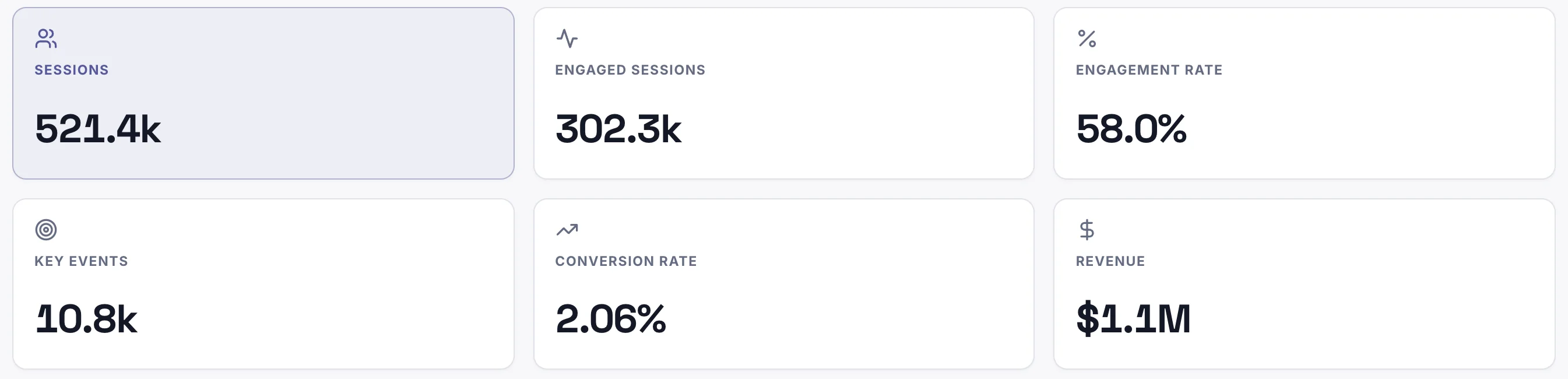
- Sessions
- How many visits your site got.
- Engaged sessions
- Visits that lasted over 10 seconds, viewed two or more pages, or had a key event.
- Engagement rate
- Engaged sessions ÷ sessions.
- Key events
- The actions you mark as important, such as purchases or sign-ups.
- Conversion rate
- Key events ÷ sessions.
- Revenue
- The revenue GA4 recorded from those visits.
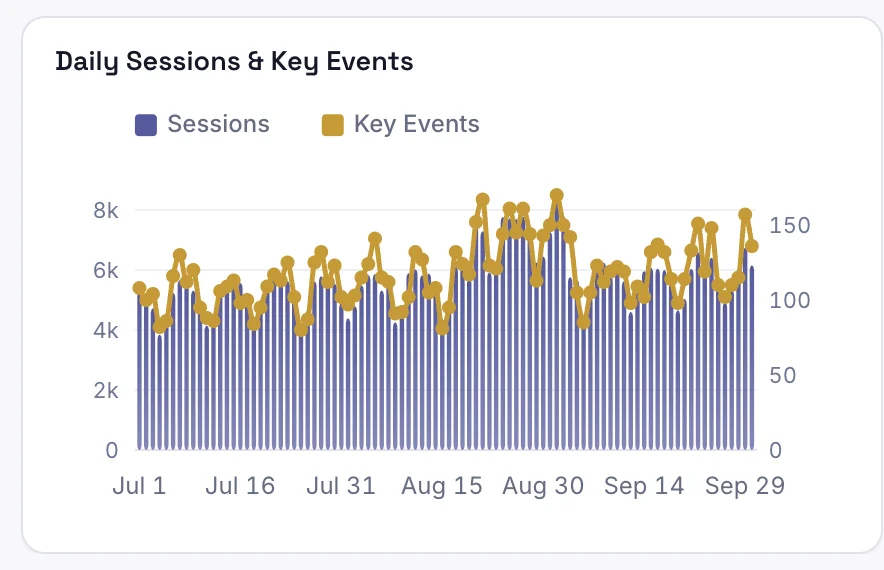
Daily sessions and key events
Visits and key events for every day in the period.
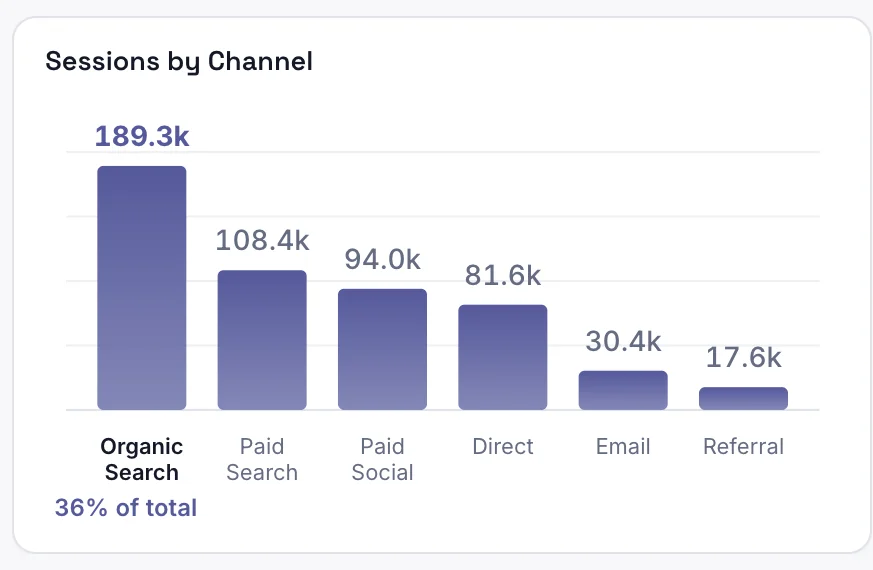
Sessions by channel
Visits from each channel: search, social, email and the rest.
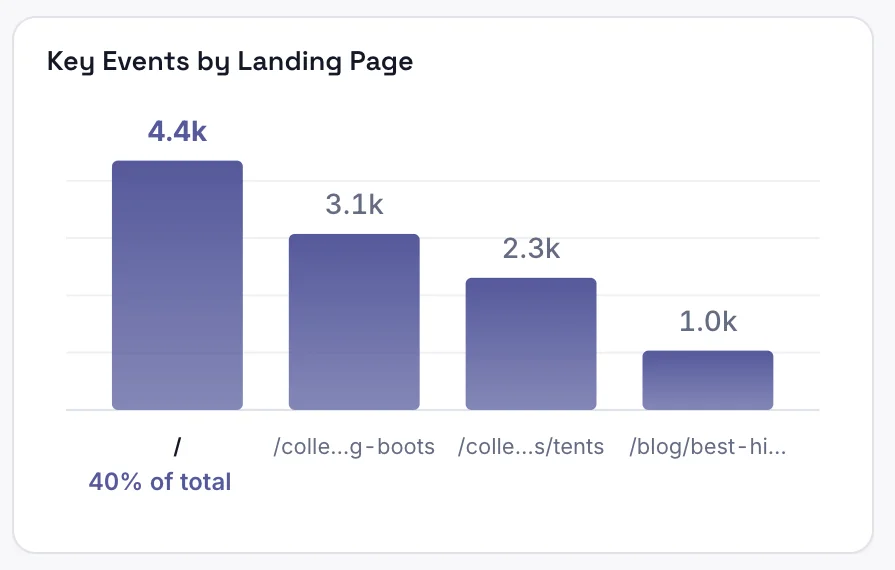
Key events by landing page
Key events from visits that started on each page, highest first.
How it works
How to use this GA4 dashboard template
Step 1
Connect GA4
Connect your GA4 account in Mammoth, or upload a report export.
Step 2
Paste the template
Copy the sentence at the top of this page into Mammoth. It builds the same dashboard from your data.
Step 3
Share or schedule it
Share a link, or have it emailed every week. Viewers are free.


Compare
GA4 dashboard templates compared
This template in Mammoth, GA4's own reports, and a Data Studio template. Data Studio is Google's free report builder, called Looker Studio until recently.
Mammoth template
For reporting on GA4 with your ad spend and CRM data, shared with clients or your team.
- ✓Ready-made template
- ~FreeFree plan for uploaded files
- ✓Meta Ads or CRM data in the same dashboard
- ✓Share a link anyone can open
- ✓Change it by asking in plain words
GA4 reports
For digging into one property inside Google Analytics.
- ~Ready-made templateStandard reports built in
- ✓Free
- ✕Meta Ads or CRM data in the same dashboard
- ✕Share a link anyone can open
- ✕Change it by asking in plain words

Data Studio template
For a free report when most of your data is Google's.
- ✓Ready-made template
- ✓Free
- ~Meta Ads or CRM data in the same dashboardNeeds a paid partner connector
- ✓Share a link anyone can open
- ✕Change it by asking in plain words
GA4 dashboard template questions
What should a GA4 dashboard include?
What are key events in GA4?
How do I use this GA4 dashboard template?
Is the template free?
Can I change the template?
Can Mammoth connect to GA4 directly?
How often does the dashboard update?
Can I combine GA4 with other sources?
Can I share it with clients?
Is the data on this page real?





Use this GA4 dashboard template
Connect GA4, paste the template, and share the dashboard with a link.
- ✓ 14-day Pro trial
- ✓ No credit card
- ✓ Viewers always free
More like this
See everything Mammoth does →- Connectors100+ tested connectors for your data.
- Data EngineClean, join and refresh your data.
- AI Dashboard GeneratorType a prompt, get a dashboard.
- Dashboard ExamplesDashboards, reports and decks to copy.
- AIAsk questions about your data.
- Google Ads Dashboard TemplateSpend, conversions and ROAS by campaign.
- Meta Ads Dashboard TemplateSpend, purchases and ROAS by ad set.
- White Label DashboardsDashboards with your logo and domain.
- Embedded AnalyticsDashboards inside your app or portal.