Xero dashboard template
14-day Pro trial · No credit card · Viewers are always free

The template: paste this into Mammoth
Xero profit and loss: revenue, gross profit, gross margin (gross profit over revenue), operating expenses, net profit and net margin (net profit over revenue) as KPIs, revenue and net profit by month, expenses by line type, and expenses by account

In production at














What is a Xero dashboard template?
A Xero dashboard template is a ready-made dashboard for your Xero accounts, with the numbers and charts already chosen. This one covers the profit and loss: connect Xero and it fills in with revenue, gross margin, expenses and net profit, month by month and account by account. It updates from Xero, so the month-end review starts from current numbers instead of an exported report.
What's on it
What's in the Xero dashboard template
Six numbers at the top and three charts below them.
Six numbers at the top

- Revenue
- Income from the accounts Xero files under Income or Revenue.
- Gross profit
- Revenue minus cost of sales.
- Gross margin
- Gross profit ÷ revenue.
- Operating expenses
- Overheads: wages, rent, software and the rest.
- Net profit
- Revenue and other income, minus every cost.
- Net margin
- Net profit ÷ revenue.
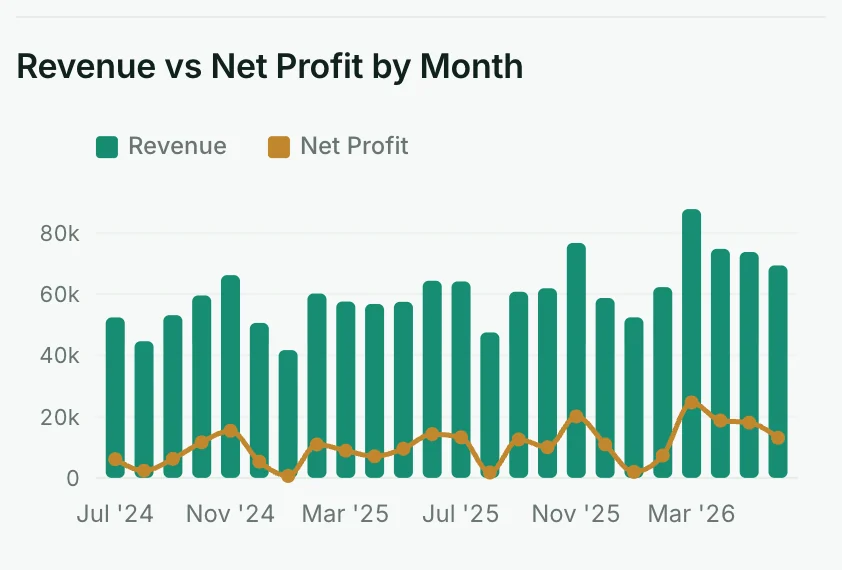
Revenue vs net profit by month
Revenue as bars and net profit as a line, one point a month.
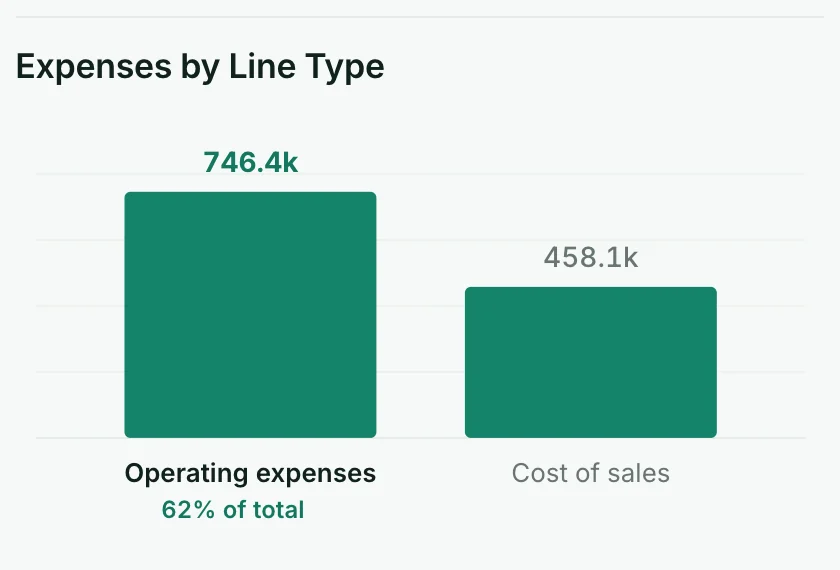
Expenses by line type
What is spent on cost of sales against operating expenses.
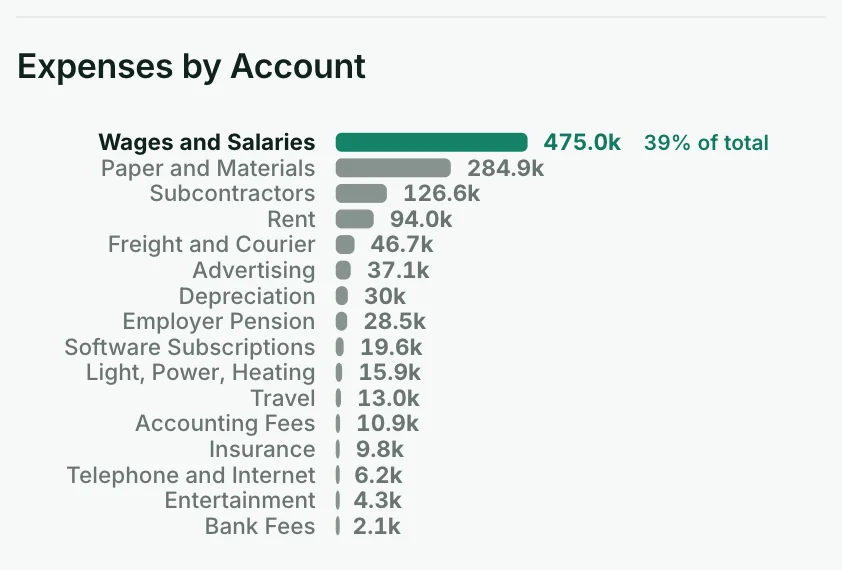
Expenses by account
Every expense account, largest first.
How it works
How to use this Xero dashboard template
- Step 1
Start with the template
Sign up and the Xero dashboard opens on sample data, so you can see it before you connect anything.
- Step 2
Sign in with Xero
One sign-in. Your data arrives as one tidy table, the dashboard moves onto it, and it refreshes every day.
- Step 3
Share or schedule it
Share a link, or have it emailed every week. Viewers are free.


Compare
Xero dashboard templates compared
This template in Mammoth, the reports built into Xero, and a dashboard built by hand in a spreadsheet from an export.
Mammoth template
For the profit and loss month by month, next to your sales or payroll data, shared with anyone.
- ✓Ready-made template
- ~FreeFree plan for uploaded files
- ✓Updates itself
- ✓Sales or payroll data in the same dashboard
- ✓Share a link anyone can open
Xero reports
For running one report inside Xero, for people with a Xero login.
- ~Ready-made templateBuilt-in reports
- ~FreeIncluded with Xero
- ✓Updates itself
- ✕Sales or payroll data in the same dashboard
- ✕Share a link anyone can open

Spreadsheet from an export
For a one-off look at the numbers.
- ✕Ready-made template
- ✓Free
- ✕Updates itself
- ~Sales or payroll data in the same dashboardPasted in by hand
- ~Share a link anyone can openSend the file
Xero dashboard template questions
What should a Xero dashboard include?
How are gross margin and net margin worked out?
How do I use this Xero dashboard template?
Is the template free?
Can I change the template?
Can Mammoth connect to Xero directly?
How often does the dashboard update?
Can I combine Xero with other sources?
Can I share it with clients?
Is the data on this page real?





Use this Xero dashboard template
Sign up, sign in with Xero, and the dashboard fills in with your own data.
- ✓ 14-day Pro trial
- ✓ No credit card
- ✓ Viewers always free
More free dashboard templates
Real Mammoth dashboards like this one, each with the sentence that builds it.