13 Best HR Dashboard Software Tools for 2026, With Prices
The best HR dashboard software, split into HR systems with reporting built in and analytics tools that sit over several HR systems. Prices from each vendor's own page.

· 15 min read
The short answer
If your people data sits in one HR system, use that system's reporting: BambooHR (from $10 per employee a month) and Rippling (from $8) both build custom dashboards, and HiBob and Paycor do the same on quoted prices. For performance and engagement data, 15Five ($4 to $16 a user) and Lattice (from $4 a seat, $4,000 minimum) carry it. When the numbers have to be combined from several systems, use an analytics layer: Mammoth, Power BI ($14 a user) or Tableau ($15), or Visier for a large enterprise.
AI dashboards built from your own data.


Table of contents
- The best HR dashboard software
- What is HR dashboard software?
- What to look for in HR dashboard software
- Quick comparison
- Best HR dashboard software for combining several systems
- Best HR dashboard software for small and mid-size companies
- Best HR dashboard software for reporting next to other business data
- Best HR dashboard software for managers with their own view
- Best HR dashboard software for HR leaders who are not analysts
- Best HR dashboard software for payroll-led larger companies
- Best HR dashboard software for engagement and performance
- Best HR dashboard software for performance reviews
- Best HR dashboard software for headcount planning
- Best HR dashboard software for large enterprises
- Best HR dashboard software for Microsoft companies
- Best HR dashboard software for analysts
- Best HR dashboard software for small teams on Zoho
- Which HR dashboard software should you choose?
- Frequently asked questions
- Where these prices came from
HR dashboard software turns people data, such as headcount, leavers, hiring, pay and engagement, into a screen that updates on its own. Search for it and most of what comes back is HR systems rather than dashboard tools, and that tells you something useful about the category.
If all your people data lives in one HR system, the best HR dashboard is usually the one that system already ships. If it lives in three, you need something that sits above them. This post covers both kinds, thirteen tools in all and including Mammoth Analytics, which I founded, with each price read off the vendor's own pricing page on 10 November 2026.
The best HR dashboard software
- 1. Mammoth for HR numbers combined from several systems, with free viewers
- 2. BambooHR for small and mid-size companies that want one HR system
- 3. Rippling for HR data reported next to finance and sales data
- 4. HiBob for managers who need a view of their own team
- 5. Paycor for HR leaders who are not analysts
- 6. ADP Workforce Now for payroll-led larger companies
- 7. 15Five for engagement and performance outcomes
- 8. Lattice for performance reviews and calibration
- 9. ChartHop for headcount planning with Finance
- 10. Visier for the largest, most complex organisations
- 11. Power BI for companies already on Microsoft
- 12. Tableau for analysts who want depth
- 13. Zoho Analytics for small teams already on Zoho People
Numbers 2 to 9 are HR systems with dashboards built in. Mammoth and 10 to 13 are analytics tools that sit over HR data from several systems. Mammoth is my company, so read its entry with the most scepticism you can spare.
What is HR dashboard software?
HR dashboard software connects to the systems that hold people data, calculates HR metrics such as headcount, turnover, time to hire and cost per head, and shows them on a dashboard that refreshes on a schedule. The tools here come in two kinds, and the split matters more than any feature list:
| HR system with built-in dashboards | Analytics layer over HR data | |
|---|---|---|
| Examples | BambooHR, Rippling, HiBob, Paycor, ADP, 15Five, Lattice, ChartHop | Mammoth, Visier, Power BI, Tableau, Zoho Analytics |
| Data it reads | Its own records | Exports and connectors from several systems |
| Setup | Little: the data is already there | More: someone has to join the systems |
| Strength | Accurate on its own records | Answers questions that span systems |
| Weak spot | Blind to data held elsewhere | Only as clean as the data you feed it |
The question to ask first is where your people data lives. A 60-person company running everything in BambooHR has its HR dashboard already. A 600-person company with payroll in ADP, reviews in Lattice and hiring in Greenhouse does not, because no single one of those systems can see the other two.
What to look for in HR dashboard software
- What it charges per. HR systems price per employee, so the bill grows with headcount whether or not anyone opens a dashboard. BI tools price per user, which here means per person who reads the dashboard.
- Whether managers can see their own team only. A people dashboard that shows every salary to every manager cannot be shared. Look for role-based or row-level access.
- Counts beside percentages. On a team of eight, one leaver is a 12.5% attrition rate. A dashboard that shows the rate without the count invites the wrong conversation.
- Which systems it can read. An engagement tool that cannot see payroll cannot tell you whether the disengaged are also the underpaid.
How this list was put together. Every price came off the vendor's own pricing page on 10 November 2026, and the References at the end link each one. Several vendors publish no price at all, and where that is the case the entry says so rather than quoting a figure from a review site. Nobody here has run thirteen HR systems side by side on the same workforce, so each "best for" is a judgement about fit, based on what the vendor builds and how it charges.
Quick comparison
| # | Tool | Kind | Entry price | Free plan or trial |
|---|---|---|---|---|
| 1 | Mammoth | Analytics layer | Free tier | Free plan |
| 2 | BambooHR | HR system | $10/employee/mo | Not stated |
| 3 | Rippling | HR system | From $8/employee/mo plus a base fee | No |
| 4 | HiBob | HR system | No public price | Demo |
| 5 | Paycor | HR system | No public price | Demo |
| 6 | ADP Workforce Now | HR system | No public price | Demo |
| 7 | 15Five | Performance and engagement | $4/user/mo | Demo |
| 8 | Lattice | Performance and engagement | $4/seat/mo, $4,000/yr minimum | Product tour |
| 9 | ChartHop | Headcount planning | Proposal only | Demo |
| 10 | Visier | People analytics | No public price | Demo |
| 11 | Power BI | BI tool | $14/user/mo | Free account, no sharing |
| 12 | Tableau | BI tool | $15/user/mo | Trial |
| 13 | Zoho Analytics | BI tool | €24/mo for 2 users | Free plan, 15-day trial |
Annual-billing rates where the vendor offers a choice.
Best HR dashboard software for combining several systems
1. Mammoth
Mammoth pros:
- Unlimited free viewers on every plan, so every manager can read the board without a licence
- Cleans and joins exports from payroll, the HR system and engagement surveys in the same product that publishes the dashboard
- Row-Level Security on authenticated sharing, so one board shows each manager only their own team (Pro and Enterprise)
- Ready-made HR boards for headcount and attrition, an HR scorecard, HR analytics and compensation review
Mammoth cons:
- It is not an HR system: it holds no employee records and runs no payroll or reviews
- If everything already sits in one HR system, that system's own reporting will be quicker to set up
Mammoth sits in the second column of the table above. It does not replace BambooHR or ADP. It reads what they export, along with the engagement survey and the spreadsheet somebody in Finance keeps for contractors, and turns that into one set of HR numbers.
The cleaning is the part that matters for people data. Department names drift between systems, an employee ID gains a leading zero in one export, and leavers are recorded as a status in one place and a date in another. Mammoth's steps fix those once, stay visible, and rerun when next month's files land with the same faults.
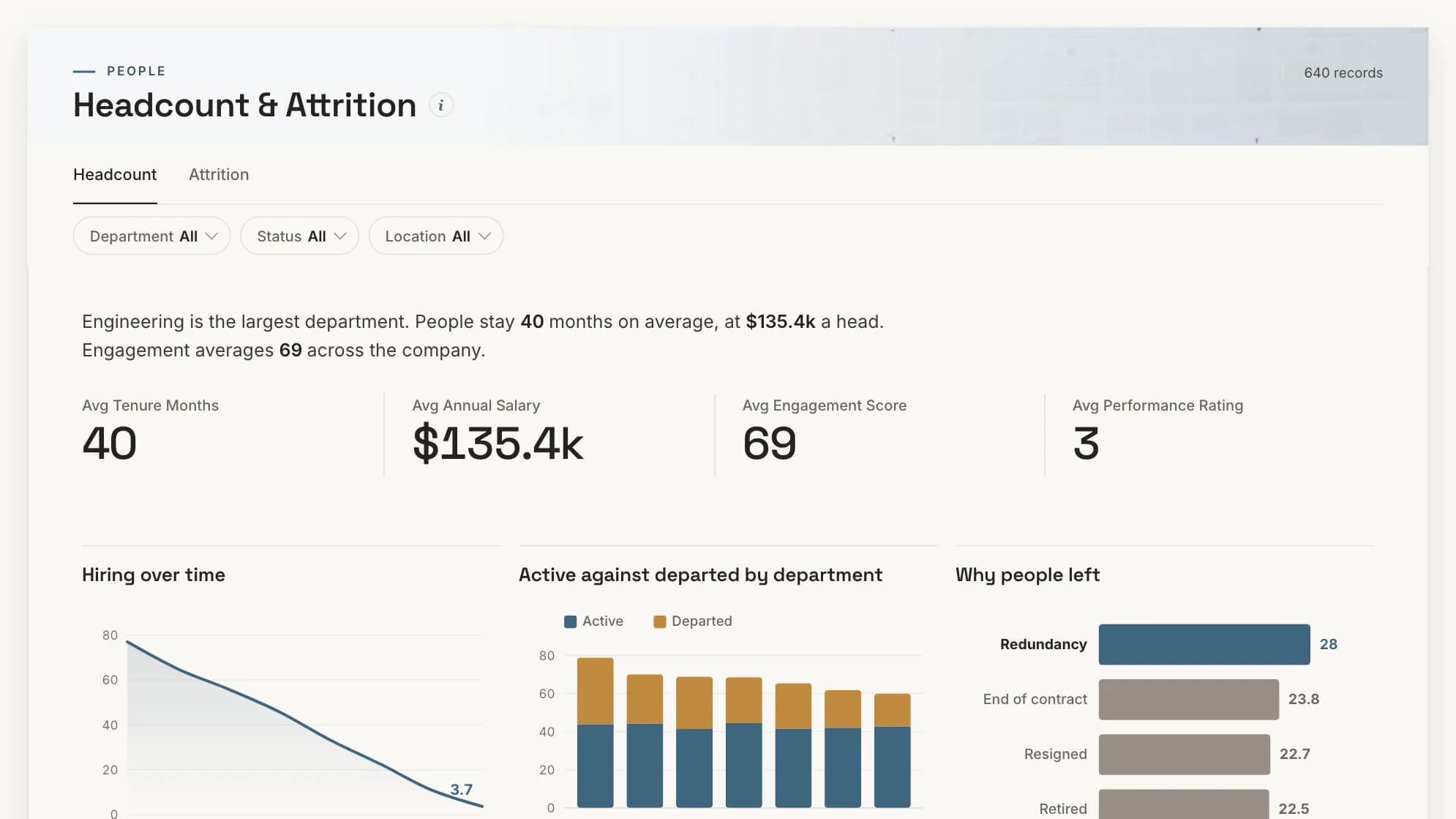
The HR dashboard examples show the four HR boards in full. The HR analytics one puts engagement, performance and absence on one page, because a team with rising absence and falling engagement is telling you something neither metric says alone.
| Plan | Per month, billed annually | Billed monthly | Builders |
|---|---|---|---|
| Free | $0 | $0 | 1 builder |
| Starter | $39/month | $49/month | 2 builders |
| Team | $149/month | $189/month | 5 builders |
| Pro | $499/month | $629/month | 15 builders |
| Enterprise | From $5,000/month | Annual only | Unlimited |
Viewers are free and unlimited on every plan, because only builders count. Storage is a separate axis: every paid plan includes 10 GB, and more costs the same on any plan (+$100/month for 50 GB, +$300/month for 250 GB, +$800/month for 1 TB, billed annually). Free holds 1 GB. Every account starts with 14 days of Pro, no credit card.
See every plan and what it includes
Mammoth pricing: Free tier available. Dashboard viewers are free and unlimited on every plan, because only the people building dashboards count as platform users.
Combine your HR exports into one dashboard that every manager can read, with viewers free on every plan.
Best HR dashboard software for small and mid-size companies
2. BambooHR
BambooHR pros:
- Dashboards and a custom report builder on the entry Core plan
- Flat monthly rates below 26 employees, so a small team knows its bill
- Custom dashboards, analytics and HR benchmarks on Elite
BambooHR cons:
- Reports cover what is in BambooHR, and little else
- Tailored dashboards need the top tier
BambooHR is the HR system most small companies shortlist, and its reporting grows with the tier. Core can "visualize key HR metrics" and build custom reports from data across the system. Elite adds custom dashboards on live HR data plus benchmarks against other companies.
BambooHR pricing: Core $10, Pro $17 and Elite $25 per employee per month on the plan cards (the FAQ on the same page gives $10.25 and $17.50 for Core and Pro). With 25 employees or fewer it is a flat $250, $425 or $650 a month.
Best HR dashboard software for reporting next to other business data
3. Rippling
Rippling pros:
- Builds reports and dashboards from charts, pivot tables, calculated fields and filters
- Connectors bring in CRM, support and finance data, and Snowflake by zero-copy
- Point-in-time reporting, so you can see headcount as it stood last March
Rippling cons:
- No named plans or full price list on the pricing page
- The analytics are strongest when the HR data is in Rippling already
Rippling's analytics page says it builds reports "from scratch" and can generate a dashboard from a description. The interesting part is the connectors: revenue per employee is a question that needs both HR and finance data, and Rippling is one of the few HR systems that reads the second.
Rippling pricing: "Rippling plans start at $8 per employee per month, with a monthly base fee." No plan names or base fee are published.
Best HR dashboard software for managers with their own view
4. HiBob
HiBob pros:
- Configurable dashboard views, with leader-specific metrics
- Role-based access to the underlying data
- Data maintained at the source and updated in real time
HiBob cons:
- No public price; every route on the pricing page leads to a demo
HiBob builds its people analytics around the manager. Each leader sees metrics for their own team, controlled by role, which is the access model a people dashboard needs before anyone will share it. Its AI writes "executive and board-ready stories" from the same data.
HiBob pricing: not published. The pricing page offers a demo.
Best HR dashboard software for HR leaders who are not analysts
5. Paycor
Paycor pros:
- Ready-made insight on headcount, resignations, retention and compensation
- Splits voluntary from involuntary turnover, and reports time to hire
- Up to seven years of workforce data, with benchmarks
Paycor cons:
- No public price
- Built for payroll customers, so it reads Paycor's data first
Paycor's analytics page says HR leaders "don't have to be a data analyst", and the product is shaped around that. Reports come from templates with filters and custom columns, and benchmarks draw on EEOC government data and other Paycor customers.
Paycor pricing: not published. The pricing page discusses bundles and cost per employee without figures, and offered 50% off the first six months on 10 November 2026.
Best HR dashboard software for payroll-led larger companies
6. ADP Workforce Now
ADP pros:
- Compensation benchmarks from a pool of over 39 million employees
- Dashboards inside the same system that runs payroll
ADP cons:
- No public price on any of the three packages
- Aimed at "midsized and large businesses", by ADP's own description
If your payroll already runs on ADP, its reporting sees the numbers most HR dashboards are trying to reconstruct: pay, hours and headcount, all from the source. The benchmark pool is the stand-out, and few tools on this list can match it for pay comparison.
ADP Workforce Now pricing: not published. Select, Plus and Premium all carry a "Get Pricing" button.
Best HR dashboard software for engagement and performance
7. 15Five
15Five pros:
- An HR Outcomes Dashboard with engagement, performance and turnover trends
- Connects HRIS data with reviews, engagement and compensation
- Published per-user prices
15Five cons:
- Reads people programmes, not payroll or finance
- Which dashboard sits on which plan needs checking with the vendor
15Five's HR Outcomes Dashboard is the closest thing on this list to a ready-made answer for "are we losing the people we can least afford to lose". It joins engagement and performance data to the HRIS so turnover can be read against both.
15Five pricing: Engage $4, Perform $11 and Total Platform $16 per user per month, billed annually. Compensation is $9 or $11 per user per month on top.
Best HR dashboard software for performance reviews
8. Lattice
Lattice pros:
- Named dashboards for team analytics, adoption and DEIB
- Calibration analytics broken down by manager and tenure
- Modular pricing: buy performance, goals or engagement on their own
Lattice cons:
- A $4,000 minimum annual agreement
- Reports on Lattice's own programmes rather than payroll
Lattice is a performance and engagement system first. Its calibration view, which shows how ratings spread by manager, is the dashboard an HR team uses during review season to spot the manager who rates everybody a five.
Lattice pricing: Performance $10, Goals and OKRs $8, and Engagement $4 per seat per month. Compensation adds $6 and Grow adds $4. "The minimum annual agreement is $4,000", billed annually.
Best HR dashboard software for headcount planning
9. ChartHop
ChartHop pros:
- Connects to ADP, Greenhouse, Workday, SAP and over a hundred other HR, recruiting and finance tools
- Builds dashboards, comp cycles and headcount plans from chat
- A live org chart from day one
ChartHop cons:
- No price list; you answer three questions and receive a proposal
ChartHop sits between HR and Finance. Its connectors pull from the HR system, the applicant tracker and the planning model, which makes it one of the few tools here that can answer "what will headcount cost next year" without an export.
ChartHop pricing: proposal only, "sized to your team".
Best HR dashboard software for large enterprises
10. Visier
Visier pros:
- More than 2,000 prebuilt people metrics
- Benchmarks drawn from over 250 million HR data points
- An AI assistant, Vee, for questions in plain language
Visier cons:
- No pricing page; sales only
- Sized for the largest, most complex organisations, in Visier's own words
Visier is people analytics as its own product, not a module in an HR system. It reads from the HR systems you already run through 20-plus prebuilt connectors and gives you the metric library a large HR analytics team would otherwise spend years defining.
Visier pricing: not published. Contact sales.
Best HR dashboard software for Microsoft companies
11. Power BI
Power BI pros:
- Connects to almost any source, in the cloud or on-premises
- Hundreds of template apps
- Already licensed in many Microsoft 365 companies
Power BI cons:
- Every person who views a shared report needs a paid licence
- No HR features of its own: someone has to model the data
Power BI is a general BI tool, and HR is one of its sample dashboards rather than a product. It suits an HR team with access to an analyst. For a people dashboard the per-viewer licence is the catch: a board meant for every manager means a licence for every manager.
Power BI pricing: Pro $14 and Premium Per User $24 per user per month, paid yearly. The free account cannot share reports.
Best HR dashboard software for analysts
12. Tableau
Tableau pros:
- Deep, flexible analysis for an analyst who knows the tool
- A public gallery of human resources dashboards to start from
Tableau cons:
- Per-user pricing, and Enterprise doubles the rate
- Like Power BI, it brings no HR data model
Tableau's HR dashboard gallery is one of the top results for this search, and it is a good place to see what an HR dashboard can look like. Building one needs an analyst and a clean extract of the HR data.
Tableau pricing: Tableau Standard starts at $15 and Tableau Enterprise at $35 per user per month, billed annually.
Best HR dashboard software for small teams on Zoho
13. Zoho Analytics
Zoho Analytics pros:
- A free plan with two users, 10,000 rows and unlimited dashboards
- HR metrics such as cost per hire, offer acceptance rate and attrition reasons
- Native connectors for Zoho People and Zoho Recruit
Zoho Analytics cons:
- The free plan's row limit is small for a company with a few years of history
If your HR runs on Zoho People, Zoho Analytics is the shortest path to a dashboard, with a free plan to try it on.
Zoho Analytics pricing: a free plan for two users, and a 15-day trial. Basic is €24 a month billed annually for two users, which is the figure the page showed when read from Europe; check the US price on the page.
Which HR dashboard software should you choose?
Start with where the data lives, not with the charts.
- Everything is in one HR system. Use its reporting. BambooHR and Rippling publish prices, and HiBob and Paycor quote them.
- The question is about performance or engagement. 15Five or Lattice, because the data is theirs.
- The question is about cost and headcount next year. ChartHop, or ADP if payroll already runs there.
- The answer needs data from several systems. An analytics layer. Visier at enterprise scale, Power BI or Tableau with an analyst, or Mammoth when the exports need cleaning before they agree and you want every manager reading the board without a licence each.
The last case is the common one past about 200 people, and it is the one HR systems cannot solve on their own, since each system only sees its own records.
Frequently asked questions
What is HR dashboard software?
HR dashboard software shows people metrics such as headcount, turnover, hiring and pay on a dashboard that updates on its own. Most HR systems include one, and analytics tools such as Mammoth, Visier and Power BI build them over data from several systems.
What should an HR dashboard include?
Headcount, starters and leavers, voluntary and involuntary turnover, time to hire, and cost per head are the usual core. Show counts beside every percentage, because small teams swing hard on one leaver. Our HR dashboard examples show four layouts.
Is there free HR dashboard software?
Yes. Zoho Analytics and Mammoth both have free plans, and Power BI has a free account for building reports, though sharing them needs a paid licence. Most HR systems on this list have no free plan.
How much does HR dashboard software cost?
Across the published prices here, from free to $25 per employee a month. HR systems such as BambooHR ($10 to $25) and Rippling (from $8) charge per employee. Performance tools charge per seat, from $4. Several vendors, including HiBob, ADP, Paycor and Visier, publish no price.
Can I build an HR dashboard in Excel?
Yes, for a monthly snapshot that one person maintains. It stops working when the dashboard has to refresh on its own, when managers need to see only their own team, or when the data comes from more than one system and has to be matched first.
What is the difference between an HR dashboard and HR analytics software?
An HR dashboard shows the current numbers. HR analytics software, such as Visier, adds a metric library, benchmarks and the ability to ask why a number moved. Many tools here do both to some degree.
Where these prices came from
Every figure was read from the vendor's own pricing page on 10 November 2026. HR software pricing changes often and is frequently quoted rather than published, so check the two or three you care about before you budget.


