Snowflake Pricing 2026: $2 to $4 per Credit (With Examples)
How Snowflake pricing works, with a cost estimator and three worked bills built from Snowflake's own list prices.

Updated · 8 min read
The short answer
Snowflake charges $2 a credit on Standard, $3 on Enterprise and $4 on Business Critical, plus $23 per terabyte of storage a month (AWS US East list prices). A small reporting job costs under $200 a month, and a large warehouse left on all month costs over $17,000. Mammoth builds recurring reports on Snowflake data from $39/month.
Table of contents
- Snowflake pricing at a glance
- How Snowflake pricing works
- Snowflake warehouse sizes and credits
- Snowflake editions: Standard, Enterprise and Business Critical
- Snowflake pricing by cloud and region
- Snowflake cost estimator
- How much does Snowflake cost? Three examples
- How to reduce Snowflake costs
- When you don't need a Snowflake warehouse
- Frequently Asked Questions
The first Snowflake bill usually lands a few weeks after someone set up a warehouse for a demo and forgot to make it smaller again. Nothing broke. The warehouse just kept running, and Snowflake bills by the second.
This guide explains how the pricing works, with every price read off Snowflake's own pricing page and docs. I also built a small estimator and three worked bills, so you can see what a real workload costs before you commit. I work on Mammoth, which connects to Snowflake for reporting, and I'll say near the end when you might not need a warehouse at all.
Working out what Snowflake will cost you?
Talk to Gaurav or Dominic for 15 minutes. Tell them about your setup. They’ll show you where Mammoth fits and what it would cost.
Snowflake pricing at a glance
| What you pay for | List price (AWS US East) | How it's measured |
|---|---|---|
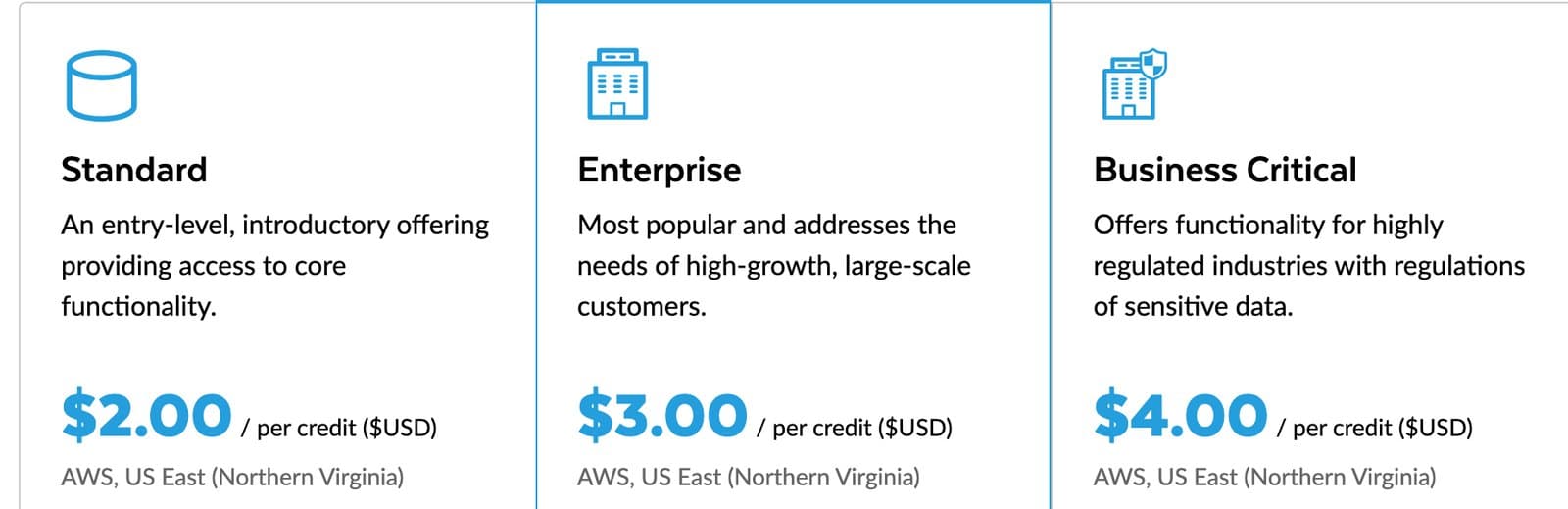
| Compute, Standard edition | $2.00 a credit | Credits per hour by warehouse size, billed per second |
| Compute, Enterprise edition | $3.00 a credit | Same |
| Compute, Business Critical | $4.00 a credit | Same |
| Virtual Private Snowflake | Quote only | Same |
| Storage | $23 per TB a month | Monthly average, after compression |
| Data transfer | Free within a region | Per byte to other regions or clouds |
| Free trial | $400 of credits for 30 days | No commitment |
These are on-demand prices. Paying for capacity in advance lowers them, and the exact discount sits in Snowflake's Service Consumption Table rather than on the pricing page.
Those are the headline numbers. The bill makes more sense once you see the three lines it's built from.
How Snowflake pricing works
Snowflake splits the bill into compute, storage and data transfer. You pay for each one separately, so storing a lot of data costs little unless you also query it a lot.
- Compute
$2 to $4 a credit
Credits burned while a warehouse runs, billed by the second. Usually the biggest line.
- Storage
$23 per TB a month
The monthly average of your data, measured after compression. Usually small.
- Data transfer
Free in the same region
Charged per byte only when data leaves for another region or cloud. Zero for most teams.
Compute is a virtual warehouse running your queries. It costs credits for every second it runs, with a 60-second minimum each time it starts. It stops costing anything once it suspends, and auto-suspend is on by default.
Storage is the average amount of data you hold each month, measured after Snowflake compresses it. Data kept for recovery after a change or a delete counts as storage too.
Data transfer is free into Snowflake and free inside a region. Snowflake charges per byte only when data leaves for another region or another cloud.
Two smaller charges sit on top of these. Cloud services, the layer that plans queries and manages logins, is free until it passes 10% of your daily compute. Serverless features such as Snowpipe loading bill by the second for the compute Snowflake runs for you.
So compute is the line that moves. And the biggest thing that sets it is the warehouse size.
Snowflake warehouse sizes and credits
Each warehouse size uses twice the credits of the one below it. An X-Small uses 1 credit an hour, a Medium 4 and a Large 8.
- X-Small$31
- Small$62
- Medium$124
- Large$248
- X-Large$4816
- 2X-Large$9632
A bigger warehouse usually finishes the same query faster. So a Large running for 15 minutes can cost the same as a Medium running for 30. The money goes when a big warehouse sits idle with auto-suspend set high, or when one never suspends at all.
These are the rates for standard Gen1 warehouses. Snowflake's newer Gen2 warehouses and Snowpark-optimized warehouses use different rates, listed in its Service Consumption Table.
Size sets how fast credits go. The edition sets what each credit costs.
Snowflake editions: Standard, Enterprise and Business Critical
Standard, $2 a credit. The core warehouse, with Snowflake's AI agents, AI search and live data sharing.
Enterprise, $3 a credit. Adds extra compute for busy periods, up to 90 days of data recovery, automatic sensitive data detection and access rules for AI agents. Snowflake marks it the most popular edition.
Business Critical, $4 a credit. Adds private network connections, customer-managed encryption keys, failover across regions and clouds, and support for HIPAA, PCI DSS and FedRAMP.
Virtual Private Snowflake. Business Critical in a separate environment, isolated from every other Snowflake account. It's quote only.
The jump from Standard to Enterprise is 50% on every credit. If you don't need busy-period scaling or long data recovery, Standard does the same compute for less.
The edition isn't the only thing that changes the price per credit, though. Where your account lives changes it too.
Snowflake pricing by cloud and region
The US regions on AWS, Azure and Google Cloud all list the same credit prices. Europe costs more.
| Cloud and region | Standard | Enterprise | Business Critical | Storage per TB |
|---|---|---|---|---|
| AWS US East (N. Virginia) | $2.00 | $3.00 | $4.00 | $23.00 |
| AWS US West (Oregon) | $2.00 | $3.00 | $4.00 | $23.00 |
| Azure East US 2 (Virginia) | $2.00 | $3.00 | $4.00 | $23.00 |
| GCP US Central 1 (Iowa) | $2.00 | $3.00 | $4.00 | $20.00 |
| AWS EU Frankfurt | $2.60 | $3.90 | $5.20 | $24.50 |
| AWS Europe (London) | $2.70 | $4.00 | $5.40 | $24.00 |
So the same workload costs 30% to 35% more in Frankfurt or London than in Virginia. Snowflake's page lists more than 25 regions per cloud, so check yours before you budget.
With the rates in hand, you can price your own workload.
Snowflake cost estimator
Pick a region, an edition and a warehouse size, then say how long it runs. The estimator multiplies credits by hours by price and adds storage.
Your workload
Estimated monthly bill
$2,227
$26,724 a year
- Compute, 704 credits
- $2,112
- Storage, 5 TB
- $115
On-demand list prices. Leaves out serverless features, cloud services above the free 10% and transfer to other regions. Pre-paid capacity costs less per credit.
It covers one warehouse at list prices. If you run several, add them up. For a full quote with serverless features and capacity discounts, use Snowflake's pricing calculator.
To show what those numbers look like in practice, here are three workloads priced the same way.
How much does Snowflake cost? Three examples
All three use the Enterprise edition on AWS US East at on-demand list prices. They're arithmetic on Snowflake's published rates, not real customer bills.
- A morning reporting job$155 a monthX-Small, 2 hours a day, 22 workdays, 1 TB stored. 44 credits = $132, storage $23.
- An analyst team's working day$2,342 a monthMedium, 8 hours a day, 22 workdays, 10 TB stored. 704 credits = $2,112, storage $230.
- A Large warehouse nobody suspended$17,510 a monthLarge, 24 hours a day, 30 days, 10 TB stored. 5,760 credits = $17,280, storage $230.
A morning reporting job: $155 a month. An X-Small warehouse refreshes a few dashboards for 2 hours each workday. That's 44 credits, or $132, plus $23 for 1 TB.
An analyst team's working day: $2,342 a month. A Medium warehouse stays busy 8 hours a day across 22 workdays. That's 704 credits, or $2,112, plus $230 for 10 TB.
A Large warehouse nobody suspended: $17,510 a month. The same 10 TB, but a Large warehouse runs all day, every day. That's 5,760 credits, or $17,280. The storage didn't change. Only the running time did.
The gap between the second and third bill is mostly a setting. That's where cutting costs starts.
How to reduce Snowflake costs
- Keep auto-suspend short. A warehouse that suspends after one idle minute stops costing money one minute after the last query.
- Start small and size up. Begin at X-Small or Small and move up only when queries are too slow.
- Split workloads. Give loading, reporting and ad hoc analysis their own warehouses, so one heavy job doesn't keep a big warehouse awake for everyone.
- Set resource monitors. They alert you, or suspend a warehouse, when credits pass a limit you set.
- Pick the edition you need. Standard costs a third less per credit than Enterprise.
- Commit once usage is steady. Pre-paid capacity costs less per credit than on demand, but only pays off if you use what you buy.
Those steps make a warehouse cheaper. Sometimes the cheaper question is whether the report needs one.
When you don't need a Snowflake warehouse
A lot of Snowflake time goes on recurring reports: the same tables, pulled and reshaped every morning for the same dashboards. If that's most of your bill, you have two options with Mammoth.
If your data is already in Snowflake, Mammoth connects to it on every paid plan. Pull in the tables a report needs, clean and combine them with saved steps or by asking in plain words, and let AI build the dashboard. Data Mammoth reads live from your warehouse doesn't count toward its storage.
If your data is in apps and files, Mammoth connects to more than 100 sources directly, so a reporting team may not need a warehouse at all.
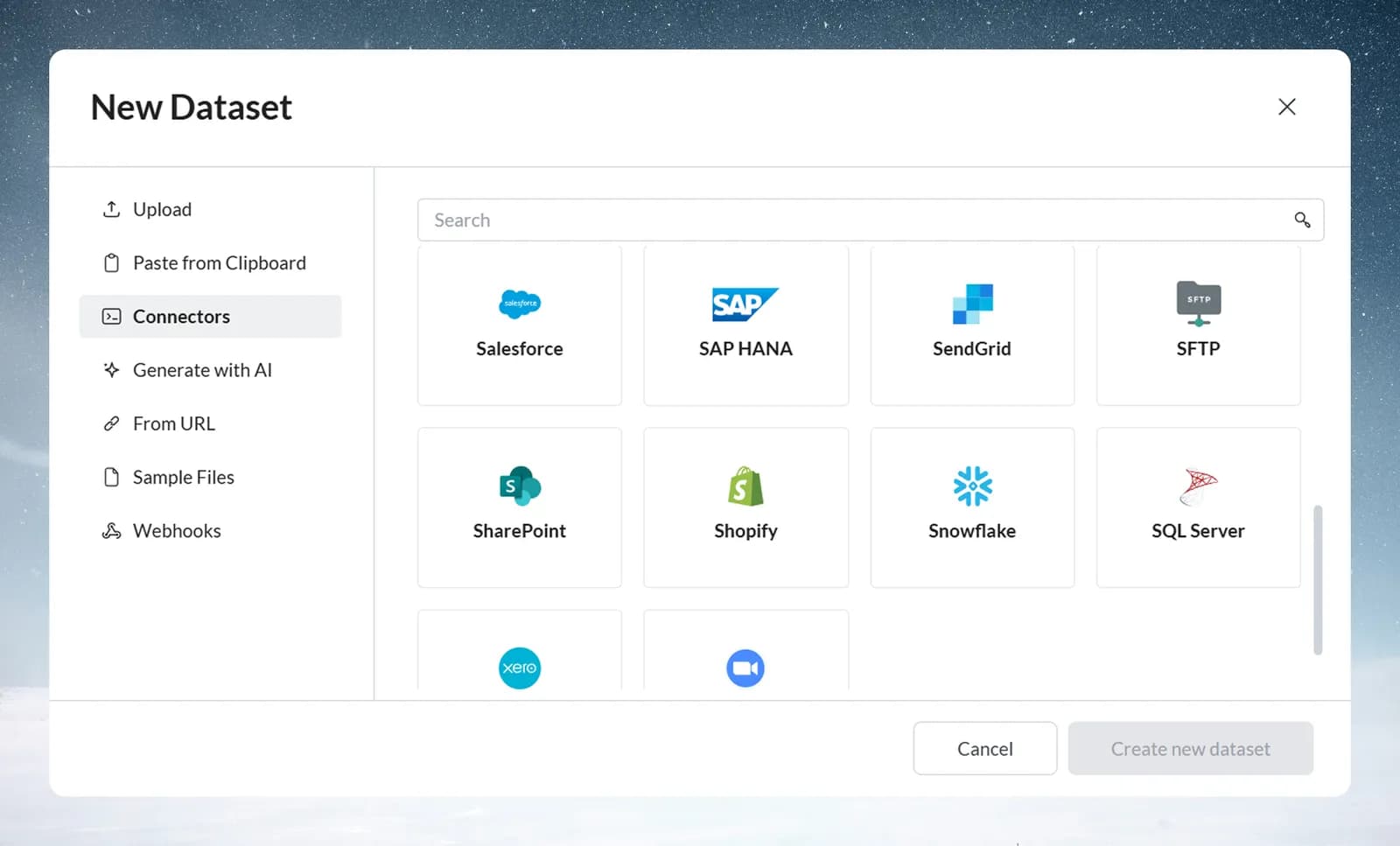
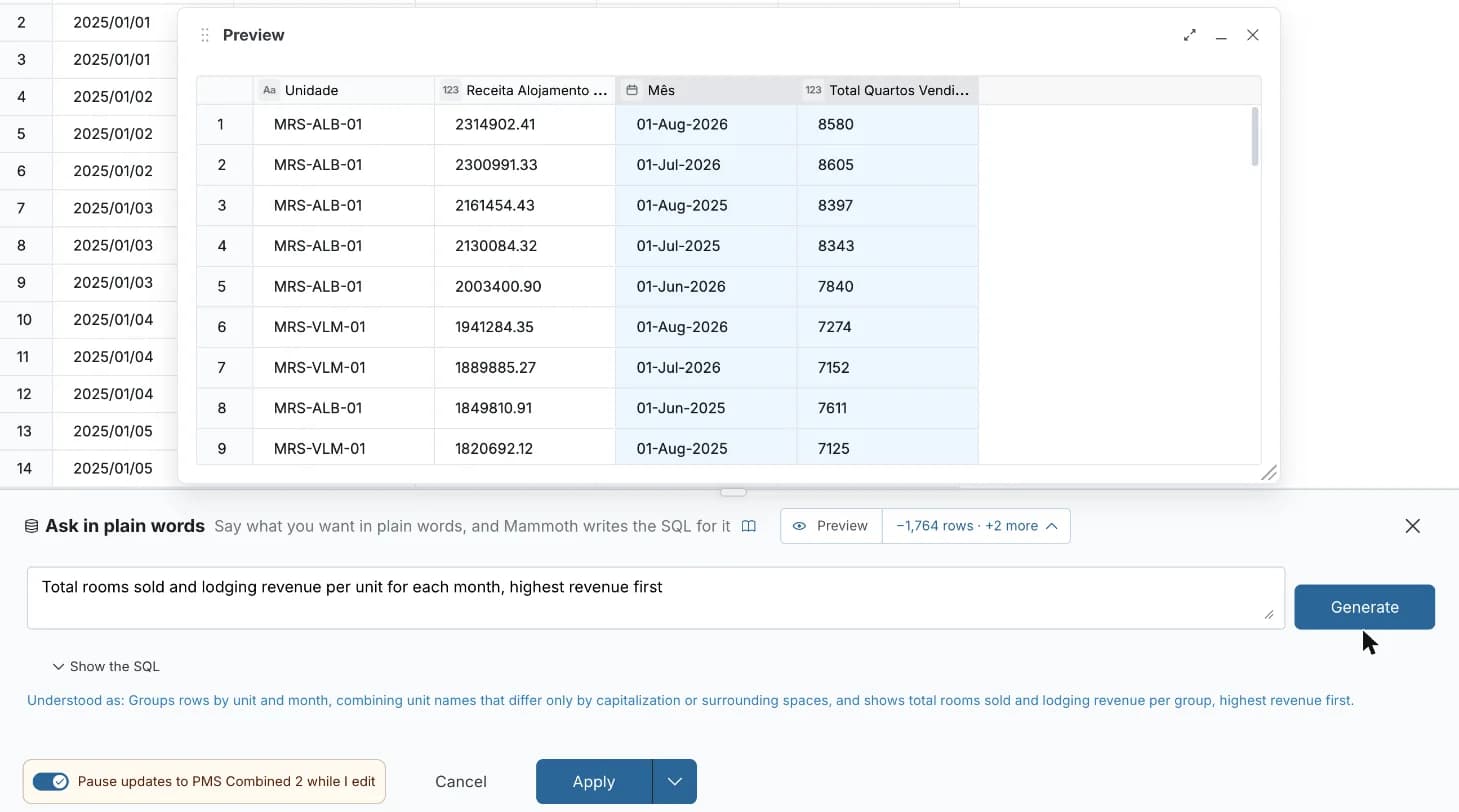
Price: free for files and standard databases. Snowflake and every other connector come with paid plans from $39/month billed annually, and the data refreshes weekly, daily or every three hours depending on the plan. Viewers are free on every plan.
Where it stops
- It's built for reports and dashboards on a schedule, not for running a data platform with hundreds of engineers' workloads.
- It doesn't replace Snowflake for data science, data sharing or very large historical tables.
Build the reports your warehouse feeds, without another warehouse to size.
If you're comparing warehouses rather than avoiding one, Databricks pricing works on a similar pay-per-use model with its own unit, and dbt pricing covers the transformation layer many Snowflake teams add.
Frequently Asked Questions
How much does Snowflake cost per month?
It depends on how long your warehouses run. At Enterprise list prices on AWS US East, an X-Small running 2 hours a workday with 1 TB stored costs about $155 a month. A Medium busy 8 hours a workday with 10 TB costs about $2,342. A Large left on all month costs over $17,000.
How much does one Snowflake credit cost?
On demand, $2 on Standard, $3 on Enterprise and $4 on Business Critical in the US regions. Europe costs more, for example $2.60, $3.90 and $5.20 in AWS Frankfurt. Pre-paid capacity costs less.
How much is Snowflake storage per TB?
$23 per terabyte a month on demand in AWS US East and Azure East US 2, and $20 in GCP US Central 1. It's measured on the monthly average after compression.
Does Snowflake charge per query?
No. It charges for the time a warehouse runs, in credits per second with a 60-second minimum each time it starts. Queries that run at the same time on one warehouse share that running time.
Is there a free version of Snowflake?
There's no free plan. New accounts get a 30-day trial with $400 of credits.
Is Snowflake expensive?
The rates are modest. The bills get large when warehouses run longer or bigger than the work needs, so auto-suspend and right-sizing matter more than the edition.