12 Best Project Management Dashboard Software Tools for 2026
Project management dashboard software compared by the thing most round-ups skip: which plan the dashboards first appear on, and how many projects one dashboard can combine. Prices from each vendor's own page.

· 12 min read
The short answer
If your projects already live in one tool, use its dashboards, and check the plan: monday.com combines 5 boards on Standard ($12 a seat), Asana adds portfolio dashboards on Advanced ($24.99), Smartsheet removes its 10-widget cap on Business ($19), and ClickUp includes dashboards from Business ($17). For a free start, Jira, monday.com, ClickUp and Wrike all have free plans. When a portfolio view needs data from several tools or from finance, use a reporting layer such as Mammoth or Power BI ($14 a user).
AI dashboards built from your own data.


Table of contents
- The best project management dashboard software
- What is project management dashboard software?
- What to look for in project management dashboard software
- Quick comparison
- Best project management dashboard software for portfolios across tools
- Best project management dashboard software for boards
- Best project management dashboard software for programme rollups
- Best project management dashboard software for spreadsheet-minded teams
- Best project management dashboard software for card variety
- Best project management dashboard software for sharing outside the team
- Best project management dashboard software for ready-made portfolio views
- Best project management dashboard software for software teams
- Best project management dashboard software for agencies
- Best project management dashboard software for Notion users
- Best project management dashboard software for custom trackers
- Best project management dashboard software as a reporting layer
- Which project management dashboard software should you choose?
- Frequently asked questions
- Where these prices came from
Project management dashboard software shows where a set of projects has got to, what is late and what it has cost, on a screen that updates from the work itself. Almost every project management tool now has one. The differences that matter are on the pricing page, in the plan where the dashboards first appear and in how many projects a single dashboard can combine.
This post compares twelve tools on those terms, including Mammoth Analytics, the company I founded, with every price and limit read off the vendor's own pages on 10 November 2026.
The best project management dashboard software
- 1. Mammoth for portfolio dashboards built from several tools and finance data
- 2. monday.com for teams that run work as boards
- 3. Asana for portfolio rollups across programmes
- 4. Smartsheet for spreadsheet-minded PMOs
- 5. ClickUp for the most dashboard card types
- 6. Wrike for dashboards shared with people outside the team
- 7. ProjectManager for portfolio dashboards without building them
- 8. Jira for software teams
- 9. Teamwork.com for agencies tracking profitability
- 10. Notion for teams whose projects already live in Notion
- 11. Airtable for building a custom project tracker
- 12. Power BI for a reporting layer over several tools
What is project management dashboard software?
Project management dashboard software turns tasks, timelines, budgets and workloads into charts and numbers that refresh as the work changes. A project dashboard covers one project. A portfolio dashboard rolls several projects up so a PMO or leadership team can see which are late or over budget without opening each one.
The tools here come in two kinds:
- Project management tools with dashboards built in. monday.com, Asana, Smartsheet, ClickUp, Wrike, ProjectManager, Jira, Teamwork.com, Notion and Airtable. The dashboard reads the tool's own tasks, so it is accurate and quick to set up, and blind to anything outside the tool.
- Reporting layers. Mammoth and Power BI. They read exports or connections from one or more tools, and from finance, and build the dashboard on top.
What to look for in project management dashboard software
- The plan where dashboards start. In most of these tools the free or entry plan has a limited dashboard or none. The table below shows where each one opens up.
- How many projects one dashboard can combine. A one-project dashboard is a status page. A portfolio view needs rollups, and several tools cap them by plan.
- Cost beside progress. Percent complete says nothing about whether the budget survived it. If the question is "which programmes are over budget", the dashboard needs cost data, which often lives in finance rather than in the project tool.
- Who can view it. Per-seat pricing means every stakeholder who opens the dashboard may need a seat. Check whether viewers or guests are free.
How this list was put together. Every price and plan limit came from the vendor's own pricing or help pages on 10 November 2026, and the References link each one. Some vendors show European visitors prices in euros; the US dollar figures below are the ones each vendor publishes for the US. Nobody here has run all twelve on the same portfolio, so each "best for" is a judgement about fit.
Quick comparison
| # | Tool | Entry paid price | Where dashboards open up | Free plan |
|---|---|---|---|---|
| 1 | Mammoth | Free tier | Every plan; viewers free | Yes |
| 2 | monday.com | $9/seat/mo | 1 board on Basic, 5 on Standard, 50 on Enterprise | Up to 2 seats |
| 3 | Asana | $10.99/user/mo | Project dashboards on Starter, portfolio on Advanced | Up to 2 users |
| 4 | Smartsheet | $9/member/mo | 10 widgets on Pro, unlimited on Business | 30-day trial |
| 5 | ClickUp | $9/user/mo | Trial on Free and Core, included from Business | Yes |
| 6 | Wrike | $10/user/mo | Personal dashboards from Team | Yes |
| 7 | ProjectManager | $15/user/mo | Project dashboard on Team, portfolio on Business | 30-day trial |
| 8 | Jira | $8.48/user/mo | Reports and dashboards on Free | Up to 10 users |
| 9 | Teamwork.com | $9.99/user/mo, 3 minimum | Profitability insight on Optimize | 5 users, 5 projects |
| 10 | Notion | $12/member/mo | Dashboard views on Business | Yes |
| 11 | Airtable | $20/user/mo | Interface dashboards; sharing on paid plans | Yes |
| 12 | Power BI | $14/user/mo | Sharing needs Pro or Premium | Free account |
Annual-billing rates where the vendor offers a choice.
Best project management dashboard software for portfolios across tools
1. Mammoth
Mammoth pros:
- Combines project data from several tools with cost data from finance on one dashboard
- Unlimited free viewers on every plan, so stakeholders read the dashboard without a seat each
- Ready-made project status and project portfolio boards
- Cleans the exports first, so differently named projects and owners line up
Mammoth cons:
- It is not a project management tool: no tasks, timelines or assignments
- If every project lives in one tool, that tool's own dashboard will be quicker
Mammoth is the second kind of tool on this list. Teams usually reach for it when the portfolio is spread out: engineering in Jira, client work in another tool, and the budget in a finance system that neither can see.
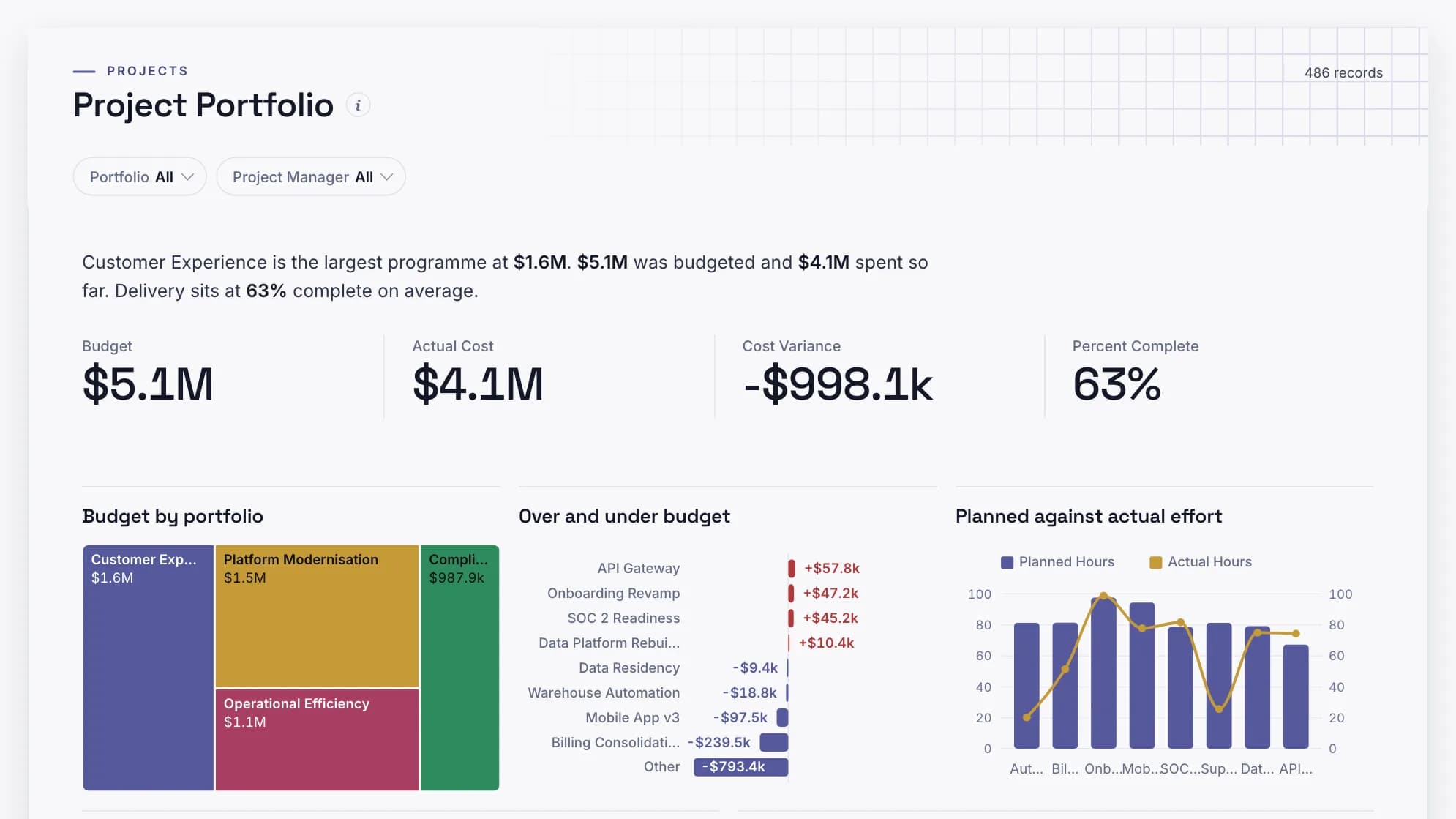
Its project portfolio dashboard is built around cost variance. It shows budget against actual cost per portfolio, with effort planned against effort spent beside it. The variance is shown per portfolio rather than as a total, because a programme 20% under and one 20% over net to nothing, and netting to nothing is how an overrun stays invisible until it is large.
The project status dashboard puts every workstream in one state view, with the slippage and its cost on a second page. Both rerun when next week's exports land, through cleaning steps that stay visible.
| Plan | Per month, billed annually | Billed monthly | Builders |
|---|---|---|---|
| Free | $0 | $0 | 1 builder |
| Starter | $39/month | $49/month | 2 builders |
| Team | $149/month | $189/month | 5 builders |
| Pro | $499/month | $629/month | 15 builders |
| Enterprise | From $5,000/month | Annual only | Unlimited |
Viewers are free and unlimited on every plan, because only builders count. Storage is a separate axis: every paid plan includes 10 GB, and more costs the same on any plan (+$100/month for 50 GB, +$300/month for 250 GB, +$800/month for 1 TB, billed annually). Free holds 1 GB. Every account starts with 14 days of Pro, no credit card.
See every plan and what it includes
Mammoth pricing: Free tier available. Dashboard viewers are free and unlimited on every plan, because only the people building dashboards count as platform users.
Put every project and its cost on one dashboard, with viewers free on every plan.
Best project management dashboard software for boards
2. monday.com
monday.com pros:
- Chart, numbers, battery and Gantt widgets
- Dashboards combine more boards as you move up the plans
- A free plan for up to two seats, and a 14-day trial of Pro
monday.com cons:
- Basic dashboards read a single board
- Plans start from three seats
monday.com's dashboards are the clearest example of plan gating on this list. On Basic a dashboard reads one board. Standard combines 5, Pro 20 and Enterprise 50, though one line on the same pricing page gives Pro as 10, so check if that number decides it for you.
monday.com pricing: Basic $9, Standard $12 and Pro $19 per seat per month, billed annually ($12, $14 and $24 monthly). Enterprise is quoted.
Best project management dashboard software for programme rollups
3. Asana
Asana pros:
- Column, line, burn-up, donut, number and lollipop charts
- Portfolio dashboards that roll up several projects
- Universal reporting across the whole workspace on Advanced
Asana cons:
- Portfolio dashboards and universal reporting need Advanced
Asana spells out its gating plainly: "Project dashboards are Starter+, portfolio dashboards are Advanced+, and universal reporting is Advanced+." For a PMO, Advanced is the real entry price.
Asana pricing: Starter $10.99 and Advanced $24.99 per user per month, billed annually ($13.49 and $30.49 monthly). The free Personal plan covers two users.
Best project management dashboard software for spreadsheet-minded teams
4. Smartsheet
Smartsheet pros:
- Unlimited dashboards on every paid plan
- Familiar grid, so finance-minded PMOs adapt quickly
- A 30-day free trial with no card
Smartsheet cons:
- Pro caps each dashboard at 10 widgets
- Portfolio views need Enterprise
Smartsheet's widget cap is the limit that bites. Ten widgets is enough for one project, and tight for a portfolio. Business lifts it.
Smartsheet pricing: Pro $9 and Business $19 per member per month billed yearly ($12 and $24 monthly). Pro is for 1 to 10 members and Business needs 3 or more. Enterprise is quoted.
Best project management dashboard software for card variety
5. ClickUp
ClickUp pros:
- More than 60 dashboard card types
- A free plan with no card required
ClickUp cons:
- Dashboards are a trial on Free and Core and included from Business
- ClickUp's own feature page and pricing table describe the gating differently
ClickUp has the widest choice of dashboard cards here. The pricing table marks dashboards as a trial on Free and Core and included from Business, which adds "Advanced Dashboards".
ClickUp pricing: Core $9 and Business $17 per user per month billed yearly. Enterprise is quoted.
Best project management dashboard software for sharing outside the team
6. Wrike
Wrike pros:
- Table, chart, calendar and timeline widgets
- Public links so external viewers can see a dashboard
- Forecasting and visual dashboards on Pinnacle
Wrike cons:
- Team is limited to 2 to 15 users, and Business to 5 to 200
- All plans are billed annually
Wrike pricing: Team $10 and Business $25 per user per month, billed annually. Free plan available, and a 14-day trial. Pinnacle and Apex are quoted.
Best project management dashboard software for ready-made portfolio views
7. ProjectManager
ProjectManager pros:
- Project dashboards that update automatically on Team
- Portfolio dashboards rolling up tasks, cost and workload on Business
- Unlimited free guest licences
ProjectManager cons:
- Team is capped at 10 users and 20 projects
ProjectManager is built for the traditional project manager. Its dashboards come ready-made rather than assembled from widgets.
ProjectManager pricing: Team $15 and Business $28 per user per month, billed annually. 30-day free trial, no card.
Best project management dashboard software for software teams
8. Jira
Jira pros:
- Reports and dashboards on the free plan, for up to 10 users
- Atlassian Analytics on Enterprise for cross-product insight
Jira cons:
- Built around software delivery; less natural for non-technical projects
Jira pricing: free for up to 10 users. Standard was $8.48 per user per month at the pricing page's default team size and monthly billing; the page recalculates the rate as you change team size.
Best project management dashboard software for agencies
9. Teamwork.com
Teamwork.com pros:
- Project health, utilisation, planned versus actual and profitability reports
- A free plan for up to 5 projects and 5 users
Teamwork.com cons:
- Revenue, cost and profitability insight sits on Optimize, which is quoted
- Minimum seat counts on paid plans
Teamwork.com pricing: Basics $9.99 per user per month billed annually with a minimum of 3, Accelerate $24.99 with a minimum of 5. 14-day trial on paid plans.
Best project management dashboard software for Notion users
10. Notion
Notion pros:
- Dashboards built from the databases a team already keeps
Notion cons:
- Dashboard views are available on Business and Enterprise only
- A maximum of 12 widgets, 4 per row
Notion pricing: Plus $12 and Business $24 per member per month, billed monthly ($120 and $240 a year). Free plan available.
Best project management dashboard software for custom trackers
11. Airtable
Airtable pros:
- Interface Designer's dashboard layout puts charts and numbers on one canvas
- Up to 50 interfaces per base
Airtable cons:
- Sharing an interface separately from the base needs a paid plan
- You build the tracker yourself
Airtable pricing: Team $20 and Business $45 per user per month, billed annually. Free plan for individuals and the smallest teams.
Best project management dashboard software as a reporting layer
12. Power BI
Power BI pros:
- A dashboard can draw on several reports and data models, so several PM tools at once
- Already licensed in many Microsoft 365 companies
Power BI cons:
- Sharing needs Pro or Premium Per User for every viewer
- A Power BI dashboard cannot be filtered or sliced; that happens in the underlying report
Power BI pricing: Pro $14 and Premium Per User $24 per user per month, paid yearly. The free account cannot share reports.
Which project management dashboard software should you choose?
Start with where the projects live.
- All in one tool you already pay for. Use its dashboards, and check the plan table above before assuming you have them.
- Choosing a tool now, and dashboards matter. monday.com if you want to combine boards cheaply, Asana Advanced for portfolio rollups, Smartsheet Business for a spreadsheet PMO.
- Software delivery. Jira, whose free plan includes dashboards for up to 10 users.
- Spread across tools, or the budget lives in finance. A reporting layer. Power BI if you have an analyst and every viewer has a licence, Mammoth if the exports need lining up first and stakeholders should read the dashboard free.
Frequently asked questions
What is a project management dashboard?
A project management dashboard is a single screen showing progress, deadlines, workload and cost for one project or a portfolio. It updates from the project data, so the status meeting starts from the numbers rather than from verbal updates.
What is the best project management dashboard software?
It depends on where the work lives. monday.com, Asana and Smartsheet have the strongest built-in dashboards on their mid-tier plans. For portfolios spread across several tools or needing finance data, a reporting layer such as Mammoth or Power BI fits better.
Is there free project management dashboard software?
Yes. Jira includes reports and dashboards free for up to 10 users, Mammoth has a free plan with free viewers, and monday.com, ClickUp and Wrike have free plans with limited dashboards.
How much does project management dashboard software cost?
Entry paid plans run from about $9 to $20 per user per month on annual billing. Portfolio dashboards usually need a higher tier, such as Asana Advanced at $24.99 or Smartsheet Business at $19.
What should a project dashboard show?
Status per workstream, what is late, budget against actual cost and effort planned against effort spent. Our project dashboard examples show a status view and a portfolio view.
Can I build a project dashboard in Excel?
Yes, for one project that one person updates. It breaks down when several people edit it, when it has to refresh from the project tool on its own, or when cost data from finance has to be matched to each project.
Where these prices came from
Every figure was read from the vendor's own pricing or help pages on 10 November 2026. Several vendors show European visitors prices in euros, so the US figures come from the US prices each vendor publishes. Jira and some others recalculate by team size. Check the tools you shortlist before you commit.


