JPG to Excel. Free, with any email.
Turn a photo or screenshot of a table into an Excel file. No JPG-to-PDF step.
Want a CSV rather than a spreadsheet? Use the image converter.
 Excel
Excel Google Sheets
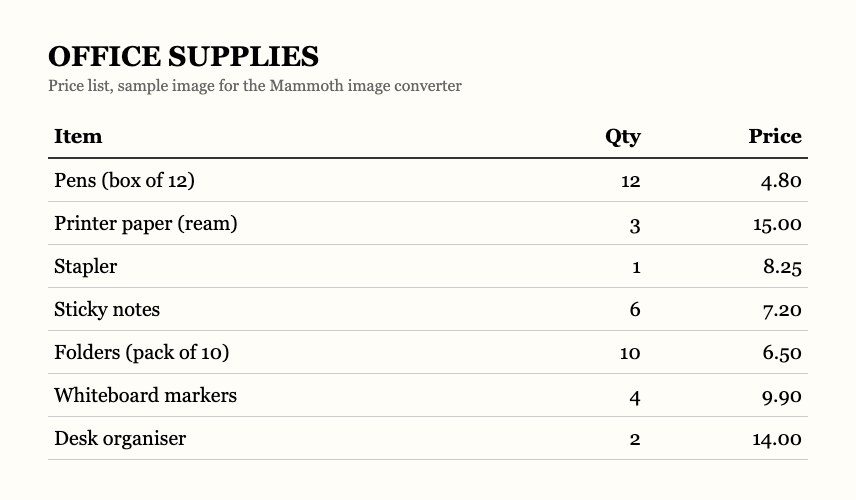
OFFICE SUPPLIES
Price list · photo from phone
price-list.jpg uploaded
We email a link that opens the tables in Mammoth
- JPG, PNG, WEBP and HEIC
- No JPG-to-PDF step
- A real .xlsx file
- Deleted within 24 hours
Illustration of how the tool works. No image to hand? Try our sample price list.














The numbers in your picture, in a spreadsheet
Use it on its own, or have Mammoth do it for you every week.
Free, with any email
Enter your email at the end. We send a link that opens your tables in Mammoth.
One step, not two
Other tools turn your JPG into a PDF first. This reads the image directly.
A real Excel file
Download it as Excel and you get an .xlsx. Or as CSV if you'd rather.
How to convert a JPG to Excel
A screenshot works better than a photo. There's no angle, shadow or blur.
price-list.jpg
Step 1
Upload your image
JPG, PNG, WEBP, TIFF or HEIC.
Step 2
Choose Only tables
It finds the table and skips the text around it.
- ItemPriceCoffee3.50Bagel2.75Juice4.20
Step 3
Check the numbers
Compare a few cells with the picture, especially small digits.
Access your tables
name@email.comReceive tablesStep 4
Get your Excel file
Enter your email. The link we send opens the table in Mammoth. Download it as Excel.
Prefer to watch? Here it is in four minutes.
Recorded in October 2026. The last step has changed: the tool now emails a link that opens your table in Mammoth, where you download Excel or CSV.
How to get a clean table from a picture
The picture decides most of the result. Four things help.
Screenshot if you can
A screenshot has no angle, shadow or blur.
Crop to the table
Cut out the text around it before you upload.
Shoot straight on
Hold the phone flat above the page, not at an angle.
Use good light
Even light with no shadow across the numbers.
Other ways to do it
Excel may already do this for you.
Excel's Data from Picture
Small, clean tables
- FreePartly
- One stepYes
- Gives you an .xlsx fileYes
JPG to PDF to Excel
If you already use those tools
- FreePartly
- One stepNo
- Gives you an .xlsx fileYes
- This page
This converter
Bigger or messier tables
- FreeYes
- One stepYes
- Gives you an .xlsx fileYes
Converting images every week?
Mammoth can do it for you. Put the images in a folder and their tables are added to one table automatically.
Receipts
 Drive
Drive DropboxOneDrive
 SFTP
SFTP| Office store | Sep 02 | Printer paper | 15.00 | |
| Cafe | Sep 02 | Team lunch | 64.20 | |
| Print shop | Sep 03 | Flyers | 120.00 | |
| Office store | Sep 04 | Pens (box) | 4.80 | |
| Cafe | Sep 05 | Coffee | 18.50 |
Illustration. Every new file in the folder is added to the same table.
Your image stays private
We read your image and send you a link. The image is deleted within 24 hours. The tables you pick are added to your Mammoth account, and stay yours.
- SOC 2 Type II
- ISO/IEC 27001:2022
- HIPAA
- GDPR
You upload
price-list.jpg
We read the table
You check the rows
Link sent to you
It opens the tables in Mammoth
- < 24 hours
Image deleted
Within 24 hours
Prefer not to upload? Try Excel's Data from Picture first.
Questions people ask
Can't Excel do this itself?
Do I get an .xlsx file?
Why not convert the JPG to a PDF first?
How accurate is it?
Photo or screenshot?
Will my table's formatting survive?
Does it read handwriting?
Do I need to sign up or install anything?
What happens to my image?
I have dozens of these every month.


Extract, clean and send it on, every week
Mammoth reads each new file, cleans the data and sends it to your database, SharePoint or a dashboard.
- ✓ Free trial
- ✓ No credit card
- ✓ Viewers always free