Dashboards · Formats & design
One dataset. A dashboard, a deck, a report or a video.
One dataset
Four things to make from the same table
Everything below was made from one table of sales for a fictional coffee chain: 74,028 rows covering nearly three years.
Slide deck
A leadership deck, from one request
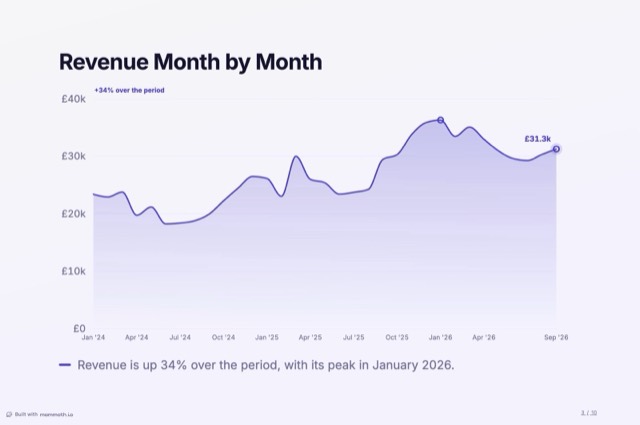
A cover, the headline numbers, one point per slide with the chart that makes it, and recommended actions to close. Use the arrows, or your keyboard.
 Slide 1 of 10
Asked for as “a quarterly business review deck for the leadership team”, in the Keynote style. Charts and figures are as Mammoth computed them; we rewrote the line under each chart. More on AI presentations from data.
Open the live deckWritten report
A report someone will read, on screen or on paper
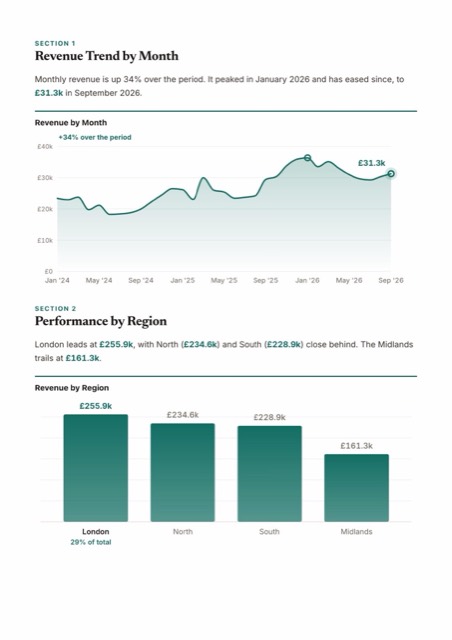
Headed sections, a chart in each, and commentary between them. The same report reads on the web, prints on A4 or US Letter pages, or fits on one poster.
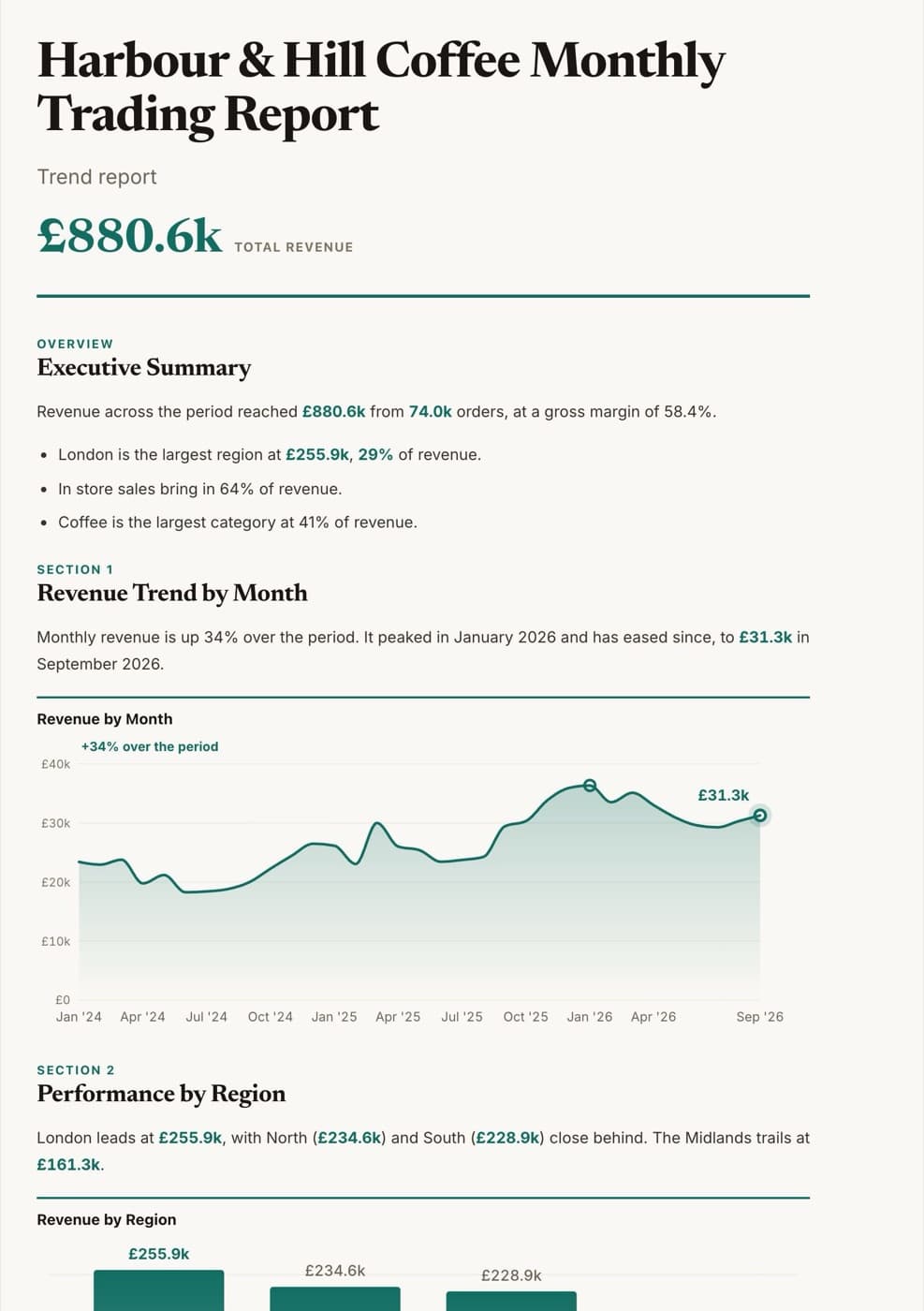
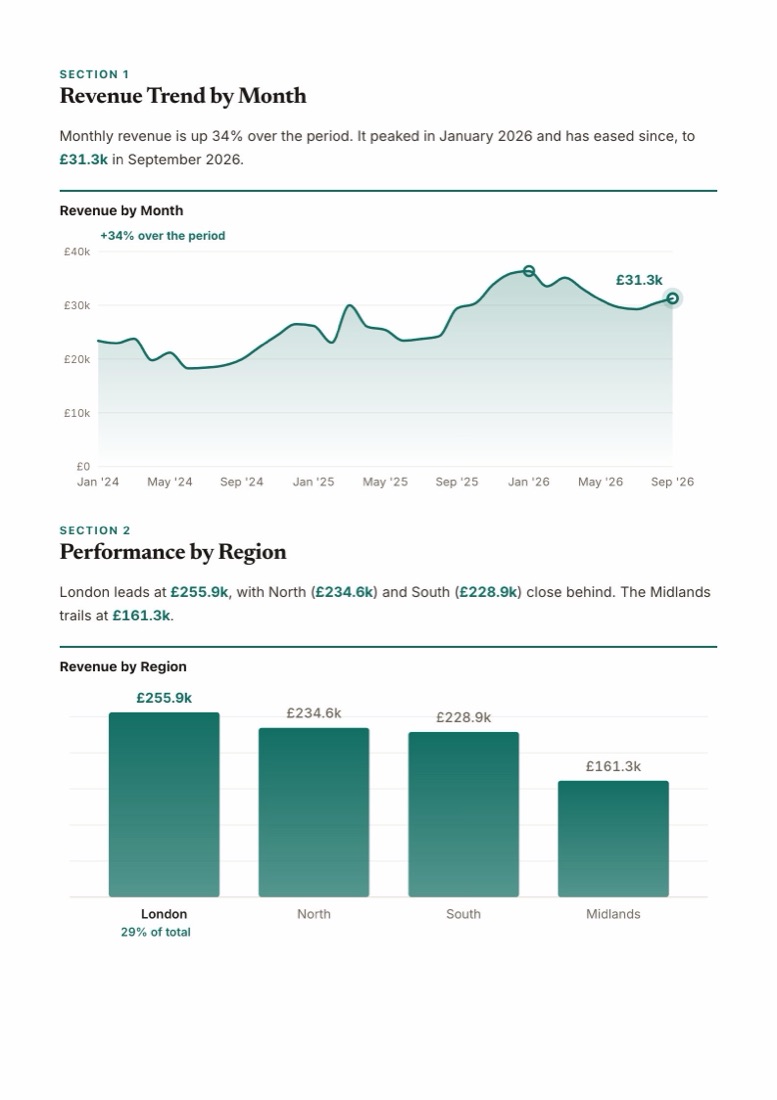
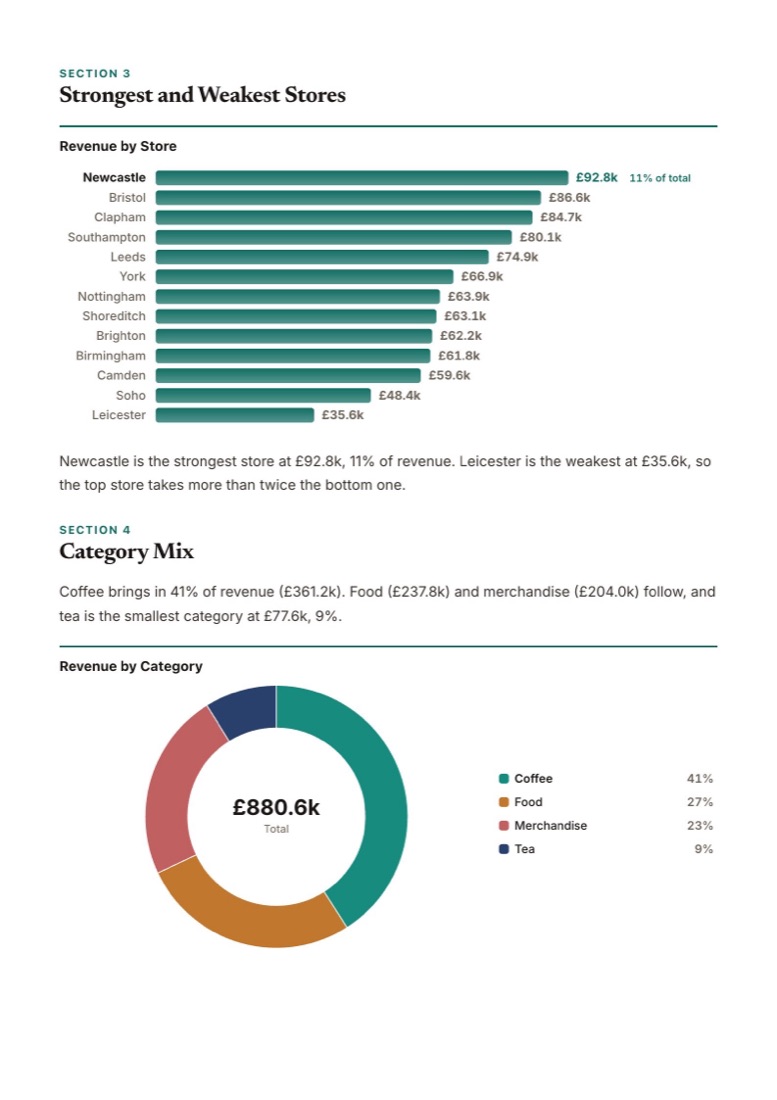
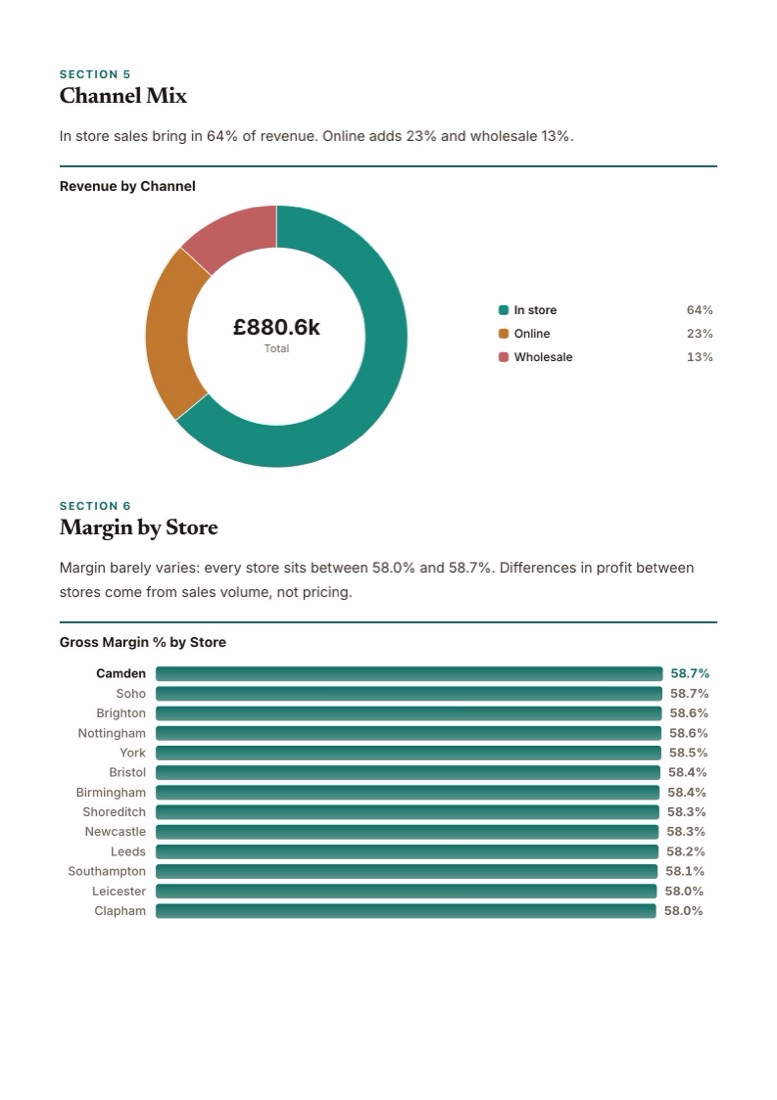
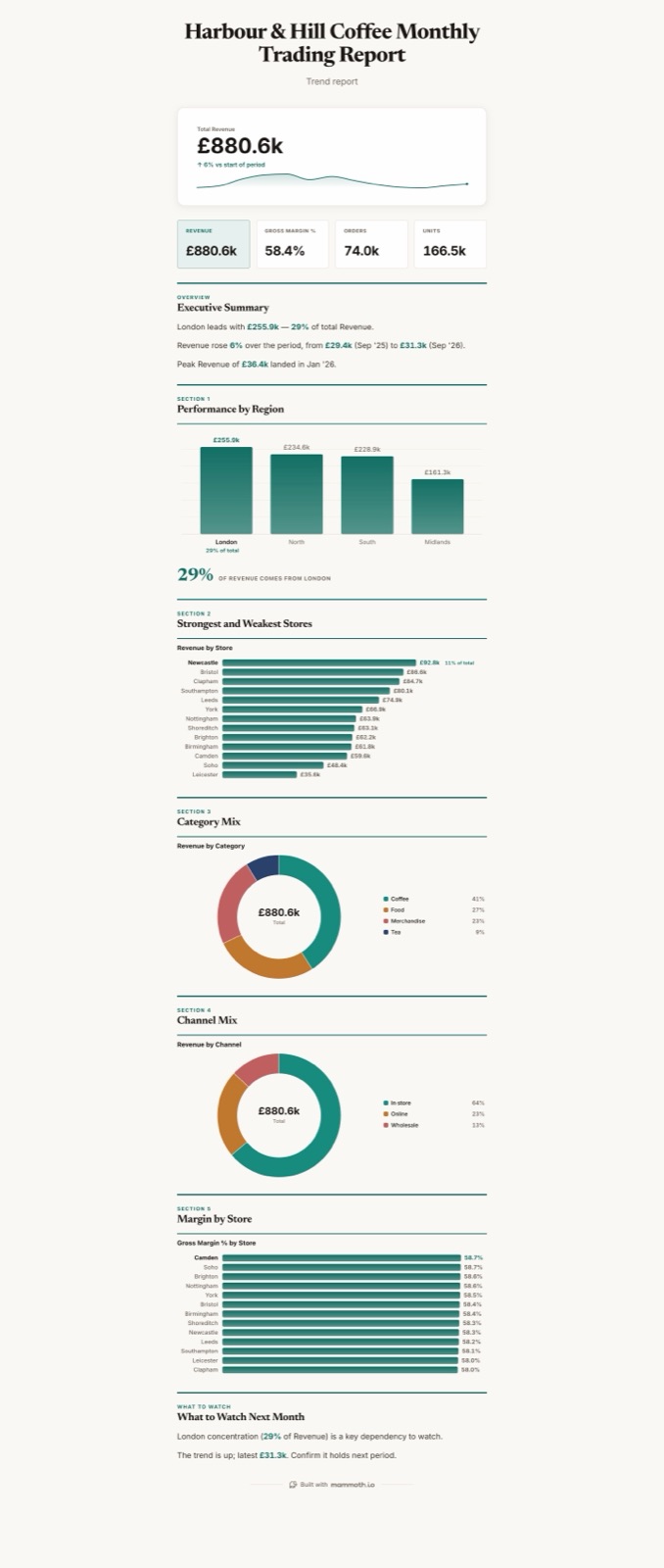
Or one poster. The same report on a single long page, with its own short summary, for a wall or a channel.
Asked for as “a written monthly trading report for the board”, in the Editorial style. Charts and figures are as Mammoth computed them; the commentary is ours, edited in the report. More on the AI report generator.
Open the live reportMotion video
The story, animated, as an MP4
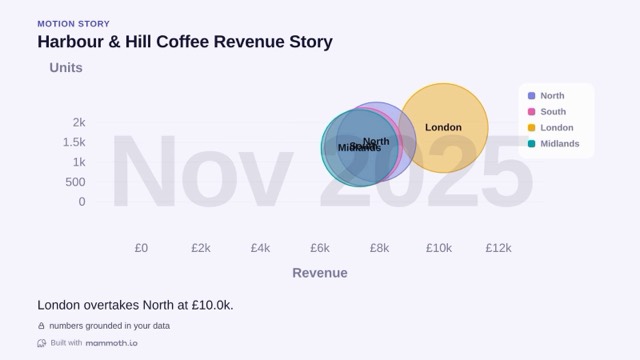
A motion story plays the data over time and exports as a video for a social post or the top of a meeting.
Exported by Mammoth from the same data: 31 seconds, with each region's revenue and units moving month by month and the turning points called out as they happen. Also exports square.
Download the MP4Design
Restyle everything in one step
Pick a stock style, or give Mammoth your website address or logo and it builds one from your brand. Every format takes the same style, so the deck and the dashboard look like they belong together.
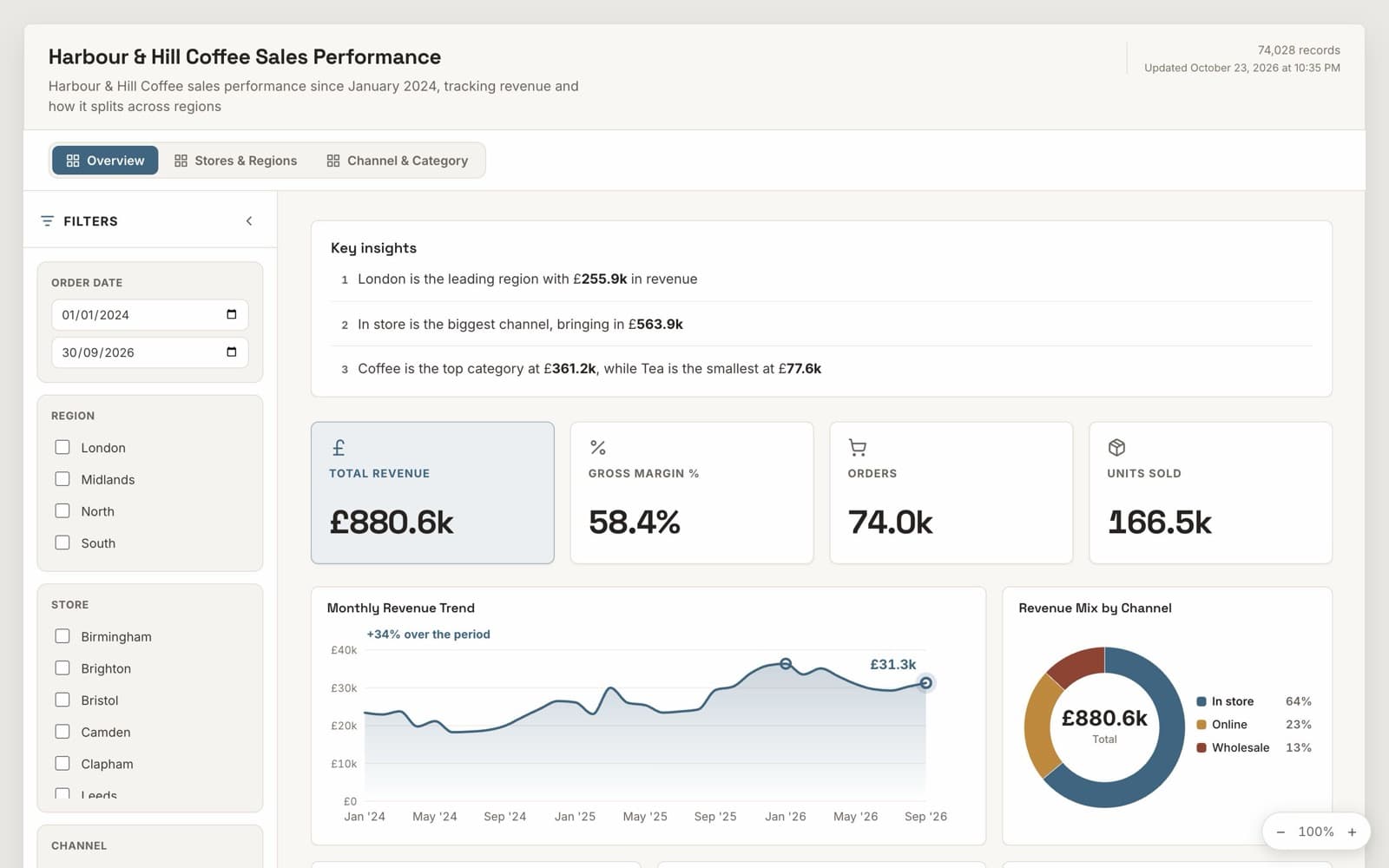
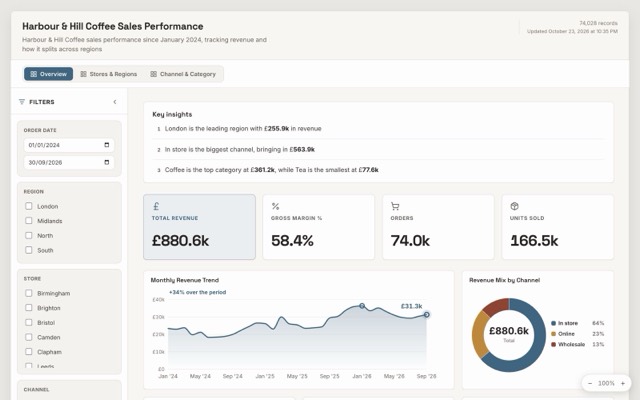
The same board, restyled in one step. Nothing about the data or the layout changes. Sample data for a fictional coffee chain.
Open the live boardFormats
Pick the shape your audience reads
Dashboard, presentation or document
The same data becomes a dashboard, a slide deck or a written document, plus a Q&A page, each with named types.
Switch formats in place
Switch an output to another format and its content reshapes, filling in what the new format needs.
Document length, paper and poster
Documents can be brief, standard or full, laid out for web or for A4 or US Letter, or shaped as a single poster.
Multiple pages
Boards have pages with tabs or a side rail; add, rename, reorder or duplicate them.
Motion and social
Stories that travel
Motion stories and video
A presentation or document can animate as a motion story and export as an MP4 in landscape, square or portrait.
Share as carousel
Turn a board's findings into portrait cards for social feeds, one claim per card, previewed before download.
Decks read on a phone
On a phone, a published deck becomes a scrolling view.
Design
Finished, and on brand
Styles
Pick from stock styles or apply one consistent style across colours, type and charts.
Style from your brand
Give a website address or an image and Mammoth builds a style from its colours and fonts, kept readable.
Readable contrast
Text contrast is checked when the board renders, in every style.
Light and dark
Each style can render light or dark.
Looks for KPIs and insights
Restyle the KPI strip or the key insights block on its own from a set of looks.
Title band styles
Set the header's layout, backdrop (patterns or your own photo) and tone, with a short label above the title.
Covers
Documents and decks open with a cover you can configure; dashboards can add one.
Text blocks and a one-line summary
Add notes, caveats, methodology or headings, which the AI can draft, and new dashboards get a one-line scope sentence.
Limits
Limits worth knowing
Better to know before you choose than after.
- A format switch has no undo
- No confirmation and no restore for a switch.
- No video on boards with row-level security
- Turned off on boards with Row-Level Security.
- A carousel needs something to say
- Refused with a reason when the board has too little to say. Sample-data boards are labelled on every card.
- Text blocks hold words, not live figures
- Text blocks hold no data, so no computed figures.
- An embed shows a deck or report as a dashboard
- Per-viewer rows in a signed embed need Pro. Key mode refuses boards with row rules. Without the SDK, the frame has a fixed height. A deck or a report embeds as a dashboard: to show slides or pages, share the board by link or download it.
- Not a free-form design canvas
- Charts come from the chart library or from a chart you describe, and layouts follow a grid. You can't draw shapes freely or place pixels by hand.
- PowerPoint is a picture per slide
- The PowerPoint download puts each page on a slide as an image. It is for dropping a report into a deck, not for editing the charts in PowerPoint.
Checked against the product on 2026-10-23. Every dashboard capability, with its plans and limits, is also published as machine-readable JSON.
Questions people ask first
Can Mammoth make a slide deck from my data?
Can it write a report?
Can I make a video from my data?
Can I use my brand?
Can I embed a deck or a report on my website?





Turn this month's numbers into this month's deck.
Start free, connect your data, and ask for a dashboard, a deck or a report.
- ✓ 14-day Pro trial
- ✓ No credit card
- ✓ Viewers always free