Best Data Cleaning Tools for 2026 (Free and Paid)
Six data cleaning tools compared by the cleaning job they do best, with prices from each vendor's own page.

· 7 min read
The short answer
The best data cleaning tools are Mammoth for cleaning that repeats every month, OpenRefine or Excel for one messy file, Alteryx for analysts who build long workflows, WinPure for finding duplicates, and Melissa for checking addresses.
Table of contents
- The best data cleaning tools at a glance
- What data cleaning tools do
- 1. Mammoth: best for cleaning that repeats every month
- 2. OpenRefine: best for one messy file, for free
- 3. Excel and Power Query: best for teams that work in spreadsheets
- 4. Alteryx Designer: best for long workflows built by analysts
- 5. WinPure Clean&Match: best for finding and merging duplicates
- 6. Melissa: best for checking and correcting addresses
- Other data cleaning tools
- Which data cleaning tool to choose
- How to start cleaning your data
- Frequently Asked Questions
Every messy export has the same five problems. The same customer appears twice, "New York" is spelled four ways, dates come in three formats, key fields are blank, and half the addresses wouldn't get a letter delivered.
Data cleaning tools fix those problems. Some fix them once, in one file. Others save the fix and repeat it every time new data arrives. I compared the main ones by the cleaning job they do best, and read every price off the vendor's own page. I work on Mammoth, which is one of them, so I'll say where it fits and where it doesn't.
The best data cleaning tools at a glance
| Tool | Best for | Starting price |
|---|---|---|
| Mammoth | Cleaning that repeats every month | Free, then $39/month |
| OpenRefine | One messy file, for free | Free, open source |
| Excel and Power Query | Teams that work in spreadsheets | Included in Excel |
| Alteryx Designer | Long workflows built by analysts | $250 a user a month |
| WinPure Clean&Match | Finding and merging duplicates | From $185 a user a month |
| Melissa | Checking and correcting addresses | 250 global addresses a month free, then from $40 |
Free options: Mammoth's free plan, OpenRefine, Power Query inside Excel, and Melissa's 250 free global address checks a month.
Before the tools, here's what "cleaning" usually means in practice.
What data cleaning tools do
Data cleaning, also called data cleansing, means fixing the errors in a dataset so the numbers built on it are right. Most of the work falls into five jobs.
- Remove duplicatesAcme CorpAcme CorpAcme Corp
- Merge spelling variantsNYCnew yorkNew York New York
- Fix formats15-Jan-20241/15/20242024-01-15
- Fill or flag blanks(empty)Unknown
- Validate addresses1 Main st, NY1 Main St, New York, NY 10001
The difference between tools is which of these jobs they handle well, and whether they repeat the work on next month's data or leave you to do it again.
I'll start with the tool built for the repeat.
1. Mammoth: best for cleaning that repeats every month
Best for: analysts and finance or operations teams who clean the same exports every week or month.
Mammoth saves every cleaning step in a pipeline, so the next file gets the same treatment without anyone redoing it. Its Bulk Replace step uses AI to suggest groups of spelling variants, such as "iPad air5" and "Ipad Air 5", and merges each group into one value.
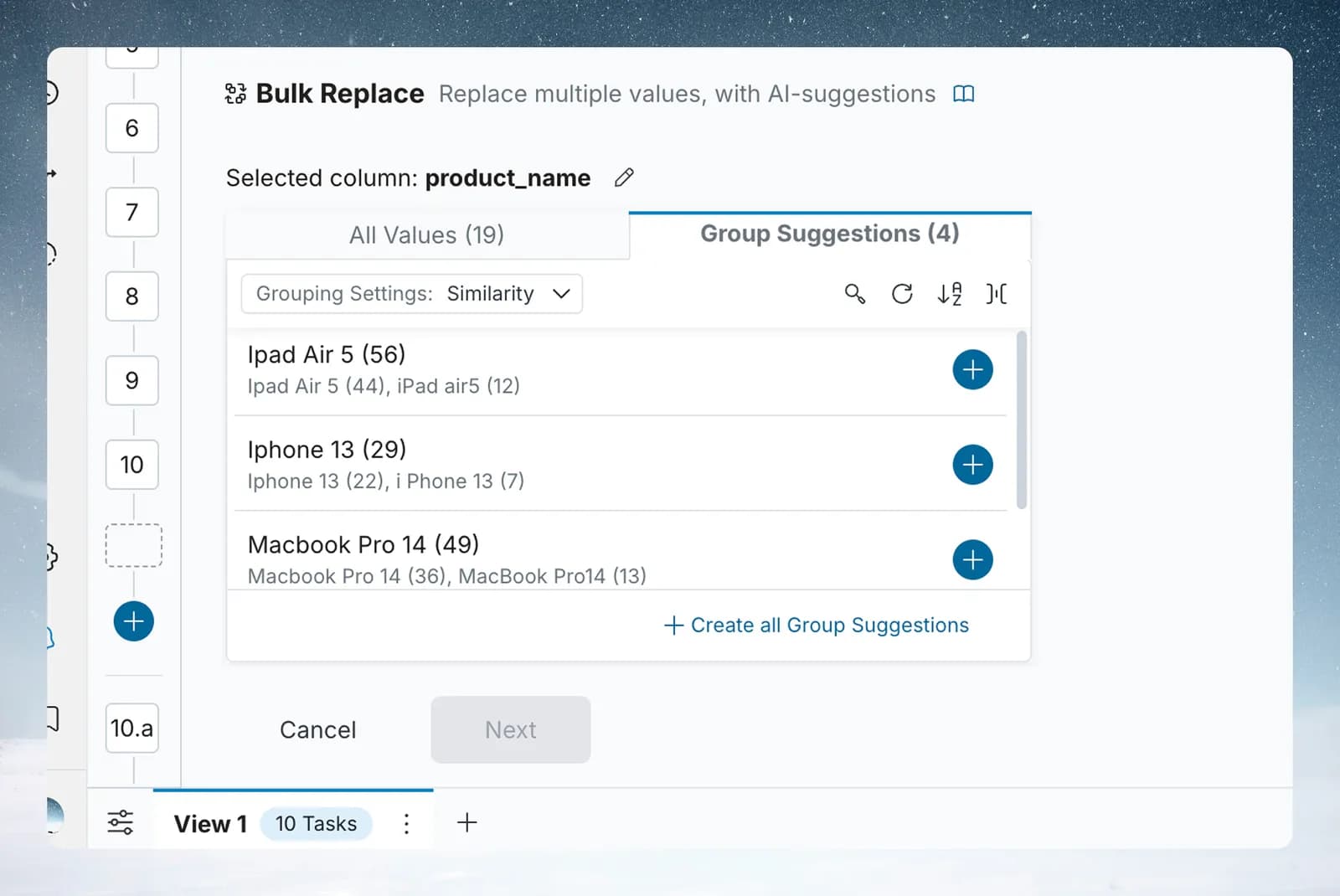
Cleaning a recurring export takes four steps:
- Connect the data, from files, folders, databases or more than 100 apps.
- Add the cleaning steps: remove duplicate rows, merge spelling variants, convert text to dates, fill blanks, or describe a fix in plain words.
- Run the Data Quality Report to see what's still wrong. It scores the data and recommends the next fixes.
- Schedule it, so next month's file goes through the same steps and lands in your dashboard or spreadsheet.
Price: free to start. Paid plans start at $39/month billed annually and refresh on a schedule. Viewers are free on every plan.
Where it stops
- It doesn't verify postal addresses against a postal database. Melissa does that.
- For one file you'll never see again, OpenRefine is quicker to start.
Clean next month's export with the steps you set up today.
If you only have one file to fix, a free desktop tool is the fastest way in.
2. OpenRefine: best for one messy file, for free
Best for: anyone cleaning a one-off export.
OpenRefine is a free, open-source tool for working with messy data, and it runs on your own computer. Its clustering finds values that are probably the same thing, such as two spacings of a street name, and lets you merge them in one go.
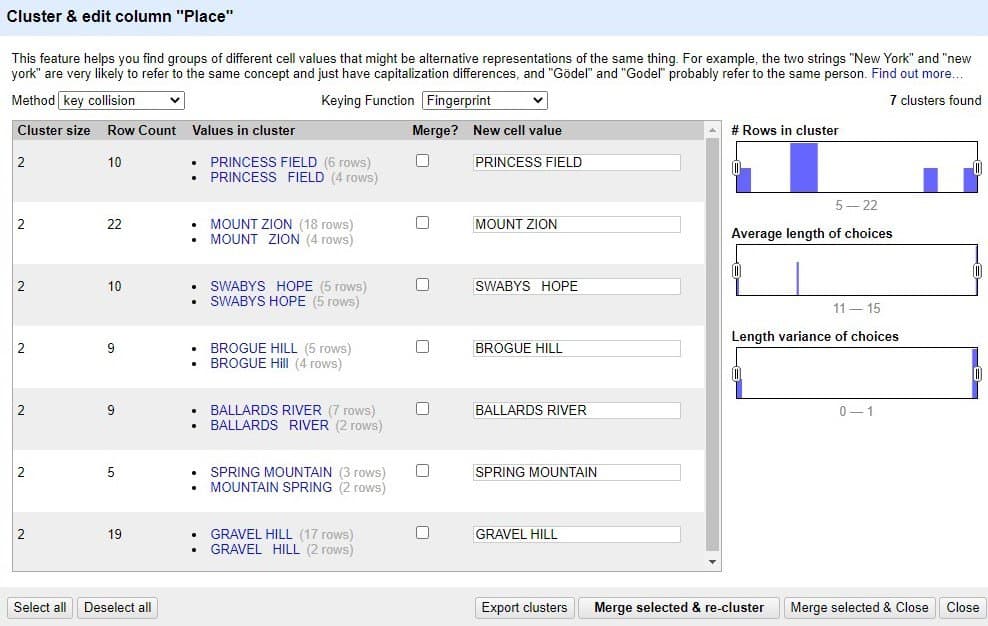
Price: free.
Where it stops
- It cleans one file at a time. Next month you start again.
- It doesn't connect to apps or databases or run on a schedule.
If your team lives in spreadsheets, the cleaning tools are already on your computer.
3. Excel and Power Query: best for teams that work in spreadsheets
Best for: analysts whose report has to stay in Excel.
Excel can remove duplicates, trim spaces and split columns by hand. Power Query, built into Excel, goes further: it saves each cleaning step, so the next export goes through the same steps when you refresh. Our guide to data cleaning in Excel walks through the techniques.
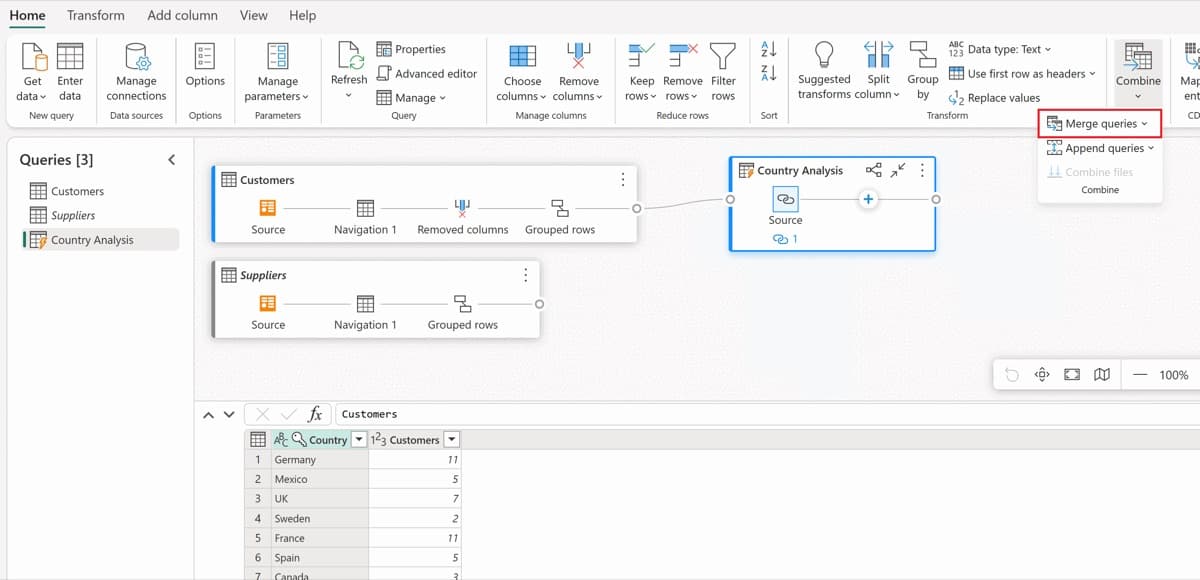
Price: included in Excel.
Where it stops
- Someone still has to open the file and refresh it.
- Large files slow Excel down, and it stops at 1,048,576 rows.
When the cleaning becomes a long chain of steps, analysts often move to Alteryx.
4. Alteryx Designer: best for long workflows built by analysts
Best for: trained analysts who build complex cleaning and blending workflows.
Alteryx Designer builds workflows by dragging tools onto a canvas and connecting them, including a dedicated data cleansing tool. Workflows can be saved and rerun.
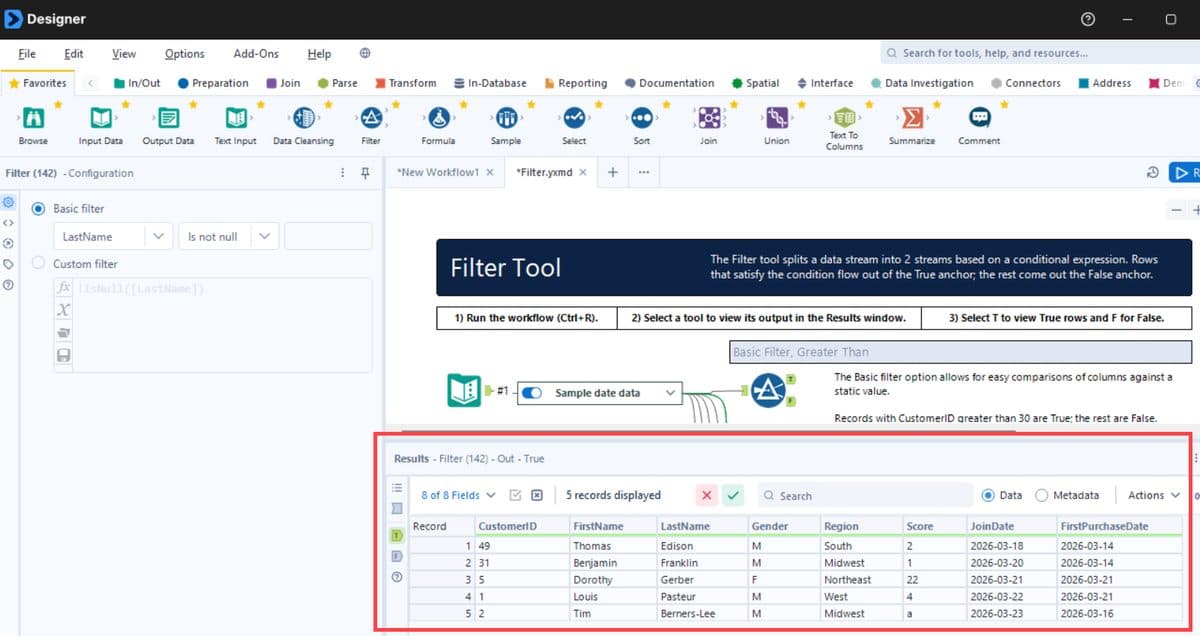
Price: Alteryx One Starter Edition is $250 a user a month, billed annually. Professional and Enterprise are quoted. Our Alteryx pricing guide covers the editions.
Where it stops
- It takes training to build workflows well.
- It's priced per builder, which adds up across a team.
The next two tools specialise in one cleaning job each.
5. WinPure Clean&Match: best for finding and merging duplicates
Best for: teams cleaning customer or supplier lists with many near-duplicate records.
WinPure Clean&Match profiles, cleanses, deduplicates and matches records, including across systems, to build one master record for each customer. It runs inside your own environment, on a desktop or a server.
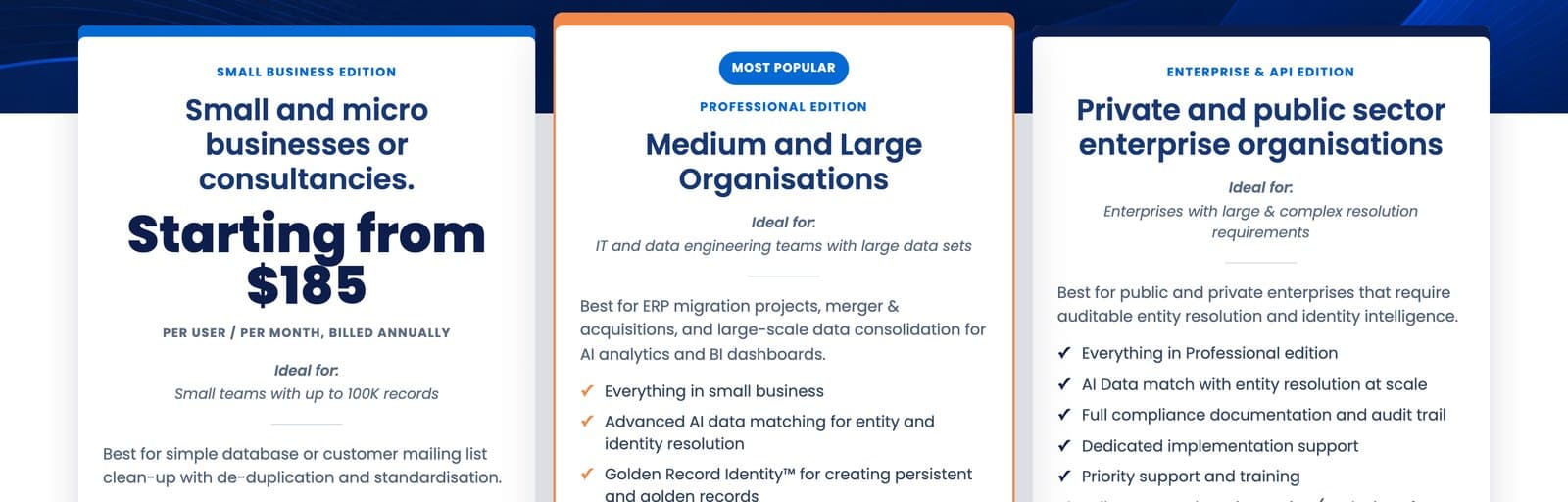
Price: the Small Business Edition starts at $185 a user a month, billed annually, for up to 100,000 records. Professional and Enterprise are quoted, and there's a 30-day free trial.
Where it stops
- It's built around matching records, not general cleaning and reporting.
- The Small Business Edition caps you at 100,000 records.
Duplicates are one specialist job. Addresses are another.
6. Melissa: best for checking and correcting addresses
Best for: teams that mail, ship or bill to the addresses in their data.
Melissa checks addresses against postal data and corrects them, in the US and around the world. You pay per record checked, through credits or a subscription.
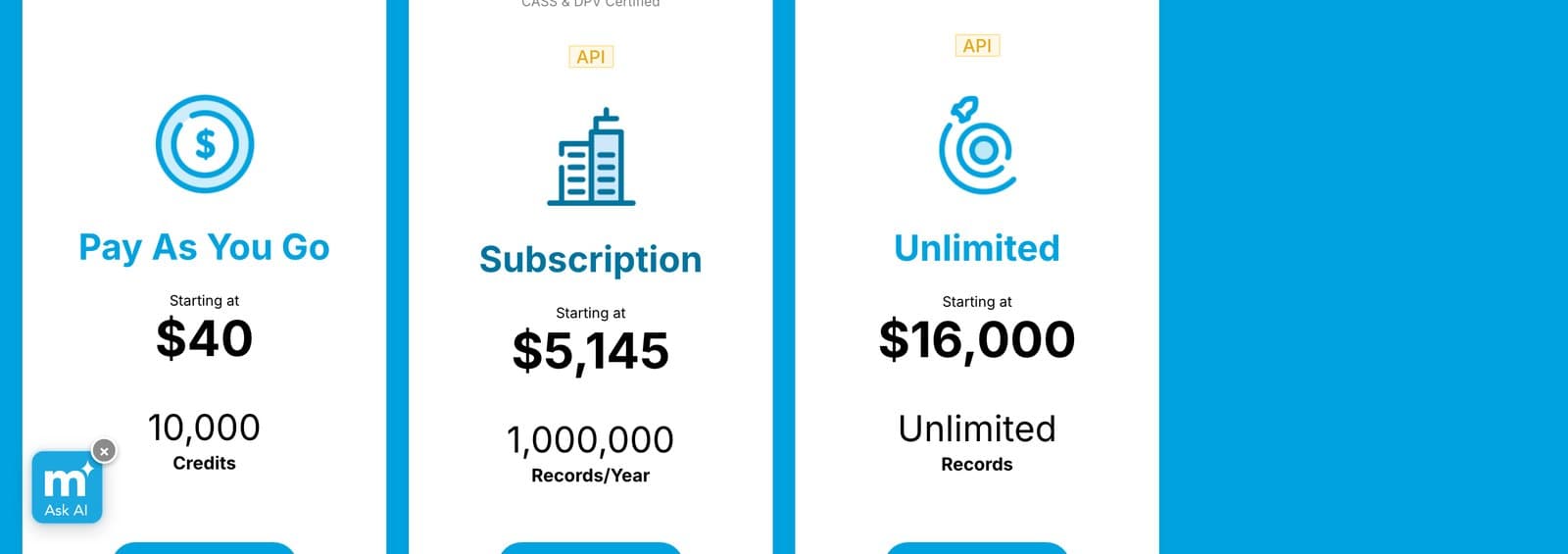
Price: pay as you go from $40 for 10,000 credits, where a US address uses 3 credits and a global one 10. Global address verification is free for 250 records a month, and subscriptions start at $40 a month for 1,000 records.
Where it stops
- It checks contact data, not the rest of your dataset.
- High volumes need a subscription, from $5,145 a year for a million US records.
Those are the six I'd look at first. A few more come up in most comparisons.
Other data cleaning tools
DataMatch Enterprise. Data Ladder's tool for cleansing and fuzzy matching across millions of records, with libraries for names and standard formats. Quote-only, with a free trial download.
Python and pandas. pandas is an open-source Python library for data analysis and manipulation, and a common way to script cleaning for people who code.
Tableau Prep. Visual cleaning for teams already on Tableau. Our data preparation tools guide compares it with other prep tools.
CRM cleaning tools. Cleaning contacts inside Salesforce or HubSpot is its own job. Our guide to CRM data cleansing covers it.
If you want to catch bad data on a schedule rather than fix it, see our guide to data quality tools.
Which data cleaning tool to choose
- If
You clean the same exports every week or month.
- If
You have one messy file and no budget.
Use OpenRefine
- If
The result has to stay in Excel.
Use Excel and Power Query
- If
Trained analysts build long workflows.
Use Alteryx Designer
- If
Your customer list is full of duplicates.
Use WinPure Clean&Match
- If
You mail, ship or bill to the addresses.
Use Melissa
How to start cleaning your data
- Pick one file you clean every month, and time how long it takes.
- List the five jobs it needs: duplicates, spelling variants, formats, blanks and addresses.
- Fix it once in a tool that saves the steps, so you never repeat them by hand.
- Run next month's file through the same steps and check what slipped through.
- Add a check for the problem that slipped, such as a count of blank IDs.
Frequently Asked Questions
What are data cleaning tools?
Software that fixes errors in a dataset, such as duplicate rows, spelling variants, wrong formats, blank fields and bad addresses, so the reports built on it are right.
What is the difference between data cleaning and data cleansing?
Nothing in practice. Both mean fixing errors in data, and the terms are used interchangeably. Our article on data cleansing vs cleaning covers the nuance.
What is the best free data cleaning tool?
OpenRefine for a one-off file, and Power Query if you already have Excel. Mammoth has a free plan for cleaning that you want to repeat.
Can Excel clean data?
Yes. Excel can remove duplicates, trim spaces and split columns, and Power Query saves the steps so you can repeat them on the next file.
How do I remove duplicates from a large dataset?
Use a tool that handles more rows than Excel, such as Mammoth or OpenRefine, and decide first which columns define a duplicate. For near-duplicates with different spellings, a matching tool such as WinPure groups them first.
Is there an AI data cleaning tool?
Yes. Mammoth's Bulk Replace uses AI to suggest which values are spellings of the same thing, and you can describe a cleaning step in plain words. Each AI step is shown before it runs.


