Skip to content

Marketing agency dashboards

Marketing agency dashboard examples

Four dashboards for an agency: what each client spent and earned with retainer hours used, the monthly SEO read, client campaigns side by side, and which channels earn their budget. Open any of them to see it in full, then use it as a template for your own data.
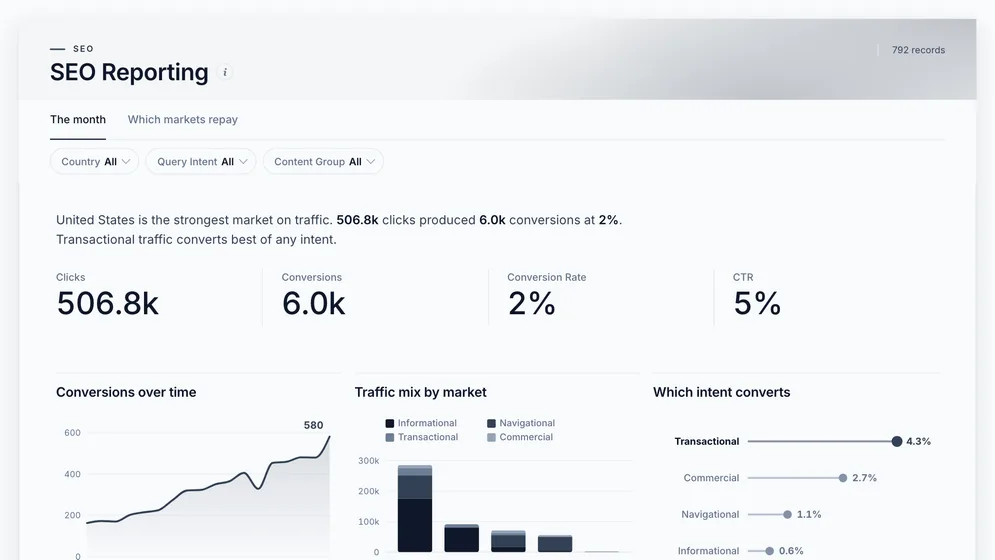
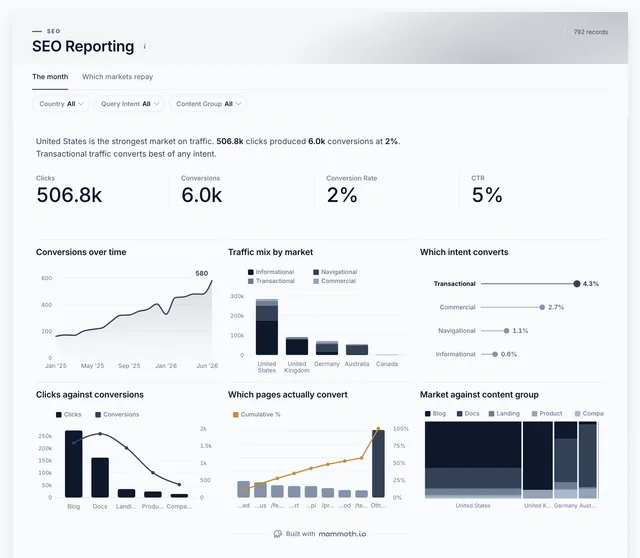
SEO Reporting dashboard: Clicks, Conversions, Conversion Rate and CTR tiles, above Conversions over time.
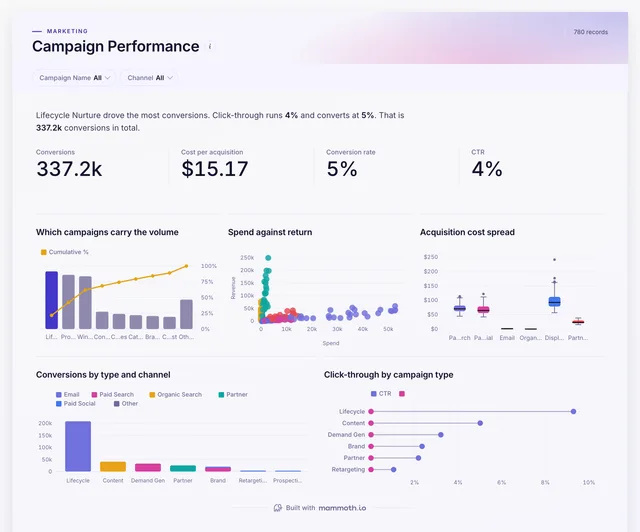
Campaign Performance dashboard: Conversions, Cost per acquisition, Conversion rate and CTR tiles.
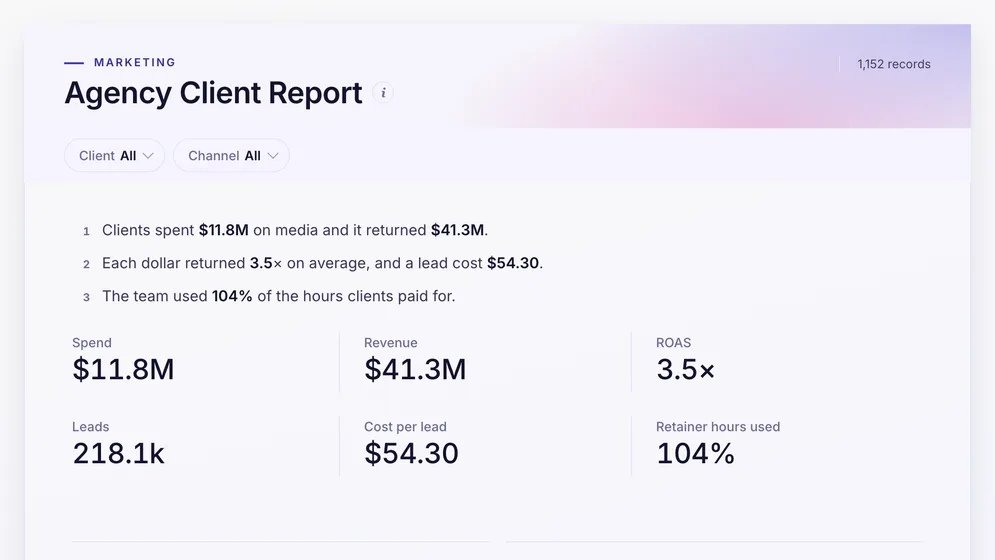
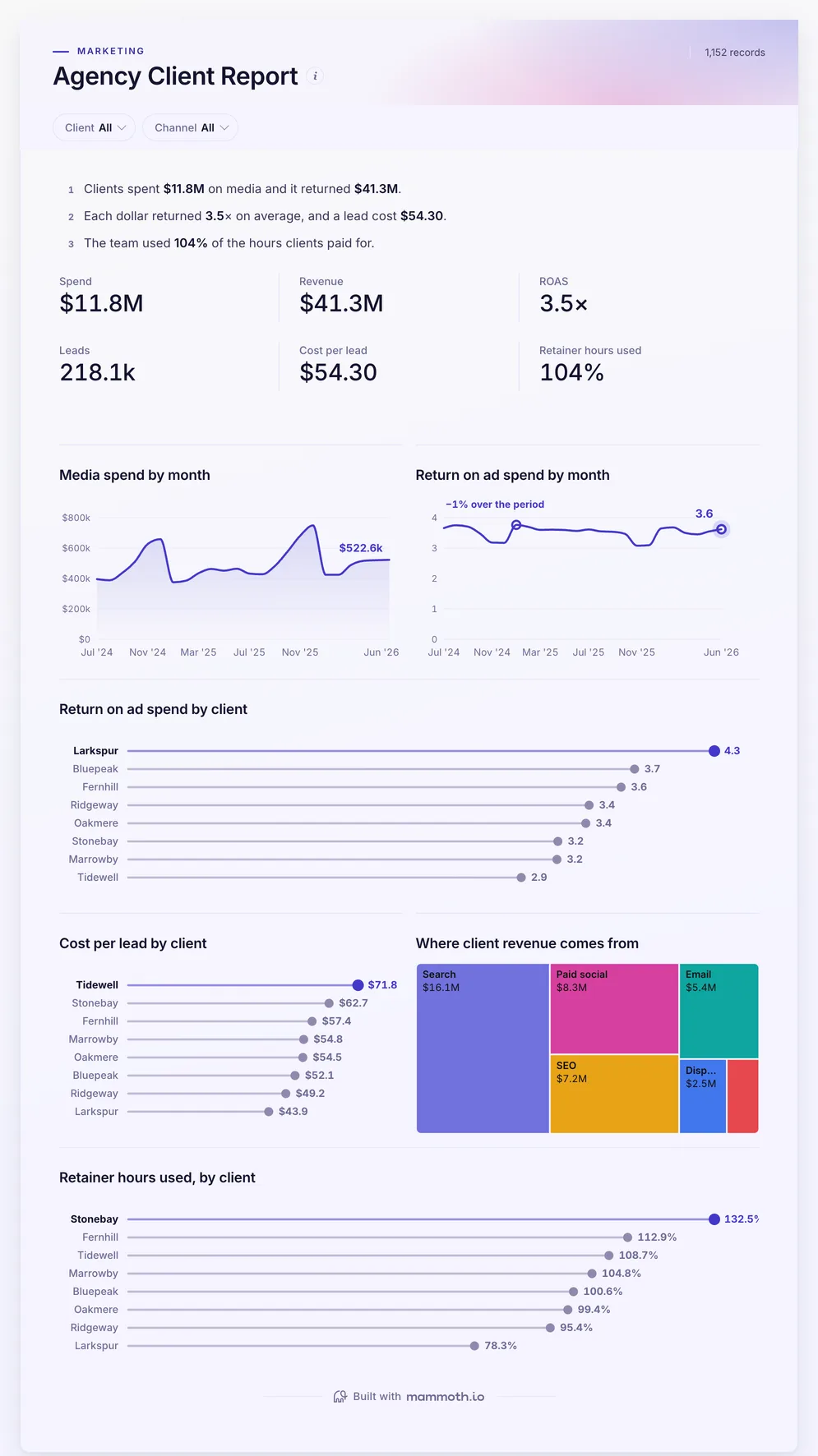
Agency Client Report dashboard: Spend, Revenue, ROAS, Leads, Cost per lead and Retainer hours used tiles.

Three of the four examples. All figures are sample data.

The examples

Four marketing agency dashboard examples and templates

Click a board to see all of it. Click Use template to start your own copy in Mammoth. All figures are sample data.

  1. Agency Client Report dashboard: Spend, Revenue, ROAS, Leads, Cost per lead and Retainer hours used tiles.
    Sample data

    Marketing agency dashboard

    What did each client's money return, and are we over-serving retainers?
    • Spend
    • Revenue
    • ROAS
    • Leads
    Use template
  2. SEO Reporting dashboard: Clicks, Conversions, Conversion Rate and CTR tiles, above Conversions over time.
    Sample data

    SEO agency client dashboard

    What do we send an SEO client every month?
    • Clicks
    • Conversions
    • Conversion rate
    • CTR
    Use template
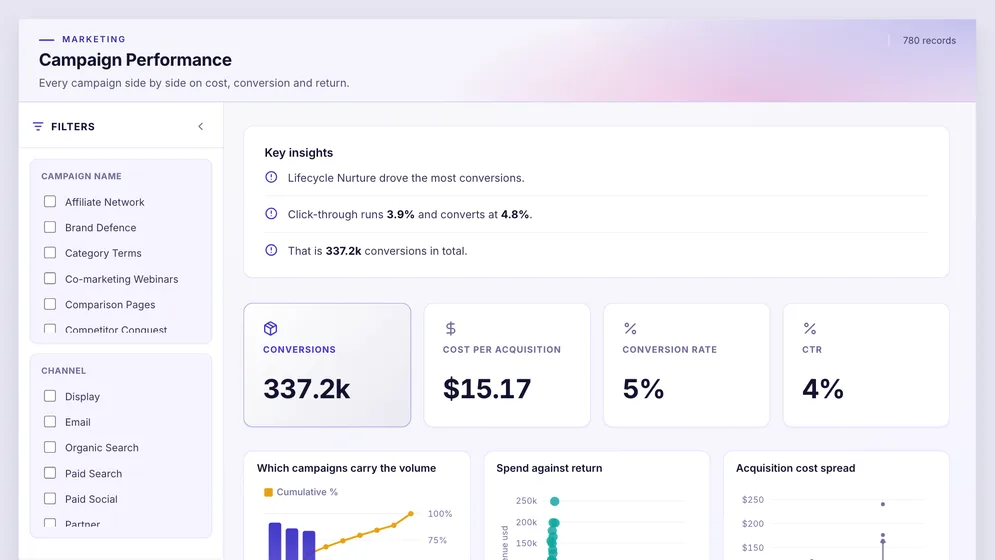
  3. Campaign Performance dashboard: Conversions, Cost per acquisition, Conversion rate and CTR tiles.
    Sample data

    Client campaign dashboard

    Which client campaigns are working?

    • Conversions
    • Cost per acquisition
    • Conversion rate
    • CTR
    Use template
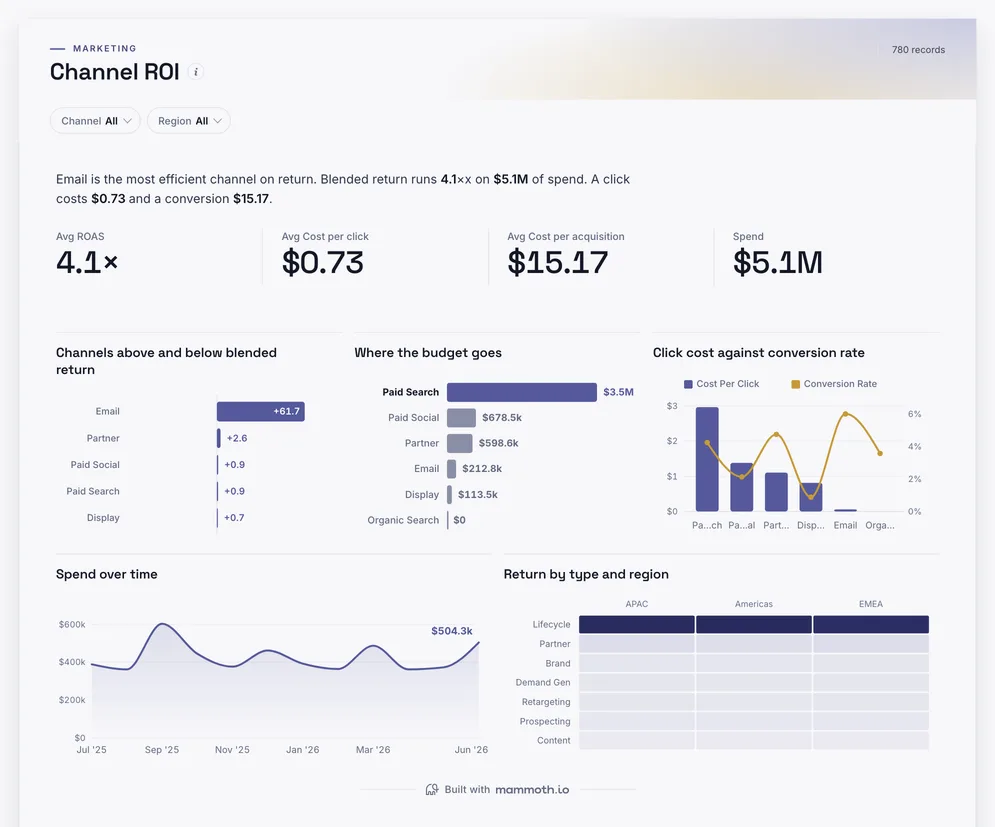
  4. Channel ROI dashboard: ROAS, Cost per click, Cost per acquisition and Spend tiles.
    Sample data

    Client channel ROI dashboard

    Which channels earn their budget for each client?

    • ROAS
    • Cost per click
    • Cost per acquisition
    • Spend
    Use template

Definition

What a marketing agency dashboard is

A marketing agency dashboard is one screen that shows how each client's marketing is performing and how the agency is doing on each account: media spend, revenue, return on ad spend and cost per lead by client and channel, and the retainer hours used against what the client pays for. The data usually comes from the ad platforms, analytics, the CRM and the agency's own timesheets.

  • Every client

    Return and cost per lead, client by client.

  • Retainer hours

    Used against bought, so over-servicing shows.

  • Client-ready

    Share a link instead of building slides.

The metrics

The metrics a marketing agency dashboard is built from

Eight numbers. Most depend on a definition agreed with each client first, such as what counts as a lead.

  • Media spend

    How much did each client spend?

    What the data needs

    Spend by client, channel and campaign from the ad platforms.

  • Revenue

    What did the spend bring in?

    What the data needs

    Revenue attributed to marketing, from the client's CRM or store.

  • ROAS

    What did each dollar return?

    What the data needs

    Revenue against media spend, by client and channel.

  • Leads

    How many leads did we generate?

    What the data needs

    Form fills, calls or sign-ups by client and channel, with one definition per client.

  • Cost per lead

    What did each lead cost?

    What the data needs

    Media spend divided by leads, by client and channel.

  • Retainer hours used

    Are we over-servicing an account?

    What the data needs

    Timesheet hours by client against the hours each retainer includes.

  • Account margin

    Does each client make the agency money?

    What the data needs

    Fees by client against the cost of the hours spent on it.

  • Client retention

    Do clients stay?

    What the data needs

    Clients active at the start and end of each period, and the fees they carry.

How to build one

How to build your own marketing agency dashboard

From one of the examples above to a live dashboard on your own data.

  1. 1

    Pick a template

    Start from any of the four boards above.

  2. 2

    Add your data

    Upload a spreadsheet, or connect one of 100+ tested connectors.

  3. 3

    Clean it once

    Fix and combine your data once. Mammoth repeats those steps for you.

  4. 4

    Set it to refresh

    The dashboard updates on a schedule and flags data that fails a check.

  5. 5

    Share the link

    Public, password-protected or sign-in only, on every plan.

Start with a template

14-day Pro trial · No credit card

FAQ

Marketing agency dashboard questions

Last reviewed against the template catalogue.

What should a marketing agency dashboard show?
How each client's marketing is doing, and how each account is doing for the agency. That means spend, revenue, ROAS, leads and cost per lead by client and channel, and retainer hours used against bought. The boards above cover those, with SEO and campaign reporting beside them.
What should go in a client report?
What was spent, what it returned, what changed since last month and what happens next. Keep it to the client's goals, and send a link to a live board rather than a deck that is out of date the day after.
How do I build an agency dashboard?
Start with the monthly report the account team already sends. Then follow five steps.
  1. Connect each client's ad platforms and analytics, tagged with the client name.
  2. Add leads or revenue from the client's CRM or ecommerce platform.
  3. Add timesheet hours by client and the hours each retainer includes.
  4. Agree one definition of a lead and of revenue per client.
  5. Refresh daily for spend and monthly for hours, with a view for each client.
Can each client see only their own numbers?
Yes. Build one board, then share a filtered view per client. Row-level access in Mammoth keeps each client to their own rows, so one template serves every account.
Where does agency data come from?
Usually Google Ads, Meta Ads and LinkedIn Ads, Google Analytics and Search Console, the client's CRM, and the agency's timesheet tool. Mammoth has 100+ tested connectors, and can also connect to anything with a REST API. You combine the sources once, and Mammoth repeats the same steps on every refresh.
Do clients need a paid seat to view it?
No. Dashboard viewers are unlimited and free on every Mammoth plan, including the free one, so every client contact can open their board at no per-viewer cost. Only the people building the dashboards count as platform users.

Build the marketing agency dashboard you actually need.

Start from one of these templates or your own spreadsheet. Share it with as many people as you like, free.

  • ✓ 14-day Pro trial
  • ✓ No credit card
  • ✓ Viewers always free