Oracle Database connector
This page shows how to connect Mammoth to Oracle Database and import a table or SQL query as a dataset. Oracle connects through a connection form, then opens in the connector workspace's SQL view, where you browse schemas and tables, query them, and save the result.
Which connectors you can add depends on your plan.
What you need before connecting Oracle
- An Oracle server reachable from the internet
- A database user with read access to the tables you want to import
- The server's hostname, port (default 1521), service name, username and password
- Mammoth's IP address allowed through your firewall. The connection form shows the address. See Network requirements.
Connect Oracle Database
- Open the Connectors launcher and click Oracle Database (see Add a connector).
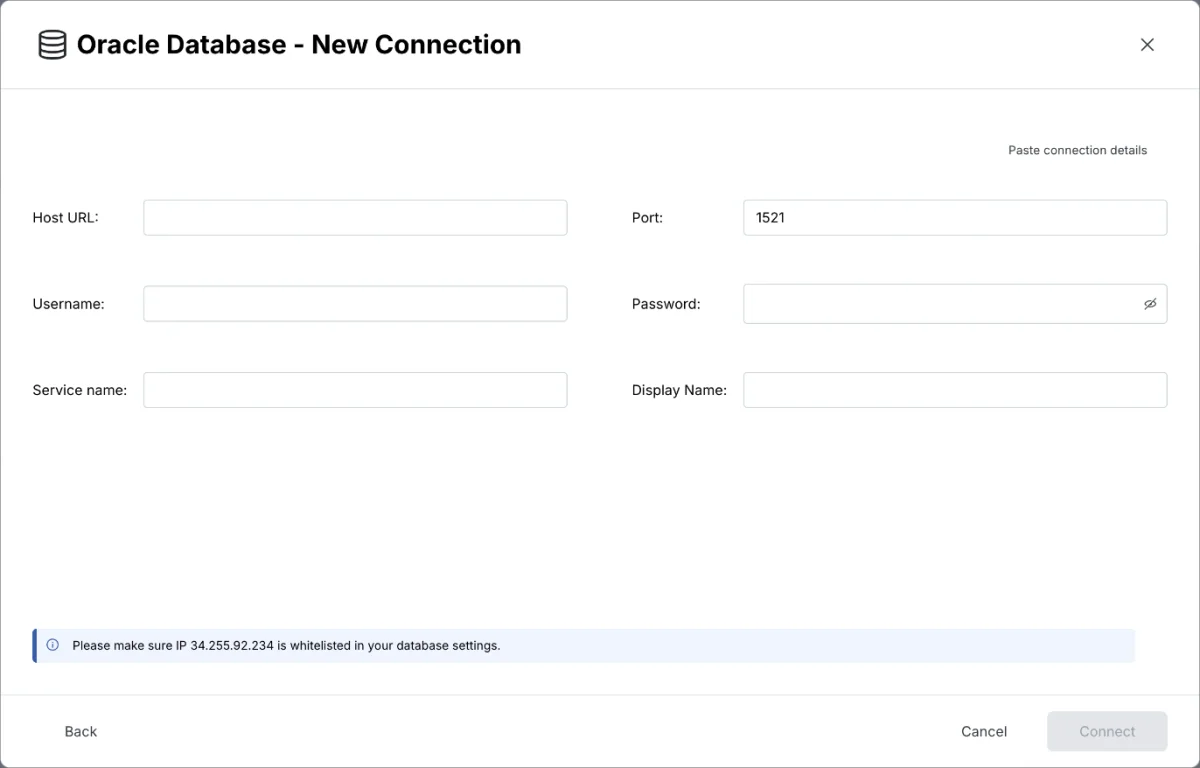
- Fill in the connection form:
| Field | What to enter |
|---|---|
| Host URL | Hostname or IP address of your Oracle server |
| Port | The listener port. Default 1521 |
| Username | Database user with read access |
| Password | That user's password |
| Service name | The Oracle service name of the database |
| Display Name | Optional label for this connection in Mammoth |
- Click Connect. The connector workspace opens on your tables.
Query Oracle tables and save a dataset
- In Tables, pick the Schema that holds your tables, then click a table. Mammoth opens its rows with the
SELECTquery that read them. - To change what you import, click Edit SQL, edit the query, and click Run.
- Click Save as dataset, enter a Name, choose Keep it up to date (Daily at 06:00 or Only when I ask), and save.
AI query writing (Write SQL) is not available for Oracle. See Query and preview database data for the SQL view.
Oracle update methods
After you save, an Oracle dataset's Update method offers two options: Replace all data or Add to existing data. Oracle refreshes don't use a key column, so Add to existing data adds every row the query returns again on each refresh.
Troubleshoot Oracle connections
- Connection fails: check that Mammoth's IP address is allowed through your firewall, and that the host, port and service name are correct.
- A table is missing: check that the database user can read it, and that you picked the right Schema.