Export the Activity Log for an audit or compliance review
Click Export at the top right of Monitor > Activity Log to save the log as CSV, XLSX or a Mammoth Dataset. The export keeps your filters, search text and scope. How far back the log goes, and whether you can export it, depends on your plan.
Export the Activity Log to CSV, Excel or a dataset
You need to see the Activity Log tab, and your plan must include Activity Log history (the activityLogDays plan feature). If it doesn't, Export prompts you to upgrade or contact support.
- Click Export at the top right. The Export file as dialog opens.
- Choose CSV, XLSX or Mammoth Dataset.
- Click Confirm.
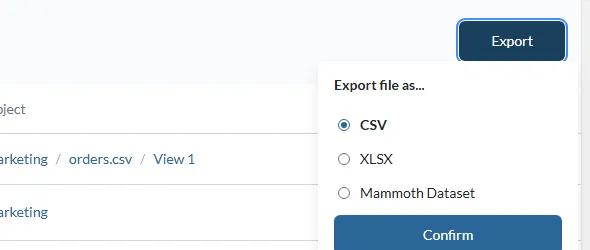
| Option | Output | Use it for |
|---|---|---|
| CSV | Downloads the log as a .csv file | Spreadsheet review, bulk analysis, external audit tools |
| XLSX | Downloads the log as an Excel .xlsx file | Excel-compatible reporting |
| Mammoth Dataset | Creates a new dataset from the current log records in the project you choose. Enter a file name and select the project | Querying and analysing the log with pipelines |
The export applies your active filters, date range, search text and scope. Remove filters first if you need the complete log for the period.
Use the Activity Log for compliance reviews
Every record includes who performed the action and when. Filter to the audit period and the relevant categories, then export to CSV or XLSX for your audit team. The Mammoth Dataset option keeps a historical record you can query with pipelines.
How far back the Activity Log goes
How far back the log reaches depends on your plan. Activity older than your plan allows isn't available, and a banner above the table says so. Without a plan allowance, the tab shows only the latest 50 items.
| Plan | Activity Log history |
|---|---|
| Free | 7 days |
| Starter | 90 days |
| Team | 1 year |
| Pro | 3 years |
Limits
| Item | Limit |
|---|---|
| Default date range | Last 30 days |
| History without a plan allowance | The latest 50 items |
| History with a plan allowance | Set by your plan's activityLogDays |
| Export while one object is selected | Not available |
Troubleshooting
| Symptom | Cause | Fix |
|---|---|---|
| The export is missing records | Filters, search text or scope were active | Reset all filters before exporting |
| Older events are missing | Your plan limits how far back the log reaches | See How far back the Activity Log goes |
| Export asks you to upgrade | Your plan doesn't include Activity Log history | Upgrade the plan or contact support |
Related
- Activity log: filter and read the log.
- Use the Activity Log as an audit log: review invites, removals and 2FA changes.
- Security: how Mammoth secures data and its compliance.
- Monitor: the other Monitor tabs.
Something wrong? support@mammoth.io