Fix column type and formula errors in a pipeline
A task fails with a type error when it gets a column it can't handle, such as text where it needs a number. A Math Function fails when its expression is incomplete or names a column that isn't there. Click Fix error on the red task card, then use the fixes below. For the general steps, see Fix a failing step.
Fix column type problems
The task got a type it can't handle: arithmetic on text, or a date step on text. Typical causes are dates imported as text (sorting, filtering and totals go wrong), a number column holding text such as N/A, or a calculation on a column not yet converted.
- Check the column's type in the failing task.
- Add a Convert Column Type task before it, converting to the type the task needs. Clean text first (remove symbols, deal with non-numeric values).
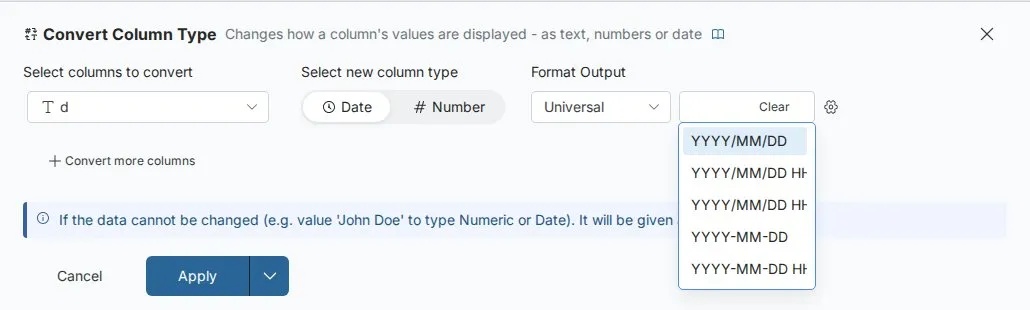
Dates in mixed formats come from different systems, are treated as text, sort wrongly, and include invalid values such as 2024-13-01 or Feb 30 2024. Check the type and the Data Quality report, see the mix of formats with Explore cards, then add Convert Column Type with Format Output (Universal, UK, US or Custom) set to match. Test it with Draft mode or Preview Data at this Task. Better still, standardise the format at the source or check it at the start of the pipeline. See Convert text to dates and numbers.
Fix Math Function expression errors
The expression editor says what is wrong:
| Message | What to check |
|---|---|
| "Column Revenue is missing" | The column doesn't exist at this step. Check spelling, and columns renamed or removed earlier. |
| "not a numeric column" or "Only numeric columns allowed" | A column is text or a date. Convert it with Convert Column Type first. |
| "Empty expression" | Enter an expression |
| "Syntax error: unmatched brackets" | Close every opening bracket |
| "Expected an operator +, -, *, / before Discount" | Two values or columns sit side by side with no operator |
| "Expression can not begin with * or /" or "Expression can not end with any of +, -, *, /" | Add the missing value at the start or end |
| "Invalid arguments for SUM" or "Function SUM takes exactly 1 argument" | Give the function one column name in double quotes, for example SUM("Revenue"). See Calculate with formulas. |
Division by zero depends on your data. If a divisor can be zero, filter those rows out first with a Conditional Filter, or handle them in a separate flow.
Related
- Fix a failing step: find the first failing task and fix or delete it.
- Convert text to dates and numbers: every Convert Column Type option.
- Error messages: every error message in one place.
Something wrong? support@mammoth.io