Publish a View as a dashboard, slides, doc or Q&A
The Publish button in the View toolbar builds a shareable dashboard, slides, doc or Q&A from your View data, with no separate BI tool or file to send around. It doesn't open a dialog: it takes you to a create page for the current View. You then publish the result and share it by link, as with any dashboard.
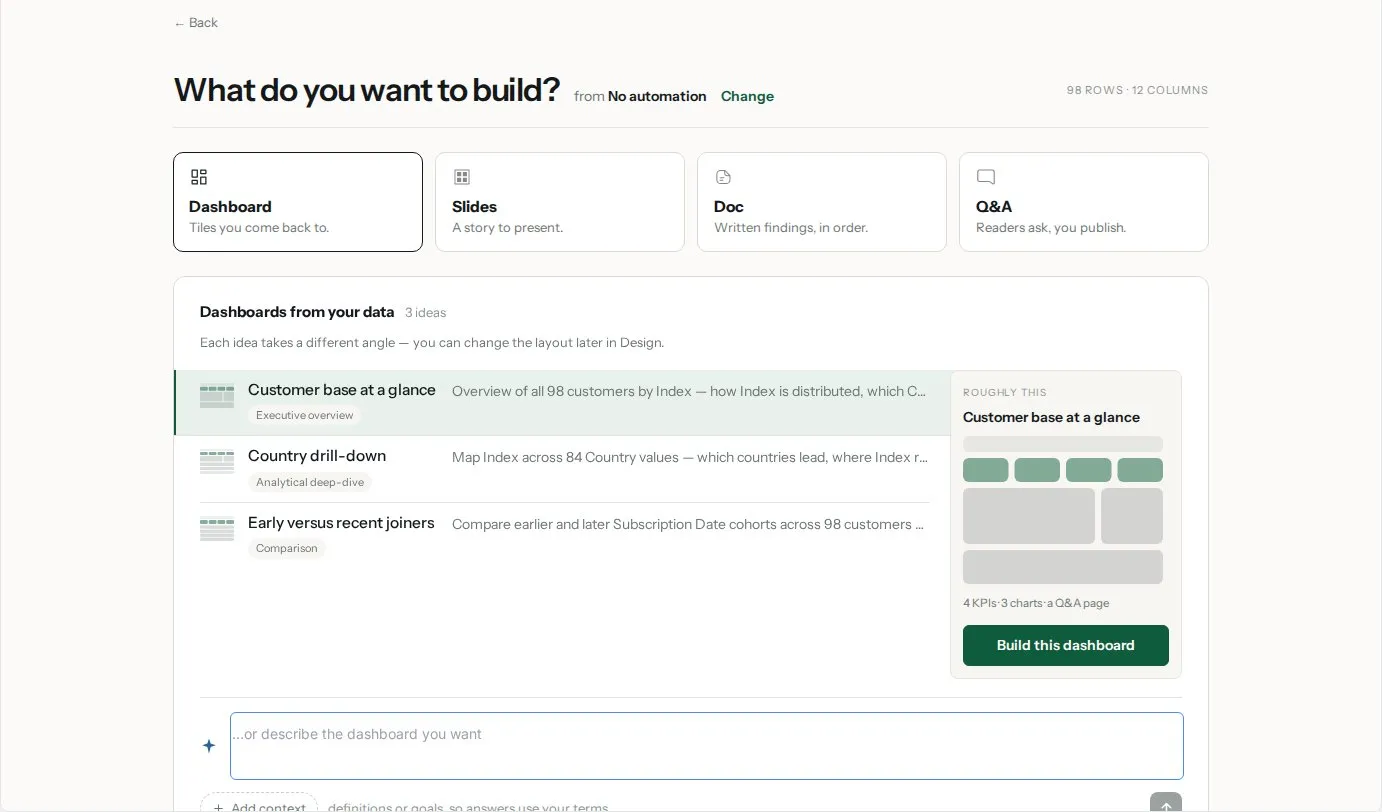
Create a dashboard from a View
- Open the View you want to share.
- Click Publish in the View toolbar. The create page opens, headed What do you want to build?, with the name of your View and a Change link to pick another View.
- Choose a format card: Dashboard, Slides, Doc or Q&A.
- Pick one of the suggested ideas, or type what you want in the ...or describe the dashboard you want field and send it. Be specific about the charts, metrics and groupings you want.
- Mammoth opens the editor with what it built. Review it, then publish and copy the link.
For other ways to start (a template, a copy of a dashboard, or a report you already send), see Create a dashboard.
Write a better dashboard description
Be specific in your description. Instead of "show sales data," try "show total revenue by product category for the last 90 days, sorted by revenue descending, as a bar chart."
Review before sharing. Check the visualizations match your intent before copying the share link.
Share it and keep it up to date
Publishing, the Sign-in required, Anyone with the link and password and Anyone with the link access types, invitations, Download PDF, Share as video and Unpublish are covered in Publish and share a dashboard. Row-level security has its own page: Row-level security.
The number of dashboards you can publish and the availability of row-level security depend on your plan.
New data reaches a published dashboard through its Sync settings: Sync automatically brings new rows into the draft, and Publish new data automatically sends them live. See Sync new data into a dashboard automatically.
Publish, download or live link: which to use
| Publish dashboard | Download | Live link | |
|---|---|---|---|
| Format | Visual dashboard | File (CSV, Excel, JSON and more) | CSV via URL |
| Recipient access | Via link | File download | URL |
| Updates automatically | Only if the dashboard's sync settings are on | No | Yes |
| Requires Mammoth account | Only with Sign-in required | No | No |
| Best for | Visual stakeholder sharing | Ad-hoc analysis | BI tool integration |
Related
- Publish and share a dashboard: access, invites, video and unpublishing.
- Create a dashboard: every way to start a dashboard.
- Docs and slides: the Slides and Doc formats.
- Download a View: a file instead of a dashboard.
- Live links: a CSV URL for BI tools.
Something wrong? support@mammoth.io