What happens when a Data Check fails in a pipeline
Each Data Check has an If check fails setting: Pause the pipeline or Flag and continue. With several checks, Any or All decides what counts as a failure. Failed checks show in the pipeline and in Monitor, and can email people you choose.
Combine several checks with Any or All
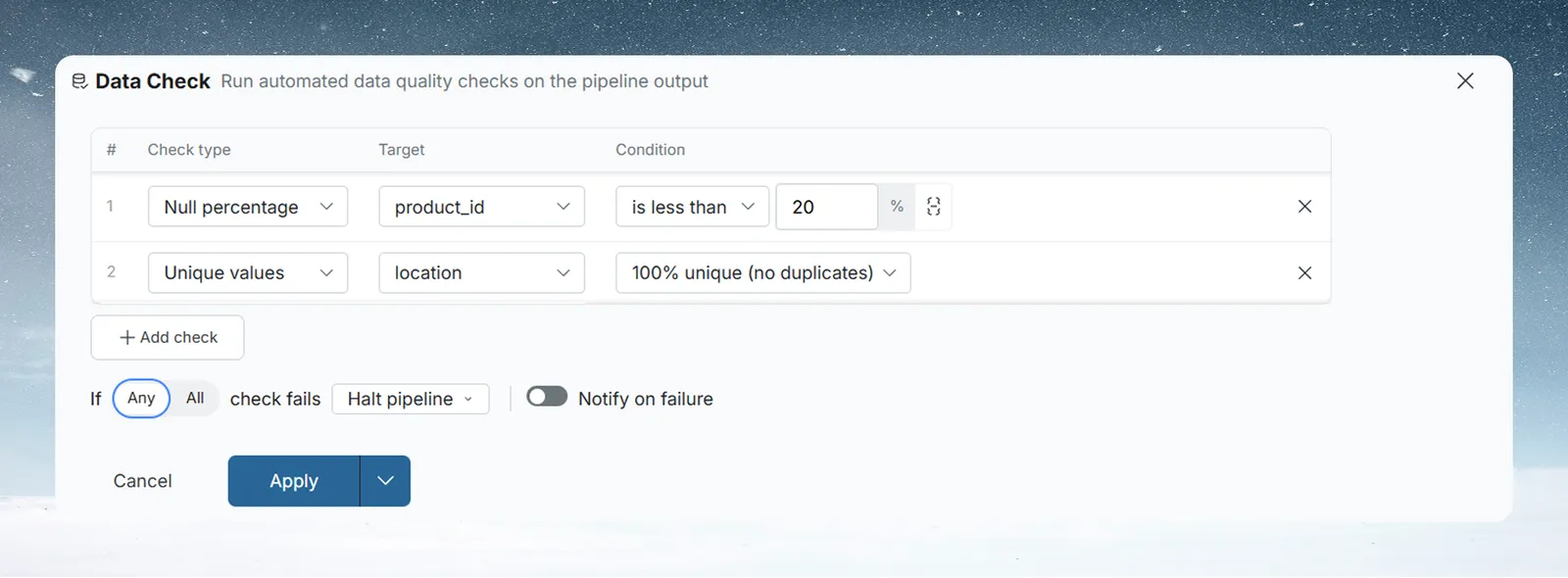
With two or more checks, the failure sentence reads If [Any | All] check fails. The toggle sets how results combine:
| Setting | The Data Check fails when |
|---|---|
| Any (default) | Any one check fails. Every check must pass. |
| All | Every check fails. One passing check keeps the pipeline going. |
All is more lenient than it sounds: it means all checks must fail to count as a failure. Use Any if one failed check should stop or flag the pipeline. Use All only when the checks are alternatives and passing one is enough.
Decide what happens when a check fails

| Setting | What happens |
|---|---|
| Pause the pipeline | The pipeline stops. Later tasks wait until the data is fixed or approved, or you change the threshold, and the pipeline runs again. Use it for financial reports, regulated outputs, or anywhere bad data must not reach the final output. |
| Flag and continue | The failure is flagged and the pipeline runs to the end. Use it for operational data that analysts can still use, or to track data quality without blocking. |
If Notify on failure is on, the email goes out whichever setting you choose.
Email people when a check fails
Tick Notify on failure and choose at least one recipient from the project's members. The email includes:
- the View name, the project name and a link to the View;
- where the Data Check sits in the pipeline, for example task 3 of 8;
- the status and details of each check, including the measured value;
- whether the pipeline was paused.
Read Data Check results and statuses
After a run, each Data Check shows one of four statuses:
| Status | Meaning |
|---|---|
| Passed | The checks met the Any or All rule |
| Failed | The checks did not meet the Any or All rule |
| Not run | The Data Check has not run yet |
| Bypassed | It was skipped in a partial rerun because it sits before the task you reran from |
Open the status to see the Data Check results: each check with its column, condition, result and status. If a check uses a column that is no longer there, the dialog asks you to edit the Data Check to fix it.
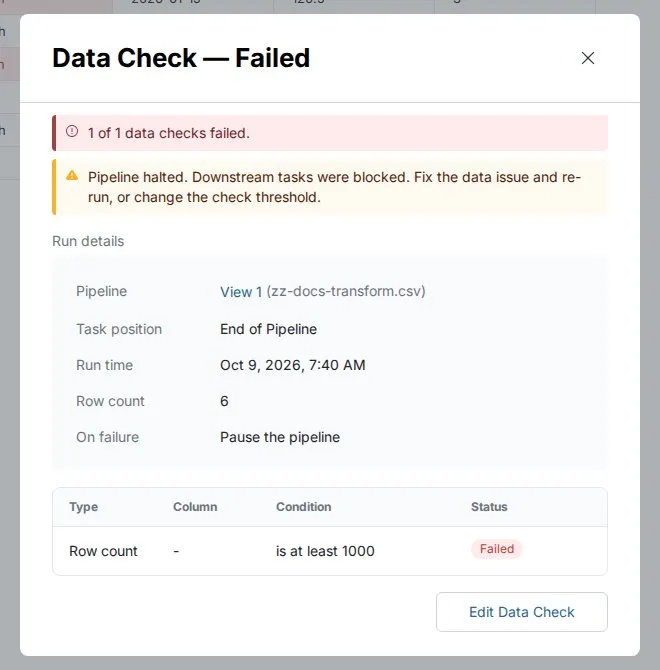
Find failed Data Checks in Monitor
A failed Data Check appears in Monitor, on the Needs Attention tab, in the Governance section. It reads Data check failed with a summary such as 1 of 2 checks failed. Click Review to open the View.
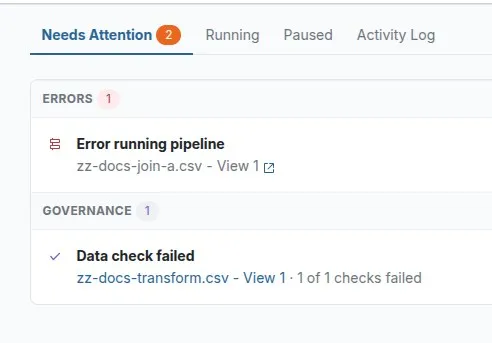
The item clears once you fix the data and the pipeline runs successfully.
Troubleshooting a Data Check
| Symptom | Cause | Fix |
|---|---|---|
| The pipeline stopped and later tasks didn't run | A Data Check set to Pause the pipeline failed | Open the status, fix the data or change the threshold, then run the pipeline again |
| A check fails even though only one rule broke | Any is selected, so one failed check fails the whole Data Check | Expected. Switch to All only if the checks are alternatives. |
| A check never fails although rules break | All is selected, so every check must fail | Switch to Any |
| The results dialog asks you to edit the Data Check | A check uses a column that no longer exists | Edit the Data Check and pick an existing column |
| The Data Check shows Bypassed | You reran from a task after it | Run the full pipeline to test it again |
Related
- Data Check types: the rules a check can test.
- Pause a pipeline for approval with a Checkpoint: notify people or wait for sign-off.
- Fix a failing step: find and fix the task that broke.
- Activity log and Monitor: where pipeline problems surface.
Something wrong? support@mammoth.io