Use a Parameter or Snippet in a filter, formula or SQL
Once a Parameter or Snippet exists, you plug it into pipeline steps instead of typing the value or SQL. In most steps you pick a parameter from a picker, and Mammoth shows it as a {Max_Units} token; in a SQL rule you insert a snippet as {{name}}. To create them, see Reuse values and SQL with Parameters and snippets.
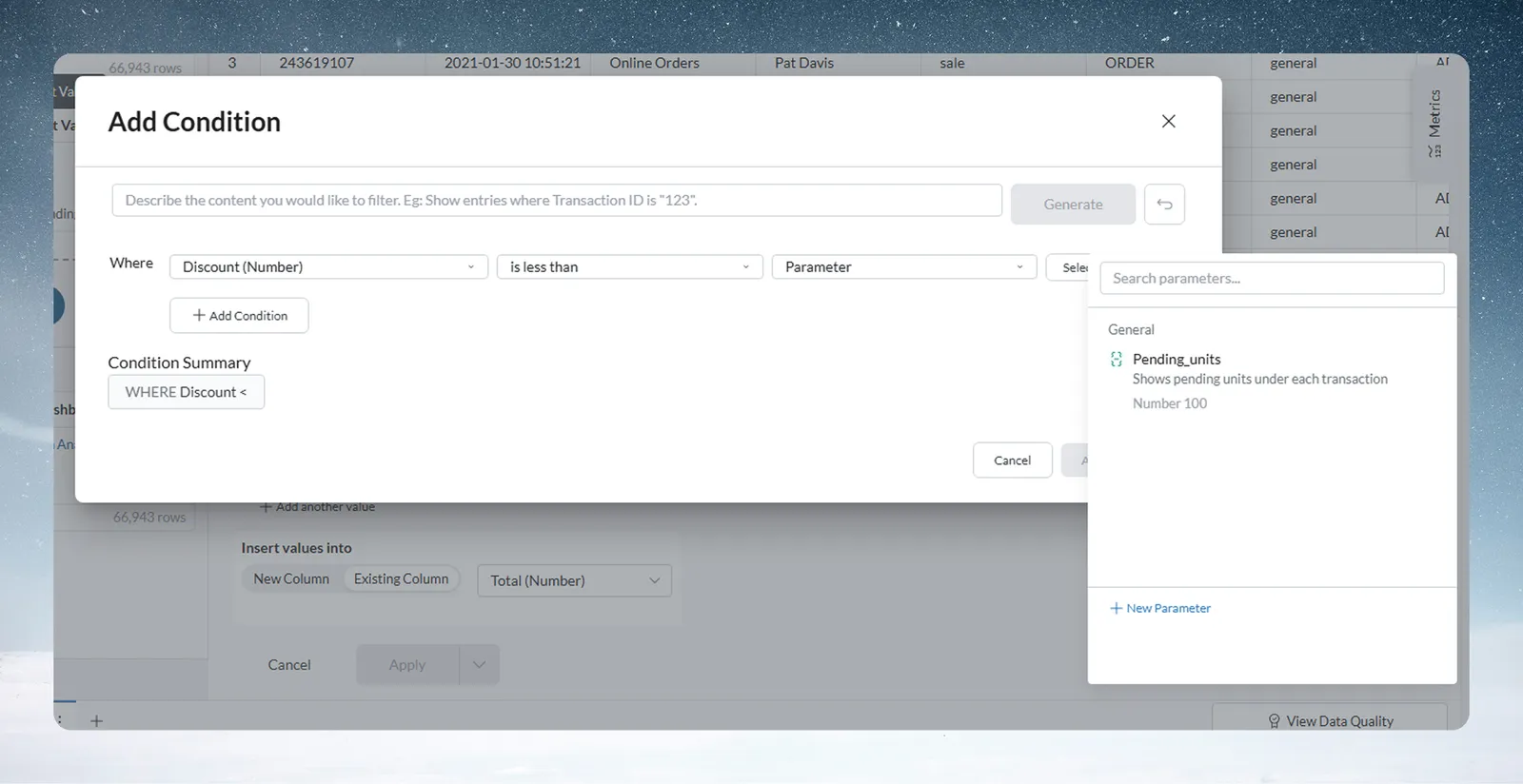
Use a Parameter in a filter condition
When you add a condition to a filter in Builder mode, the chip in front of the value reads Val by default.
- Open a pipeline and add or edit a filter condition.
- Click the Val chip and select Parameter ("Bind to a project parameter"). The chip changes to #.
- Search for and select the parameter. The picker shows parameters whose type matches the column. To create one without leaving the condition, use its New Parameter link.
- Save the condition. To unbind later, click the X on the token.
The filter uses the parameter's current value each time the pipeline runs. Parameters also work as inputs in Data check. See Filter rows.
A Conditional Filter in SQL mode does not read parameters: {Max_Units} in it stays plain text. Use Builder mode for a parameter-driven filter.
Where you can use a Parameter
| Step | How to add the parameter | Parameter types offered |
|---|---|---|
| Conditional Filter, and any Add Condition built in Builder mode | Val chip > Parameter | The column's type |
| Label & Insert Values (Enter a value) | Val chip > Parameter | The result column's type |
| Find & Replace (Find value, Replace with) | Val chip > Parameter | Text |
| Show Top/Bottom Rows (row count) | Val chip > Parameter | Number |
| Obtain Large or Small Values (Add a custom value to compare) | Val chip > Parameter | Number |
| Math Function, Formula mode | Insert Parameter above the formula, or the autocomplete list | Number |
| Math Function, SQL mode | Insert Parameter above the SQL Expression editor | All. Text and Date parameters go in as '{name}' so they read as SQL strings. |
In Math Function, the parameter is written into the expression as {name}, and two errors can appear:
- "Parameter ... not found": the formula names a parameter that doesn't exist.
- "Only numeric parameters allowed, ... is not one": a Text or Date parameter is in a formula.
For the formula syntax, see Calculate with formulas.
Use a Snippet in a SQL rule
In a SQL rule, click Insert Snippet, pick the snippet, and choose how to insert it:
| Option | What it inserts |
|---|---|
| Reference | {{name}}, which stays linked: later edits to the snippet reach the task. |
| Paste value | The snippet's current code as plain text, with no link. |
SELECT customer_id, SUM(amount)
FROM transactions
WHERE {{standard_date_filter}}
GROUP BY 1
At run time, Mammoth substitutes the snippet's code for {{standard_date_filter}}. When the snippet changes, its detail panel flags the pipelines that use it as stale; use Rerun to apply the change. See Write SQL with AI.
Troubleshooting
| Symptom | Cause | Fix |
|---|---|---|
{Max_Units} stays as text in a filter | The Conditional Filter is in SQL mode. | Switch to Builder mode and bind the value with Val > Parameter. |
| "Only numeric parameters allowed, ... is not one" | A Text or Date parameter is in a Formula-mode Math Function. | Use a Number parameter, or switch to SQL mode. |
| "Parameter ... not found" | The formula names a parameter that doesn't exist. | Create it, or fix the name. |
Related
- Reuse values and SQL with Parameters and snippets: create, edit and rerun.
- Filter rows: build the conditions parameters plug into.
- Calculate with formulas: Math Function and formula syntax.
- Write SQL with AI: SQL rules where snippets go.
Something wrong? support@mammoth.io