Fix a join that returns zero or too many rows
A Join that returns zero rows almost always has key values that differ between the two datasets. One that returns too many rows has repeating keys in the joined View. Both are fixed with a cleaning step before the join, on the Join task's inputs. For setting up a join, see Join two datasets on a shared column.
Fix a join that returns zero rows
Keys fail to match when they have:
- different wording, such as
USandUnited States; - trailing spaces:
New Yorkdoesn't matchNew York; - different case:
APPLEandapplemay not match; - different types, such as text joined to a number.
To diagnose, check the Join type first. An Inner join drops current View rows with no match; a Left join keeps them with empty joined columns. Then use Preview Data at this Task to compare a sample of keys on both sides.
| Problem | Fix, on both sides before the join |
|---|---|
| Spaces | Text Formatting with Normalize whitespace |
| Case | Text Formatting with Change text case |
| Different wording | Find & Replace to standardise values |
| Different types | Convert Column Type |
Fix rows lost to empty join keys
Empty join keys lose rows too: the join completes, the row count drops and joined columns are empty. Rows with no Customer_ID can't match, and the Data Quality report shows a high share of empty keys.
- Add a Conditional Filter to separate rows with empty keys.
- Create a View for the records that need attention.
- Set up a Messaging automation to alert your data quality team.
Check key completeness before you build complex pipelines.
Fix a join that returns too many rows
Mammoth warns Key column(s) have non-unique values when the joined View's keys repeat, because each row then matches several rows. A Join that would produce more than 100,000 rows and more than five times the larger input is rejected. The task shows Runtime error. Contact support for help., and the full message says the row count would rise to a very large value.
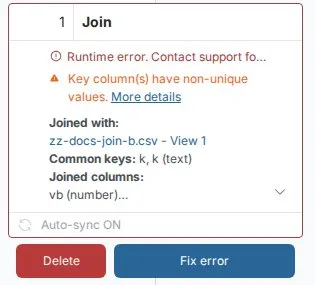
- Switch to Lookup if you need one value per row.
- Remove duplicates from the other dataset first, with Remove Duplicate Rows on the key column.
- Summarise the other dataset with Group & Pivot before joining.
Related
- Join two datasets on a shared column: join types and settings.
- Fix a failing step: any task with a red error.
- Data quality report: find empty keys and type problems before they break a step.
Something wrong? support@mammoth.io