Mammoth connectors: every data source you can connect
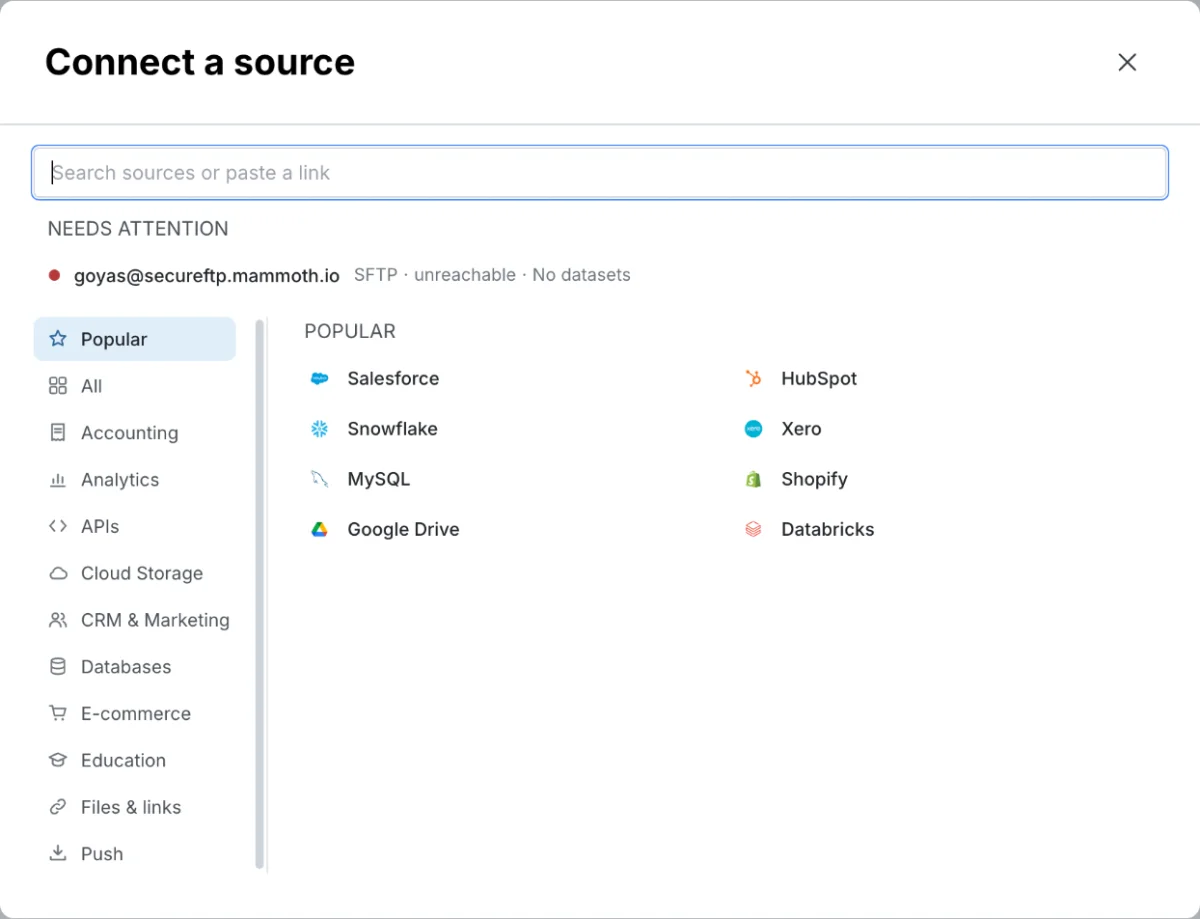
Mammoth connects to databases, cloud warehouses, cloud storage, business apps and REST APIs. Every connector starts the same way: Data Library > New dataset > Connectors, or Data → Connections > New Connection. This page lists every source, grouped by type, with a link to its own page; Connect a database or app covers the shared steps.
Which connector page do I need?
| I want to... | Go to |
|---|---|
| Import a table or SQL query from a database | Databases and warehouses |
| Import a file from a drive, bucket, file server or mailbox | Cloud storage and files |
| Import CRM or email marketing data | CRM and marketing |
| Import ad, web analytics, meeting or streaming data | Analytics and streaming |
| Import store, accounting or ERP data | E-commerce and accounting |
| Connect a service Mammoth doesn't list | REST API |
| Let another system push data to Mammoth | Receive data by webhook |
| Open my database to Mammoth's IP address | Allow Mammoth through your firewall |
Which connectors you see and who can add them
- The launcher shows the connectors your plan includes. A connector that isn't on your plan still turns up in search, greyed out, with Not on your plan · See plans.
- A connector your plan has retired stays available only while your project still has connections to it.
- Only Project Admins create connections. Project Editors can start datasets from the project's existing connections. For a new source, they can click Copy a request to send an admin what they need.
- A saved connection belongs to the project. See Manage saved connections.
Add a connector in four steps
- Go to the Data Library, click New dataset, and choose Connectors. You can also go to Data → Connections and click New Connection.
- Find your source by search or in the left menu: Popular, All, a category (such as Databases, Cloud Storage, CRM & Marketing, Analytics, E-commerce, Accounting, APIs or Education), Files & links, or Push (webhooks).
- Connect it. A database opens its connection form; other sources open the connector workspace, where the chat asks for credentials or a sign-in.
- Pick tables and columns, then click Save as dataset.
Datasets from databases, cloud apps and APIs can refresh manually or on a schedule. A file from a drive or file server is saved once, and a File Collection automation brings in new files.
Database and warehouse connectors
These use direct credentials (host, port, username, password) or a key, and most need network access from Mammoth's servers. A database opens its connection form, then the SQL view. MongoDB lists collections without a SQL view, and Parquet (Azure) connects in the connector workspace chat instead of a form.
| Connector | Default port | AI query (Write SQL) | Schemas |
|---|---|---|---|
| Amazon Redshift | 5439 | No | No |
| Apache Hadoop | 10000 | No | Yes |
| Databricks | 443 | No | Yes |
| Google BigQuery | No | Yes | |
| MongoDB | 27017 | No | No |
| MySQL | 3306 | Yes | No |
| Oracle Database | 1521 | No | Yes |
| Parquet (Azure) | No | Yes | |
| PostgreSQL | 5432 | Yes | Yes |
| SAP HANA | 443 | Yes | Yes |
| Snowflake | No | Yes | |
| SQL Server | 1433 | Yes | Yes |
AI query means Mammoth can write SQL from a plain-language description (Write SQL in a database's SQL view) when AI query is on for your workspace.
Cloud storage and file connectors
These pull files from cloud drives, buckets, file servers and mailboxes. A file you save from them is saved once, except from Google Sheets and Azure Blob Storage, which can refresh. To bring in new files on a schedule, use a File Collection automation (see What you can automate).
| Connector | Sign-in | File types |
|---|---|---|
| Azure Blob Storage | App credentials | CSV, TSV, Excel (incl. .xlsm), XML, JSON, JSONL, NDJSON, text, compressed archives |
| Dropbox | OAuth | CSV, TSV, Excel (incl. .xlsm), XML, JSON, JSONL, NDJSON, text, compressed archives |
| Email (IMAP) | Email and password | Email attachments: CSV, TSV, Excel (incl. .xlsm) |
| Google Cloud Storage | Service account | CSV, TSV, Excel (incl. .xlsm), text, Parquet, JSON, compressed archives |
| Google Drive | OAuth | CSV, TSV, Excel (incl. .xlsm), XML, JSON, JSONL, NDJSON, text, compressed archives |
| Google Sheets | OAuth | Spreadsheets |
| OneDrive | App credentials | CSV, TSV, Excel (incl. .xlsm), XML, JSON, JSONL, NDJSON, text, compressed archives |
| SFTP | Password or SSH key | CSV, TSV, Excel (incl. .xlsm), XML, JSON, JSONL, NDJSON, text, compressed archives |
| SharePoint | App credentials | CSV, TSV, Excel (incl. .xlsm), XML, JSON, JSONL, NDJSON, text, compressed archives |
CRM and marketing connectors
| Connector | Sign-in | AI query |
|---|---|---|
| HubSpot | OAuth | Yes |
| Mailchimp | OAuth | No |
| Microsoft Dynamics | App credentials | No |
| Monday.com | API token | No |
| Salesforce | OAuth (instance URL) | No |
| SendGrid | API key | No |
Analytics and streaming connectors
These pull advertising, web analytics, meeting and streaming data for blending with your other sources.
| Connector | Sign-in |
|---|---|
| Apache Kafka | Bootstrap servers, optional SASL |
| Facebook Ads Manager | OAuth |
| Google Ads | OAuth (Google) |
| Google Analytics 4 | OAuth (Google) |
| MQTT | Broker host, optional username and password |
| Zoom | OAuth |
E-commerce and accounting connectors
| Connector | Category | Sign-in | AI query |
|---|---|---|---|
| Netsuite | Accounting | OAuth (NetSuite sign-in) | No |
| Shopify | E-commerce | OAuth (shop URL) | No |
| Xero | Accounting | OAuth | Yes |
REST APIs and webhooks
| Source | Sign-in | Notes |
|---|---|---|
| REST API | Various | Built with the agent in the connector chat. The launcher also lists several hundred known API sources by category (including APIs and Education); each is built the same way. |
| Webhooks | Optional secret | Under Push: other systems send data to a Mammoth URL |
Compare all connectors: firewall, AI query and schemas
| Connector | Category | Sign-in method | Needs firewall rule | AI query | Schemas or profiles |
|---|---|---|---|---|---|
| PostgreSQL | Databases | Credentials | Yes | Yes | Yes |
| MySQL | Databases | Credentials | Yes | Yes | No |
| SQL Server | Databases | Credentials | Yes | Yes | Yes |
| MongoDB | Databases | Credentials | Yes | No | No |
| Snowflake | Databases | Credentials | Yes | No | Yes |
| Google BigQuery | Databases | Service account JSON | No | No | Yes |
| Apache Hadoop | Databases | Credentials | Yes | No | Yes |
| Databricks | Databases | Credentials (personal access token) | Yes | No | Yes |
| SAP HANA | Databases | Credentials | Yes | Yes | Yes |
| Parquet (Azure) | Databases | Azure access key | No | No | Yes |
| Oracle Database | Databases | Credentials | Yes | No | Yes |
| Amazon Redshift | Databases | Credentials | Yes | No | No |
| Google Drive | Cloud storage | OAuth (Google) | No | No | No |
| Google Sheets | Cloud storage | OAuth (Google) | No | No | No |
| Google Cloud Storage | Cloud storage | Service account JSON | No | No | Yes |
| Dropbox | Cloud storage | OAuth | No | No | No |
| SFTP | Cloud storage | Password or SSH key | Yes | No | No |
| SharePoint | Cloud storage | App credentials | No | No | No |
| OneDrive | Cloud storage | App credentials | No | No | No |
| Azure Blob Storage | Cloud storage | App credentials | No | No | No |
| Email (IMAP) | Cloud storage | Email and password | No | No | No |
| Salesforce | CRM/Marketing | OAuth (instance URL) | No | No | No |
| HubSpot | CRM/Marketing | OAuth | No | Yes | No |
| Mailchimp | CRM/Marketing | OAuth | No | No | No |
| SendGrid | CRM/Marketing | API key | Yes | No | No |
| Microsoft Dynamics | CRM/Marketing | App credentials | No | No | No |
| Monday.com | CRM/Marketing | API token | No | No | No |
| Facebook Ads Manager | Analytics | OAuth | No | No | No |
| Google Ads | Analytics | OAuth (Google) | No | No | Yes |
| Google Analytics 4 | Analytics | OAuth (Google) | No | No | Yes |
| Zoom | Analytics | OAuth | No | No | No |
| Apache Kafka | Analytics | Bootstrap servers, optional SASL | Yes | No | No |
| MQTT | Analytics | Broker credentials | No | No | No |
| Shopify | E-commerce | OAuth (shop URL) | No | No | No |
| Xero | Accounting | OAuth | No | Yes | Yes |
| Netsuite | Accounting | OAuth (NetSuite sign-in) | No | No | No |
| REST API | Other | Various | No | Agent | No |
- AI query: Mammoth can write SQL from a plain-language description (Write SQL in a database's SQL view). For HubSpot and Xero, you describe the data in the chat.
- Schemas or profiles: you pick a schema or profile (such as an account or property) after signing in.
- Needs firewall rule: allow Mammoth's IP address, shown on the connection form, through your firewall. SendGrid needs it only when your account restricts API access by IP. See Allow Mammoth through your firewall.
Related
- Connect a database or app: the shared steps for every connector and the SQL view.
- Manage saved connections: see, reuse, edit and delete connections, and who can do what.
- Allow Mammoth through your firewall: needed for database and SFTP connectors.
- Speed up pipelines and connectors: incremental refresh, query filtering and scheduling.
- Extract tables from PDFs: pull tables and text out of PDFs and images (not a connector).
- Choose how to bring data in: uploads, paste, URLs and other ways to create a dataset.
Something wrong? support@mammoth.io