See data at a task and restore a pipeline version
Click a task card's row count to see the data as it was right after that task, without changing the pipeline. To go back further, Pipeline Version history in More Pipeline options (...) lists earlier versions of the whole pipeline to copy or restore.
See the data as it was after a task
- Click the row count in the footer of a task card that has run, such as "1,240 rows" (tooltip "Preview Data at this Task"). A banner reads "Previewing Data at Task 3..." and the row count is highlighted (tooltip "Click to Exit Preview").
- To leave, click Exit Preview [Esc] in the banner, press Esc, or click the highlighted row count again.
While you preview, the Transform menu, the Export and share menu, the Column browser and the Combine menu are unavailable ("The grid data is in preview mode. Try exiting to access the Transform menu."). Task cards hide their action menus, and you can't drag columns.
Preview isn't offered on export or action steps, while the pipeline has an error, while cells are being edited, or while Draft mode is applying changes. The Source card can be previewed once the pipeline has at least one task.
Restore a task whose View is in Trash
A suspended Join or Lookup task reads from another View. If that View is in Trash, Restore opens a View in Trash dialog listing each View as "View name (in Dataset name)": "Choose "Restore view and continue" to bring them back from Trash first, then restore this task." Select Restore view and continue, or Cancel to leave both as they are. See Get things back from Trash.
Restore an earlier version of the pipeline
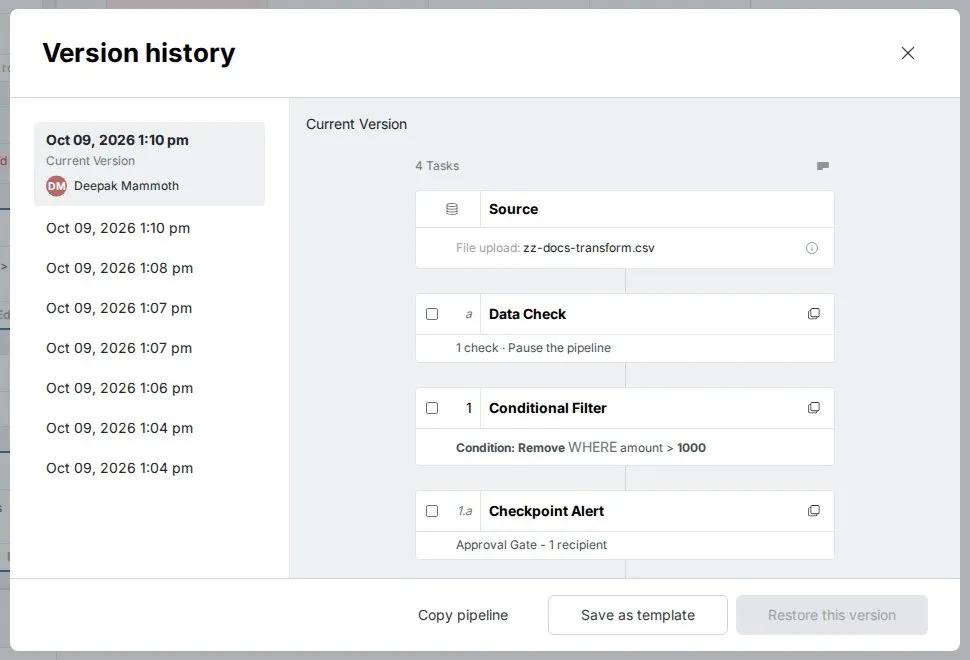
- Open More Pipeline options (...) > Pipeline Version history.
- Select a version to preview its tasks.
- Choose Copy pipeline, Save as template or Restore this version. To reuse part of it, select tasks and click Copy tasks, then paste them elsewhere.
How many older versions you can see depends on your plan.
Troubleshooting task previews
| Symptom | Cause | Fix |
|---|---|---|
| A row count won't open a preview | The step is an export or action step, the pipeline has an error, cells are being edited, or Draft mode is applying changes | Wait, or fix the error, then try again. |
Related
- Edit, reorder and copy pipeline tasks: suspend, copy and reorder tasks.
- Find the step behind wrong pipeline output: step through tasks with this preview.
- Get things back from Trash: restore deleted Views.
Something wrong? support@mammoth.io