Give the dashboard AI your definitions, goals and docs
A context is a reusable bundle of knowledge, such as your goals, definitions and reference docs, that Mammoth grounds on when it writes a dashboard's text and answers its questions. Keep contexts in Dashboards → Context (the Context library) and attach them to any dashboard in the workspace. When a context changes what a dashboard says, you review the changes before anything is written.
Open the Context library
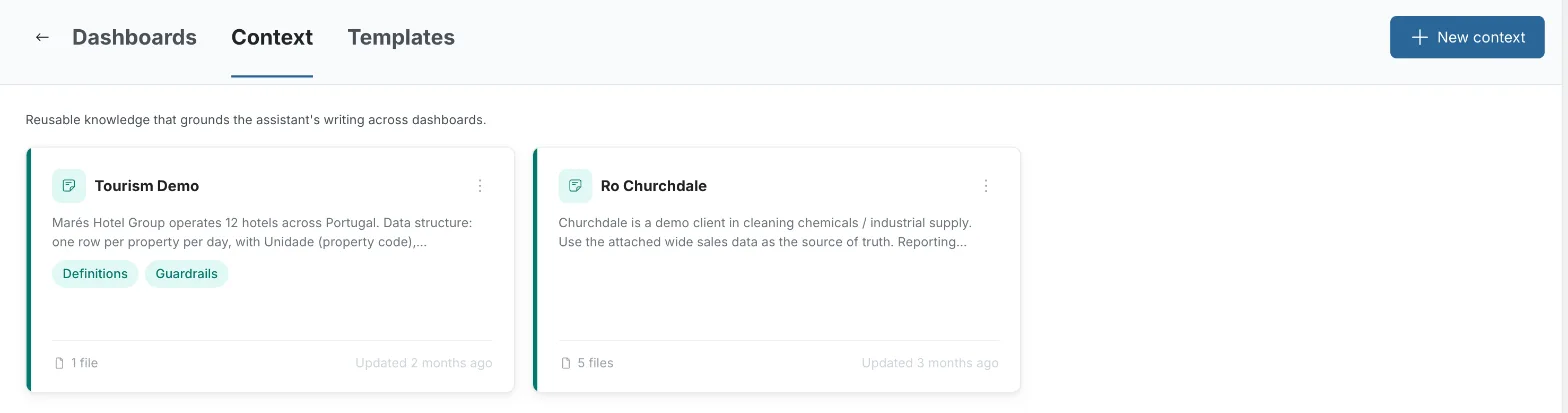
Open Dashboards → Context. The Context library lists every context in the workspace, or says "No contexts yet".
| Control | What it does |
|---|---|
| New context | Opens the context editor. |
| Search contexts | Filters the list by name, with a count such as "3 of 12 contexts". |
| Slot tags on a card | Click a tag such as Definitions or Goals and targets to show only contexts that fill that part. The filter shows as a removable chip. |
| ⋯ → Edit context | Opens the context in the editor. |
| ⋯ → Delete context | Asks, for example: "Delete "Q3 board context"? Dashboards that attach it will simply stop grounding on it." |
Create a context from a description or files
Open the editor with New context in the library, New context… in the attach dialog, or Edit context on an attached context.
- Type what Mammoth should know (your business, what matters, terms you use), or click Add files.
- Click Fill in details. Mammoth reads what you gave it and fills in the details. After a change, the button reads Update details.
- Check and edit the details.
- Click Save context. If the context already grounds the dashboard you're working on, the button reads Save and see what changes, which opens Review changes.
Editing a context affects every dashboard that attaches it.
Name the context and fill in its five details
Name is taken from your first file or the first line of your description; edit it and it stays yours. Names must be unique ("Another context already has this name."). Fill only the Details you need, and Remove the rest:
| Part | What goes in it |
|---|---|
| Background | What the assistant should know, for example "B2B SaaS, fiscal year starts Feb, audience is the board." |
| Goals and targets | Thresholds and percentages to target, used as yardsticks. |
| Definitions | Glossary, acronyms, calendar. |
| Emphasis and audience | What to lead with, and tone. |
| Guardrails | Things never to say, things to avoid. |
Add PDF, Word, text, Markdown or CSV files to a context
Add PDF, Word, plain text, Markdown and CSV files: up to 20 files per context, 10 MB each. Each file shows what it filled (for example "Filled Definitions") and how much it skipped (tables, code and boilerplate). Use Retry if reading fails.
Attach a context to a dashboard or detach it
- When you create a dashboard: Add context under the prompt.
- In the editor: Data tab → Context → Attach context.
- On a Q&A-format board: Design → Format → Context.
The attach dialog ("Pick the knowledge this dashboard should ground on.") has Search contexts, marks contexts already Attached, and offers New context…. You can attach more than one; when all are on the dashboard it says "All contexts attached". Each attached context shows a card with Edit context and Detach, and you see "Context attached" or "Context removed". If the dashboard's writing leans on the context, attaching, detaching or editing it opens Review changes.
Troubleshooting context files
| Message | What it means and what to do |
|---|---|
| "This is raw data (5,000 rows). Contexts ground writing — attach data as a source instead." | The file is a data table. Add it to the dashboard as data instead. |
| "This PDF has no text in it — it looks like a scan." | Export the PDF with its text layer, or paste the words. |
| "Can't read this file type. Try PDF, Word, plain text, Markdown or CSV." | Unsupported file type. |
| "The file is empty." | Nothing to read. |
| "Report.pdf is over 10 MB." | The file is too big. |
| "Up to 20 files per context." | The context already has 20 files. |
| "Report.pdf is already attached." | The same file was added twice. |
| "This reads as a finished report, not reference material." | Its figures describe one period, so later writing might repeat them as fact. Click Use as context if you still want it. |
| "Nothing context-relevant found — no slots filled." | Mammoth found nothing it could use. |
| "Another context already has this name." | Pick a different name. |
Related
- Review what a context changes: accept or reject rewrites.
- Q&A pages: context grounds Q&A answers too.
- Docs: the written formats that lean on context most.
- Publish a glossary: terms from context files.
Something wrong? support@mammoth.io